
Livraison le jour même ou le lendemain

Qualité garantie

Débloquez vos offres de bienvenue: Livraison GRATUITE | Jusqu'à -80 % | 30 jours d'essai gratuits à JoyPlus
Téléchargez l'application
The iPad 10.9 (10th generation) is a powerful tablet, but to truly unlock its full potential, a keyboard case for the iPad 10.9 (10th Gen) is a must-have. It transforms your iPad into a compact and capable laptop, perfect for taking notes in class, typing emails on the fly, or managing your documents. The problem? The market is flooded with models that promise the world but often disappoint in practice. This guide is here to help you avoid the common pitfalls and find the perfect match that truly meets your expectations.
Too many users regret their purchase due to recurring flaws, often hidden behind slick marketing. Here are the key red flags to watch out for.
You don't need to be an expert to make the right choice. Just focus on these few points that make all the difference in performance and durability.
For anyone typing in English, a QWERTY keyboard isn't an option—it's a necessity. Be vigilant: many online offers, especially on marketplaces, feature models with different layouts designed for other markets. Always ensure that "QWERTY" or "US/UK Layout" is clearly stated in the description. A clear photo of the keyboard remains the best way to be certain.
A good wireless keyboard for iPad 10.9 must offer a stable Bluetooth connection and nearly instant pairing. Battery life is the other critical factor. Aim for models that offer extremely long standby time (several months, or even a year). The idea is simple: you can completely forget about it between charges. Having a battery independent from the iPad's is a real plus, as it won't drain your tablet's precious power.
The main advantage of a keyboard case for the iPad 10th generation is its versatility. A good model should check all these boxes:
Taking the above criteria into account, here are recommended options that cater to different user profiles.
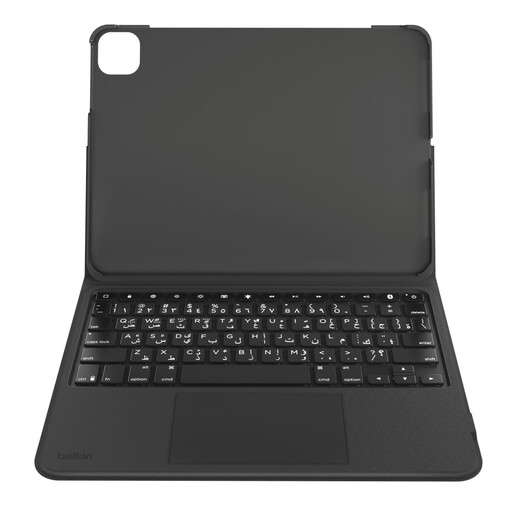
The user: Perfect for students and mobile professionals seeking a reliable and flexible all-in-one solution. It combines effective protection, a comfortable typing experience, and precise navigation for daily use, from the office to the lecture hall.
Its custom design for the iPad 10th Gen ensures a perfect, precision fit. Its large trackpad and well-spaced keys avoid the pitfall of poor ergonomics, while its record-breaking 365-day standby battery life gives you complete peace of mind.
Its keyboard is detachable, allowing you to switch from "laptop" mode to "tablet" mode in an instant for reading or watching videos. The magnetic storage for the Apple Pencil is the icing on the cake.
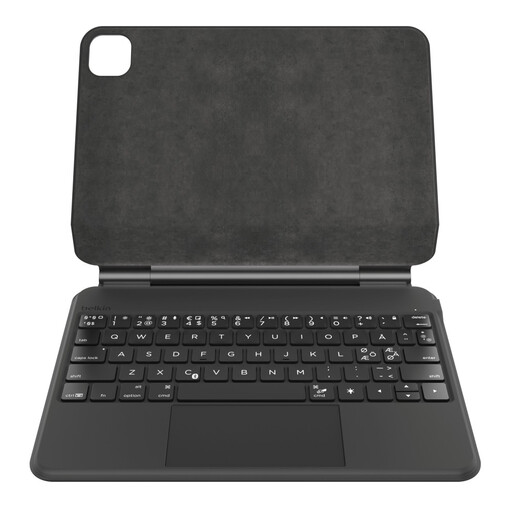
The user: Designed for those who rely on their iPad as their primary work device. It offers a premium experience, refined finishes, and features that streamline daily tasks, like the magnetic stand and auto-wake function.
Its "floating" magnetic stand provides an ultra-stable hold and a perfect viewing angle, avoiding the trap of wobbly stands. The 600 mAh battery and auto sleep/wake function ensure rock-solid reliability, even with intensive use.
The auto sleep/wake function is a daily game-changer: open the case, and the iPad wakes up. Close it, and it goes to sleep. A simple gesture that preserves the battery of both the tablet and the keyboard.
We've curated a complete range of products that meet our strict quality standards and are perfectly suited for today's market.
Battery life varies wildly. Entry-level models might last a few weeks, while high-quality options, like a Belkin keyboard for iPad 10, can achieve a full year on standby. In active use, expect several weeks or even months of use on a single charge, depending on the intensity and use of backlighting.
Absolutely, if you want to use your iPad like a true laptop. The trackpad changes everything: it allows you to use iPadOS multi-touch gestures to navigate, scroll, select text, or switch between apps, all without taking your hands off the keyboard. It's a huge productivity boost.
Rule number one: scrutinize the spec sheet. The mention of "QWERTY" or "US/UK Layout" must be explicitly stated. Second check: zoom in on the product photos. The first row of letters must be Q, W, E, R, T, Y. Be wary of vague descriptions and prioritize sellers who clearly display the correct English layout.