
Livraison le jour même ou le lendemain

Qualité garantie

Débloquez vos offres de bienvenue: Livraison GRATUITE | Jusqu'à -80 % | 30 jours d'essai gratuits à JoyPlus
Téléchargez l'application
Juggling a laptop bag, a separate case for documents, and a lunch bag? It's a daily reality for many professionals and students. This logistical dance is not only cumbersome but also incredibly frustrating on public transport. Faced with this headache, the insulated laptop backpack emerges as the ideal all-in-one solution, designed to simplify life for commuters.
I'm the Head of Product Recommendations at Joybuy, and my mission is to do the groundwork for you. In this guide, we'll break down the essential criteria for choosing the right bag and present a selection of models that meet real-world needs—all without the unnecessary marketing jargon.
Before you take the plunge, let's review the key points to check to find the model that will perfectly suit your daily routine.
This bag's key feature is, of course, its integrated cooler. Check its dimensions: can it hold your lunch box and a drink? Most models are designed to maintain the temperature (hot or cold) for 2 to 4 hours, a duration that easily covers the morning commute. Aluminium foil linings and pearl cotton padding are good indicators of performance. Some compartments are even collapsible—a real bonus for maximising the main storage space when you're not packing a meal.
The dedicated laptop compartment must be generously padded to protect it from everyday bumps and knocks. Make sure it's compatible with the size of your device, whether it's a standard 15.6-inch model or a 17-inch laptop backpack. A good work bag for men or women should also offer multiple pockets to organise cables, documents, pens, and personal items. No more fishing for things at the bottom of your bag!
A commuter backpack, by definition, is worn every day. Wide, padded, and adjustable shoulder straps, as well as a breathable back panel, aren't optional—they are essential for optimal comfort. Features like an external USB port (which requires a power bank, not included) for charging your phone on the go, a luggage strap to secure it to a suitcase, or a hidden back pocket typical of an anti-theft backpack, are real daily assets for both security and convenience.
We have selected three models that stand out for their design and features. Each one targets a very specific user profile.
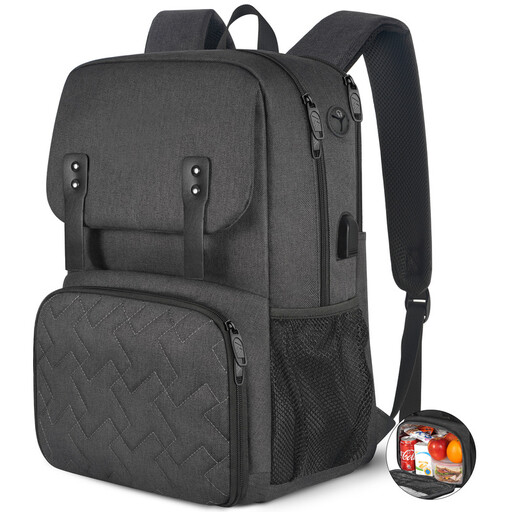
Why It Stands Out
This model is the archetype of a great compromise for daily use. Its understated design and smart construction make it a versatile ally. Its key feature? A collapsible insulated compartment, which frees up significant volume in the main section when you're not packing lunch. A pragmatic choice for those seeking the perfect balance between functionality and discretion.
Pros:
Who is it for? The ideal bag for professionals and students looking for a functional and well-organised lunch-and-work backpack for daily use, without needing excessive storage capacity.
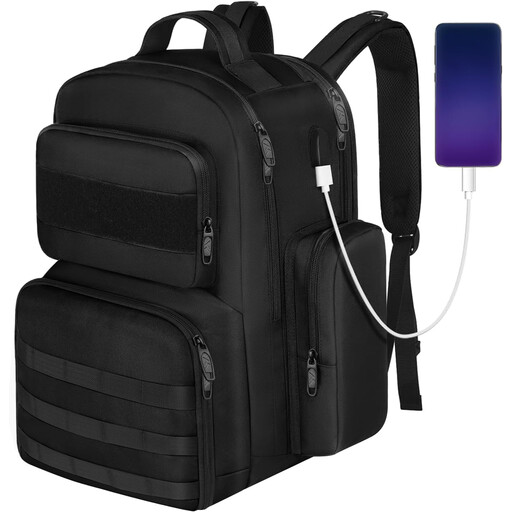
Why It Stands Out
With its rugged look and meticulous organisation, this backpack is for those who believe everything should have its place. Its tactical appearance isn't just for style: it translates into a multitude of pockets, including a hard-shell top compartment for glasses and zipped side pockets. The icing on the cake is that the laptop compartment opens completely flat, which makes airport security checks (TSA-friendly) a breeze.
Pros:
Who is it for? Perfect for users who are demanding about durability and organisation. It's equally suited for the weekday commuter and the weekend outdoor enthusiast (hiking, picnics) looking for a do-it-all bag.
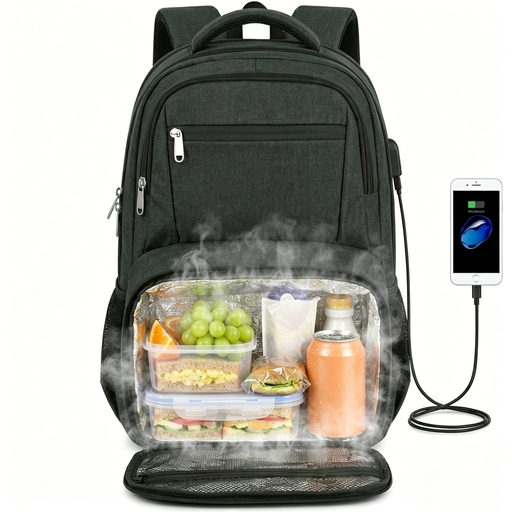
Why It Stands Out
Here is the solution for those who carry bulky equipment. Its main selling point? A compartment that can accommodate a laptop up to 17.3 inches, a feature that is quite rare in this segment. The insulated compartment is just as impressive, with a generous volume that can hold the equivalent of 10 cans. Finally, its 180° opening makes it an excellent choice for business trips.
Pros:
Who is it for? The obvious choice for professionals, creative types, or gamers with a large laptop. It's aimed at those who refuse to compromise on space, whether for their work gear or their lunch.
Our selection focuses on specific needs, but the world of backpacks is vast. If these models don't check all your boxes, or if you simply want to explore other styles, feel free to browse our complete collection.
Discover our complete collection of tech backpacks
1. How long does an insulated backpack keep its temperature? As a general rule, a good insulated compartment will maintain the temperature (hot or cold) for 2 to 4 hours. Of course, this duration depends on the outside temperature, the initial temperature of your food, and how often you open the compartment.
2. Does a backpack with a USB port include a battery? No, never. The USB port is simply a pass-through that allows you to easily connect your device to an external battery (power bank) that you place inside the bag. The power bank is never included.
3. How do I clean the insulated compartment of a backpack? The easiest way is to clean it with a damp cloth and a little mild detergent. Above all, do not put it in the washing machine, as you risk damaging the insulating lining and the fabric's water resistance. Let it air-dry completely before closing it.