
Livraison le jour même ou le lendemain

Qualité garantie

Débloquez vos offres de bienvenue: Livraison GRATUITE | Jusqu'à -80 % | 30 jours d'essai gratuits à JoyPlus
Téléchargez l'application
Juggling a laptop bag and a cooler for your lunch??It's a daily hassle. Whether you're at the office, on campus, or always on the move, the challenge is the same:?you need one bag that does it all. The insulated laptop backpack is the perfect solution. It protects your electronic devices while keeping your meal cool (or warm).
This guide is here to help you make the right choice. We'll walk you through the key features to look for and present our selection of the best models, whether you're heading to work, to class, or out for an impromptu picnic.
Before you commit to a model, here are the key points to check to ensure you make the right choice.
This is obviously the core feature of a cooler backpack. Make sure the insulated compartment is large enough for your lunch box, a drink, and a few snacks. The interior, often lined with aluminum or PEVA, should be easy to clean and, ideally, leakproof to prevent any disasters. Insulation performance varies, but most models can maintain the temperature for several hours, which is perfect for bringing your lunch to work.
The dedicated laptop pocket must be well-padded to protect it from daily bumps and scrapes. Double-check that it's compatible with the size of your device (15.6, 17 inches, etc.). A good office backpack should also offer multiple storage options to organise your cables, documents, and other accessories. A small, hidden pocket on the back is a real bonus for keeping your wallet and phone out of sight.
It's often the details that set a bag apart. A backpack with a built-in USB port is very convenient for charging your devices on the go (you'll just need to connect your own power bank). A water-repellent outer fabric is essential if you're often caught in the rain or use it as a picnic backpack. Finally, don't overlook comfort:?padded shoulder straps and a ventilated back panel will save you from aches and pains at the end of the day.
Here are the models that caught our eye, designed to simplify the daily life of urban nomads.
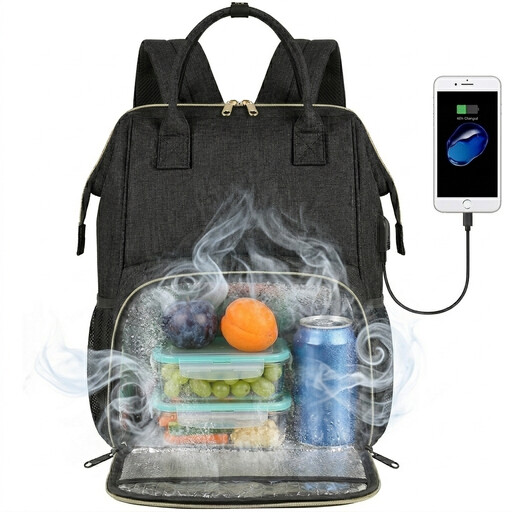
Why we love it:? It strikes the perfect balance between a compact design and smart organisation. The insulated compartment is large enough for a full lunch, leaving plenty of room for your work essentials.
Key Features:
Who is it for?? Professionals and students who want a functional and versatile all-in-one bag for daily use.
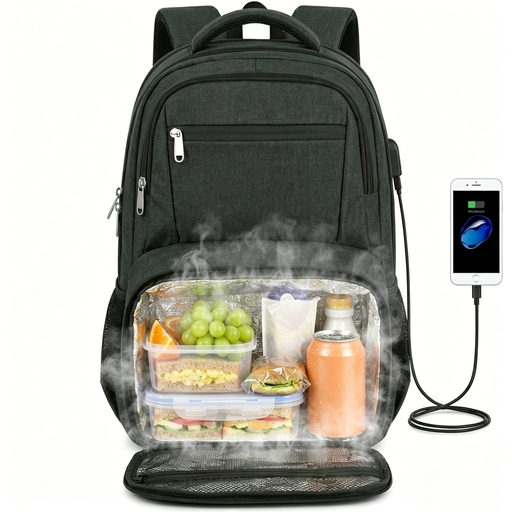
Why we love it:? This is the ultimate large-capacity model. It accommodates laptops up to 17.3 inches, and its foldable lunch compartment makes it incredibly versatile.
Key Features:
Who is it for?? Business travellers and anyone who carries a lot of gear and needs a sturdy, spacious bag for their trips.
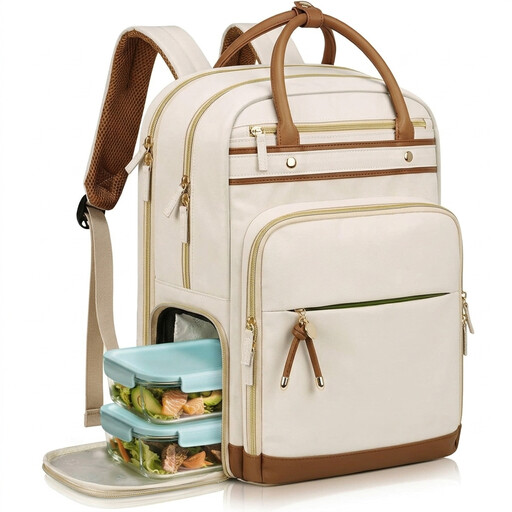
Why we love it:? It combines an elegant design with thoughtful modularity, thanks to its fully removable lunch compartment. A true 2-in-1 solution that adapts to your schedule.
Key Features:
Who is it for?? Professionals, teachers, nurses, and students looking for a bag with a polished design who appreciate the flexibility of a removable lunch compartment.
Our selection highlights a few flagship models, but the choices are vast. If none of these bags check all your boxes, or if you're simply curious to see other styles, many more options are available.
To explore a wider range, take a look at our full category of Discounted Laptop Bags.
1. How long does an insulated bag maintain its temperature?? Performance varies depending on the model and the ambient temperature, but generally, a good insulated bag will keep contents cool or warm for 4 to 9 hours. Pro tip:?to keep things cold for longer, feel free to add a small ice pack.
2. Is an insulated laptop backpack truly waterproof?? Be careful not to confuse "water-repellent" with "waterproof." Most of these bags have a water-repellent outer fabric, which can withstand light rain or splashes, but not full immersion. However, the inner insulated compartment itself is often leakproof to contain spills and prevent liquids from spreading to the rest of the bag.
3. How does the USB port on a backpack work?? The USB port is simply a pass-through; it doesn't generate power on its own. The principle is simple:?you connect your own power bank to a cable inside the bag. You can then plug your phone or tablet's charging cable directly into the USB port on the outside of the bag to recharge it. The power bank is never included.