
Livraison le jour même ou le lendemain

Qualité garantie

Débloquez vos offres de bienvenue: Livraison GRATUITE | Jusqu'à -80 % | 30 jours d'essai gratuits à JoyPlus
Téléchargez l'application
Juggling a laptop bag, a lunch box, and sometimes even a handbag is a daily struggle for many professionals and students. The insulated laptop backpack emerges as the ideal all-in-one solution. However, the market is saturated with models that make tempting promises but often deliver disappointing performance. Before you make a decision, it's crucial to know how to avoid the marketing traps and invest in a bag that will truly deliver.
As a Product Expert at Joybuy, my mission is to help you navigate your options. Here are the key red flags and essential criteria to consider.
The wrong choice can turn your daily ally into a source of frustration. Watch out for these three common pitfalls:
For a smart, long-lasting purchase, focus on these fundamental features.
The lunch compartment is the heart of this type of bag. Its quality is measured by two factors:
Your laptop is an investment. Its protection shouldn't be an optional extra.
A bag you carry every day must be comfortable and well-designed.
To help you see how these criteria apply in practice, here are a few models that cater to distinct user profiles.
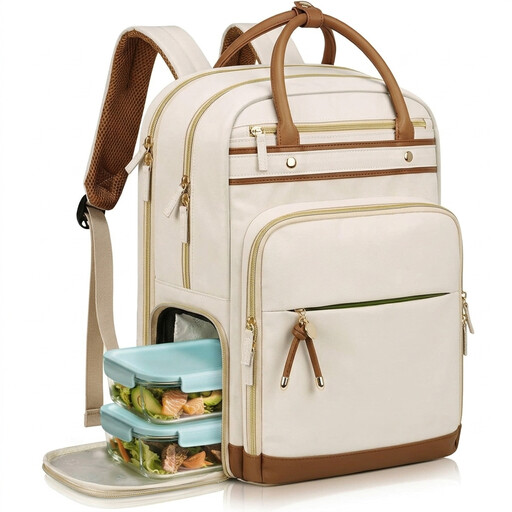
Why it's the one for you: Ideal for those who want to combine office elegance with practicality. Its design blends a professional look with the flexibility of a removable lunch compartment, perfect for daily use.
The lunch compartment is a separate, removable unit lined with aluminium and EVA. This ensures high-performance insulation and eliminates any risk of leaks into the main compartment.
2-in-1 Modularity: The lunch bag can be removed to free up space. Organisation: Multiple dedicated pockets, including a TSA-friendly compartment and a USB port.
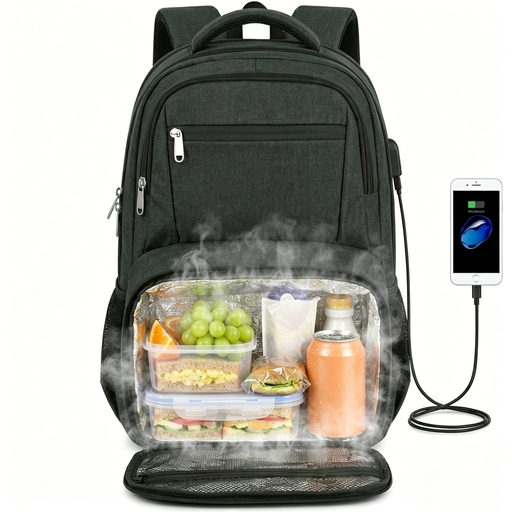
Why it's the one for you: Designed for those who carry substantial gear, including a large laptop (up to 17.3 inches). Its TSA-friendly design and luggage strap make it the ideal travel companion.
The laptop compartment is not only padded but also designed to open 180 degrees, avoiding the pitfall of inadequate protection and making security checks easier.
Large Capacity: Fits laptops up to 17.3 inches. Travel-Friendly Features: TSA-compatible, USB port, luggage strap, and an anti-theft pocket.
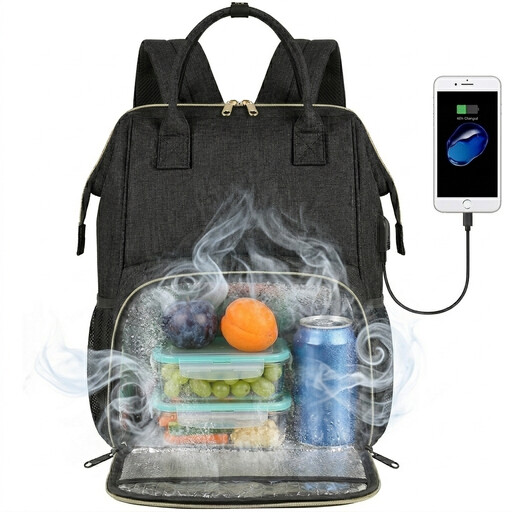
Why it's the one for you: An excellent compromise for those seeking a functional, all-in-one solution without breaking the bank. It covers the essentials: carrying a laptop, a meal, and personal items in an organised way.
Its insulated compartment is described as leakproof and easy to clean, with a manufacturer-rated performance of 4 to 9 hours. It avoids the "skin-deep" insulation trap by offering a tangible and verifiable solution.
Versatility: Suitable for classes, the office, or even picnics. Comprehensive Features: Includes a USB port, a security pocket, and multiple storage compartments.
We have compiled a complete, up-to-date list of products that meet our demanding selection criteria and safety standards.
Most manufacturers advise against machine washing, as it can damage the waterproof coatings and the bag's structure. For the insulated compartment, use a damp sponge with a little mild soap, rinse, and let it air dry. For the exterior, a damp cloth is usually sufficient.
Yes, as long as you understand how it works. It's a pass-through: you connect your own power bank inside the bag, and the external port allows you to charge your phone without having to take the power bank out. It's especially convenient on public transport or while walking.
The durability depends on the quality of the materials (PEVA lining, seams) and how you care for it. A well-maintained compartment that is cleaned regularly and not overstuffed will retain its insulating and leakproof properties for several years. Avoid placing sharp objects inside that could puncture the lining.