
Livraison le jour même ou le lendemain

Qualité garantie

Débloquez vos offres de bienvenue: Livraison GRATUITE | Jusqu'à -80 % | 30 jours d'essai gratuits à JoyPlus
Téléchargez l'application
Tired of juggling a laptop bag, a document case, and a separate lunch bag every day? For mobile professionals, students, and anyone constantly on the move, traveling light isn't just an option—it's a necessity. The insulated laptop backpack emerges as the ideal all-in-one solution to simplify your life.
This guide breaks down the essential criteria for making the right choice and presents a selection of models that get straight to the point, with no unnecessary frills.
Before you start shopping, here are a few key points to consider to find the backpack that truly fits your needs.
The main advantage of this type of bag? Its ability to perfectly separate your electronics from your meal. Ensure the laptop compartment is well-padded and, most importantly, the right size for your device, whether you need a 15-inch laptop backpack or a larger model. A good backpack with a lunch compartment should also include dedicated pockets for your documents, smartphone, and accessories, so everything has its place and remains within easy reach.
The integrated cooler compartment is the real powerhouse. Its job is to keep your lunch cool or warm for several hours. Pay close attention to the materials: a quality aluminium foil lining paired with thick insulating foam is a guarantee of performance. Most models maintain the temperature for 2 to 4 hours, which is more than enough for the morning commute to the office or university.
Certain details can transform your daily experience. A student backpack with a built-in USB port allows you to charge your phone on the go (just connect your power bank inside). A luggage strap is essential for travellers, letting you secure the bag to a trolley suitcase in a flash. Finally, a hidden anti-theft pocket on the back is a major plus for securing your valuables on public transport.
After reviewing dozens of models, our editors have selected three options that stand out for their practicality and smart design.
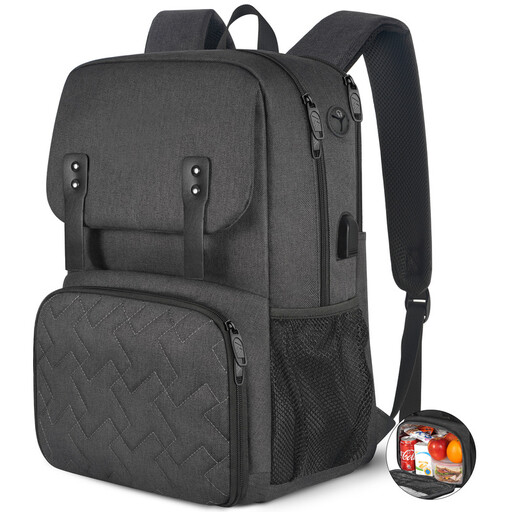
Why it stands out: This is the model that checks all the boxes. It offers a perfect balance of essential features. Its insulated compartment is not only effective but also collapsible, allowing you to maximise the main storage space when you're not carrying a meal.
Pros:
Who is it for? This is an excellent all-around choice for professionals and students looking for a reliable work lunch backpack for daily use. Its understated and versatile design makes it a perfect unisex model for the office, appealing to those who appreciate subtlety.
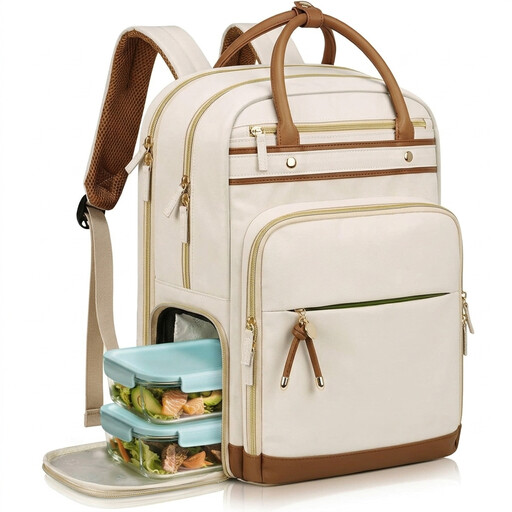
Why it stands out: Modularity is the key feature of this bag. It includes a fully removable insulated lunch bag. This allows you to use it as a standard work bag on days you eat out, or just take the lunch section with you.
Pros:
Who is it for? Ideal for active professional women (teachers, nurses, consultants...) looking for a solution that is both chic and adaptable. Its ability to completely separate the lunch and work functions is its main strength.
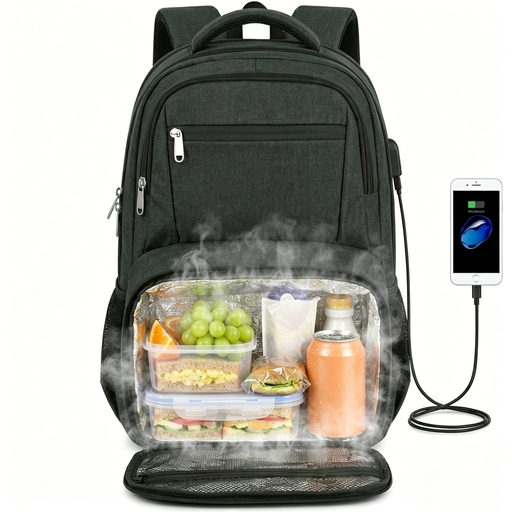
Why it stands out: This bag is built for those who think big and carry a lot of gear. It can accommodate a laptop up to 17.3 inches, and its insulated compartment is one of the most spacious on the market, capable of holding up to 10 cans.
Pros:
Who is it for? This backpack is aimed at commuters with large laptops, business travellers, or anyone who needs significant space for their meal and belongings.
If these models haven't completely won you over, or if you'd prefer a backpack without an insulated function, hundreds of other options are available. Whether you want a more minimalist design, a bolder colour, or a specific material, the perfect bag is the one that fits your style.
? Discover our complete collection of women's backpacks to find your perfect match.
On average, a good-quality insulated compartment will maintain the temperature (hot or cold) for 2 to 4 hours. This duration can vary depending on the outside temperature and whether or not you add an ice pack.
No, the USB port is simply a pass-through. You need to connect your own power bank to a cable located inside the backpack. The external port then allows you to easily connect the charging cable for your smartphone or any other device.
This is strongly discouraged. Machine washing could damage the water-repellent coating, the bag's structure, and the insulating materials. Opt for spot cleaning with a damp cloth and a little mild soap. The insulated compartment, which is often waterproof, can be easily cleaned in the same way.