
Livraison le jour même ou le lendemain

Qualité garantie

Débloquez vos offres de bienvenue: Livraison GRATUITE | Jusqu'à -80 % | 30 jours d'essai gratuits à JoyPlus
Téléchargez l'application
Keeping an eye on your home, making sure the kids are back from school, checking in on a pet or an elderly relative… There are plenty of reasons to get a security camera. Easy to install and increasingly affordable, an indoor WiFi security camera has become the ideal solution for greater peace of mind.
But with an overwhelming number of options on the market, it can be hard to know where to start. Don't worry?— this guide is here to help you understand the essential features and introduce our selection of the best current models, all without unnecessary technical jargon.
Before you take the plunge, here are the key points to consider to make the right choice—one that truly fits your home and your needs.
Image clarity is paramount. A high resolution ensures you can make out important details, like a face or a specific action. Opt for a minimum of 2K camera resolution (2560 x 1440 pixels), which offers a noticeable improvement in clarity over standard Full HD (1080p).
Night vision is just as crucial. Forget old, grainy black-and-white footage?! Many models now offer colour night vision. Thanks to more sensitive sensors or a small built-in light, they produce much clearer and more detailed images, even in low-light conditions.
To cover an entire room with a single device, a 360-degree camera is the ideal solution. These models, also known as PTZ cameras (for Pan-Tilt-Zoom), can rotate on their axis and tilt up and down, all controlled from your smartphone. The result?: you can scan the entire room remotely, leaving no blind spots.
Some models go even further with automatic tracking (or auto-tracking). As soon as motion is detected, the lens automatically follows the person or pet, ensuring the action always stays in the centre of the frame.
Smart features are there to make your life easier. Motion detection is the foundation, but recent models are much smarter?: they can differentiate between a person, a pet, or even recognise specific sounds like a baby crying. Your camera can then double as a next-generation camera baby monitor.
Two-way audio, which lets you speak and listen through the camera, has become an almost essential standard. Finally, don't overlook the long-term cost?: the ideal choice is a model that is subscription-free. Prioritise cameras that offer local storage on a microSD card to avoid monthly fees.
We have selected three models that stand out from the crowd, each catering to a specific need.
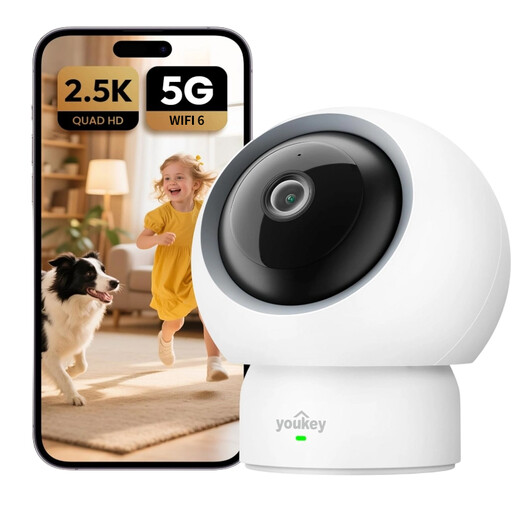
Why it stands out?: This model checks all the boxes?: high 2.5K resolution, modern connectivity (dual-band Wi-Fi 6) for perfectly smooth video, and intelligent detection algorithms. It's the ideal choice for families with children or pets, all without ever needing a subscription.
Highlights:
Who is it for? For those looking for a high-performance, all-in-one solution for family monitoring (babies, children, pets) who refuse to pay for a subscription.

Why it stands out?: The ZOSI C680 tackles a real challenge?: the reflections that make most cameras unusable behind a window. Thanks to its anti-glare lens technology, it can monitor the outdoors (a driveway, a garden) from the comfort of your home, day or night, without being blinded by reflections from the sun or your indoor lights.
Highlights:
Who is it for? The dream solution for people in apartments or renters who want to keep an eye on the area around their home (entrance, car park) but are not allowed to install an outdoor camera.

Why it stands out?: More than just a camera, this model is a true communication tool. It features a 2.8-inch screen and an incredibly simple video call function?: a person near the camera (a child, an elderly relative) can start a video call to your smartphone with the press of a single button.
Highlights:
Who is it for? Ideal for families who want a simple way to stay in visual contact with their children, or to check in on elderly relatives. It essentially becomes a video phone that's incredibly easy to use.
Our selection highlights models with very specific strengths. Are your needs different?? Or do you simply want to explore a wider range??
? Explore our full catalogue of Wireless Cameras with Phone Connection to find the perfect model for you.
Yes, you are perfectly within your rights to film the interior of your own home. However, privacy laws must be respected?: you must not, under any circumstances, film public spaces or your neighbours' property. If you employ staff (such as a cleaner or a nanny), you are required to inform them of the cameras' presence. Cameras must never be installed in private areas (toilets, bathrooms, or staff bedrooms).
An internet connection is essential for viewing footage remotely on your smartphone. However, most cameras with a microSD card slot can continue to record locally (either continuously or upon motion detection) even during a power or internet outage. You can then review the footage once the connection is restored.
This is a crucial point. To protect yourself against the risk of hacking, follow these golden rules?: