
Livraison le jour même ou le lendemain

Qualité garantie

Débloquez vos offres de bienvenue: Livraison GRATUITE | Jusqu'à -80 % | 30 jours d'essai gratuits à JoyPlus
Téléchargez l'application
Keeping an eye on your home, children, pets, or a relative has never been easier. An indoor WiFi security camera seems like the perfect solution. However, the market is flooded with marketing promises that often lead to disappointment. Before you decide, it's crucial to understand the common pitfalls to make a smart, long-term choice.
The promise of affordable security can sometimes hide significant drawbacks. Here are the most common issues that turn a good investment into a source of frustration.
To avoid these traps, focus on a few key technical specifications. They are the true indicators of a camera's performance and suitability for your needs.
A sharp image is a camera's primary mission. Full HD (1080p) resolution is the bare minimum today, but a 2K IP camera (around 3 megapixels) offers an excellent balance between detail clarity and video smoothness.
However, quality isn't just about pixels. An indoor camera with night vision must have powerful infrared LEDs to ensure a readable image even in complete darkness. Some models even offer color night vision, a real plus for distinguishing details.
This is the most critical factor for controlling your budget. You have two main options:
A model that offers both options provides highly valuable flexibility.
Receiving constant alerts for a moving shadow or a passing insect is a common problem. AI-powered smart motion detection is a game-changer. It can differentiate between humans and pets, or even recognize specific sounds (like a baby crying), ensuring you only receive relevant notifications.
For complete surveillance of a room, a motorized 360-degree indoor camera (Pan & Tilt) is an excellent solution. Controllable remotely from your smartphone, it eliminates blind spots and allows you to track a moving subject.
There's a camera for every home. Here is our selection of models, chosen for their ability to meet specific needs while avoiding the pitfalls we've just discussed.
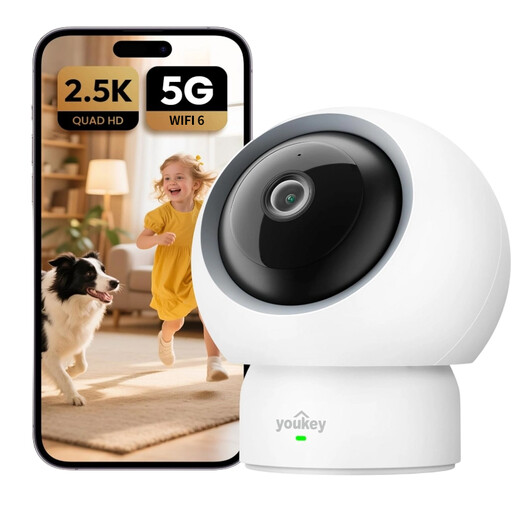
Why we chose it: Perfect as a baby camera monitor or for keeping an eye on a relative, it stands out with its specific baby cry detection. Its two-way audio lets you offer reassurance from afar, and its 360° panoramic view ensures complete room coverage.
This model offers all its features, including smart detection, without requiring a subscription. Storage is handled locally on an SD card, protecting you from hidden costs.
The baby cry detection is a rare and valuable function that makes it a much smarter monitoring tool than a standard camera.
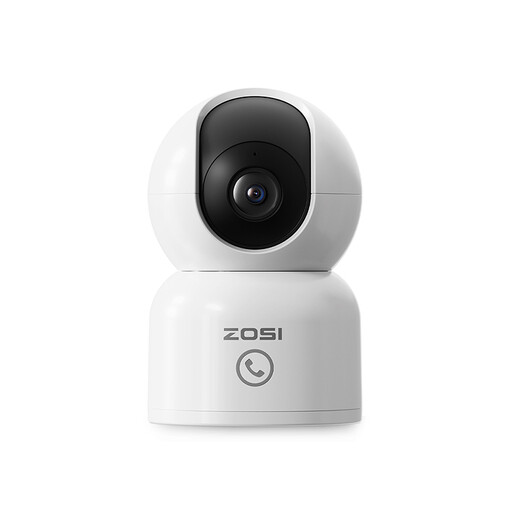
Why we chose it: Perfect as a pet camera, it features 360° automatic motion tracking to follow your dog or cat throughout the room. The two-way audio is ideal for interacting with and reassuring them while you're away.
Although a cloud option is available, motion tracking and alerts work perfectly with local storage on an SD card. You maintain full control, with no recurring fees.
The automatic subject tracking (auto-tracking) is its greatest strength. The camera pans on its own to keep your pet in the frame, which is far more effective than a simple fixed wide-angle lens.

Why we chose it: Designed for renters or anyone who doesn't want to drill holes, this camera attaches directly to a window pane. It's perfect for monitoring an entrance or garden from indoors, without complex installation or damage.
It completely bypasses the complex installation trap. Its adhesive mount applies in seconds and removes without a trace. Better yet, its anti-reflection technology solves the problem of poor image quality through glass.
The anti-reflection technology is a major advantage for through-window monitoring, delivering clear images where standard cameras fail due to glare.
Explore our complete, up-to-date selection of cameras that meet our strict selection criteria and current security standards.
Can an indoor security camera work without a subscription? Yes, absolutely. Many models are designed for subscription-free home monitoring. They rely on a microSD card to store recordings locally. You just need to purchase the memory card once. Simply verify that the model you're interested in has an SD card slot and that its basic features (live view, alerts) are not tied to a subscription.
What is the lifespan of an indoor WiFi camera? A wired indoor camera, not being subject to battery wear, can operate for many years (typically 5 years or more). Its longevity will primarily depend on the quality of its components and the manufacturer's software support (app and firmware updates). Choosing a reputable brand that provides ongoing support for its products is the best guarantee of durability.
Is installing an indoor camera complicated for a beginner? No, most modern WiFi cameras are designed to be "plug-and-play." The installation process usually boils down to: