
Livraison le jour même ou le lendemain

Qualité garantie

Débloquez vos offres de bienvenue: Livraison GRATUITE | Jusqu'à -80 % | 30 jours d'essai gratuits à JoyPlus
Téléchargez l'application
Whether it's watching over a newborn during their nap, making sure your pet isn't turning the living room into a battlefield, or simply staying connected with an elderly relative, the need for peace of mind affects us all. An indoor WiFi security camera is now the easiest and most accessible solution to stay connected to your home.
But with the overwhelming number of models available, it's hard to know where to start. Our guide is here to help you see things more clearly, breaking down the truly useful features and presenting a selection of cameras that meet real-world needs—all without unnecessary technical jargon.
Before you take the plunge, it's essential to understand the few features that will make all the difference in your daily life. Here are three points to scrutinize to ensure you make the right choice.
Image clarity is paramount. The resolution, usually expressed in megapixels (MP) or format (1080p, 2.5K, 4K), is the first indicator. A 1080p (2?MP) definition is an excellent baseline for general monitoring. For finer details, like distinguishing a facial expression or reading a label, a 4?MP resolution (often marketed as 2.5K) offers far superior sharpness.
Equally crucial is night vision. Most cameras rely on infrared LEDs to film in complete darkness, which produces a black and white image. Some more sophisticated models go further with colour night vision, a decisive advantage for accurately identifying details in low light.
A motorised 360-degree camera (Pan/Tilt) offers unparalleled coverage. Controllable from your smartphone, it can scan an entire room to leave no blind spots. It's the ideal option for keeping an eye on particularly active children or pets.
This is often complemented by automatic person tracking, which allows the camera to follow a moving subject. Smart motion detection, enhanced with AI, differentiates between a human, an animal, and incidental movements (like curtains swaying), which significantly reduces false alerts on your phone.
Interaction is a key criterion for many. The two-way audio feature not only lets you hear what's happening but also speak through the camera's speaker. It's perfect for reassuring a baby (with the camera acting as a video baby monitor), calming an anxious dog, or simply chatting with a loved one.
Some cameras go even further by integrating a direct call button or gesture recognition. A child or an elderly person can thus initiate a video call to your smartphone with a simple wave of the hand or the press of a button.
We have selected models for you that shine with their features and ease of use, for all needs and budgets.
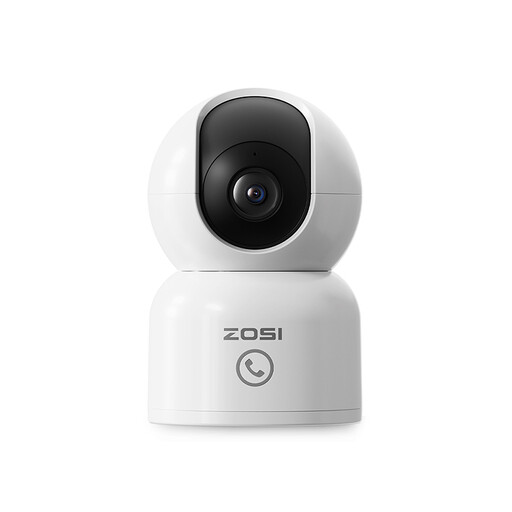
Why it stands out?: It's the ultimate all-in-one solution for family monitoring, combining high-resolution imaging with genuinely practical smart features.
Pros?:
Who is it for? Families with young children, pet owners looking for an effective dog camera, and those caring for elderly relatives will appreciate its sharp image quality and well-designed communication features.
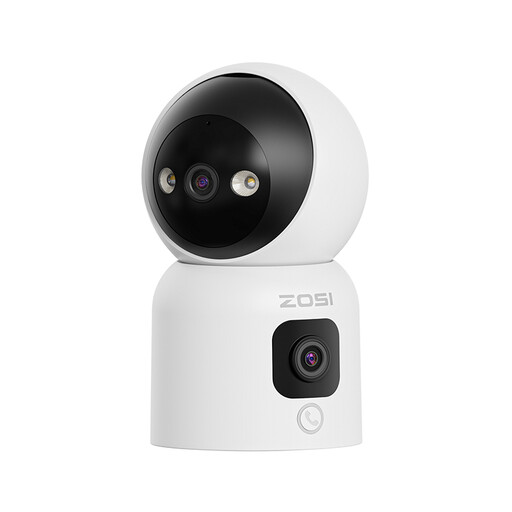
Why it stands out?: It distinguishes itself with its innovative dual-lens design, which combines a fixed panoramic view and a motorised mobile view, all with colour night vision.
Pros?:
Who is it for? For those who demand total coverage with no blind spots and appreciate advanced communication features like gesture calling. Its colour night vision is a major asset for a flawless image, day or night.
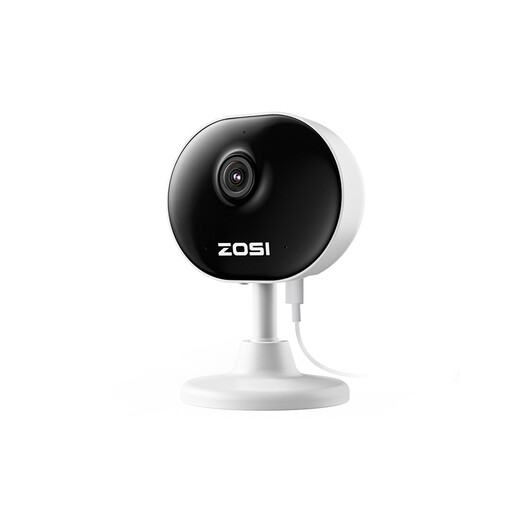
Why it stands out?: Its ultra-compact design and quick installation make it the perfect discreet and effective solution for essential monitoring.
Pros?:
Who is it for? Ideal for renters or those looking for a simple, affordable, and non-invasive indoor IP camera. Its versatile design is perfect for discreetly monitoring an entryway, a child's room, or a small business.
A pet camera is an excellent way to watch over them. And to go a step further in ensuring their well-being in your absence, consider other smart devices.
To complete your setup and create a secure haven for your dog or cat, explore our selection of kennels and habitats.
Discover our range of pet houses
Installation is a breeze and requires no technical skills. Simply plug in the camera, download the manufacturer's app on your smartphone, and follow the instructions to connect it to your WiFi network. The process usually only takes a few minutes.
Data security is a major concern, and rightly so. Modern cameras offer two main options. Local storage on a memory card (usually not included) keeps your videos at home. Cloud storage (often encrypted) ensures access to your recordings even if the camera is stolen or damaged. Also, note that features like privacy zones allow you to digitally exclude certain parts of the image from recording (a sofa, a corner of the room, etc.) to protect your privacy.
An indoor WiFi security camera needs the internet to allow you to view the live feed remotely and receive alerts. However, most models equipped with an SD card slot can continue to record locally even if your connection drops. You can then view these videos once the connection is restored.