
Livraison le jour même ou le lendemain

Qualité garantie

Débloquez vos offres de bienvenue: Livraison GRATUITE | Jusqu'à -80 % | 30 jours d'essai gratuits à JoyPlus
Téléchargez l'application
Keeping an eye on your home, checking in on a loved one, making sure your pet isn’t getting into trouble… There are many reasons to get an indoor Wi-Fi security camera! But with a crowded market and often complex spec sheets, it's easy to get lost.
This guide breaks down the available options and presents our selection of the most compelling models for 2026. Our goal is to give you all the information you need to make an informed choice that fits your needs and your home, whether you're a homeowner or a renter.
Before diving into our top picks, let's review the key criteria that should guide your decision.
Image clarity is paramount. A 2K resolution (or higher) provides enough detail to identify a face or objects. But night-time performance is just as crucial. Many models now offer colour night vision, which is significantly more effective than traditional black and white for distinguishing details in low light. This technology relies on more sensitive sensors and sometimes a discreet supplemental light to render natural colours, even in very dark conditions.
A fixed camera might be enough to monitor an entryway or a narrow hallway. For a living room, however, a 360° camera (motorised, also known as PTZ for Pan-Tilt-Zoom) offers unparalleled flexibility. Controllable remotely from your smartphone, it allows you to scan the entire room and eliminate blind spots. Some innovative models even combine a fixed lens and a motorised lens for uncompromising surveillance.
Nuisance alerts triggered by a passing insect or a simple change in lighting are a well-known source of frustration. Opt for a model with smart motion detection that can distinguish between humans, animals, or vehicles. This feature, often based on AI, drastically reduces false alarms. Another feature that has become almost essential is two-way audio. It turns your camera into a true intercom, allowing you to talk to your children, reassure your pet, or deter an intruder.
We have selected several models that stand out for their features and suitability for specific use cases.

Why it stands out: The ZOSI C680 camera is designed for a very specific use case: monitoring from the inside, through a window pane. Its anti-reflection lens technology neutralises glare from the sun or indoor lighting, a common pitfall that makes most conventional cameras unusable in this setup. Its drill-free installation makes it a prime option for an apartment security camera.
Key features:
Who is it for? Perfect for renters (or condo owners) who want to monitor an entrance, a courtyard, or a parking space from a window, without being able or wanting to install an outdoor camera.
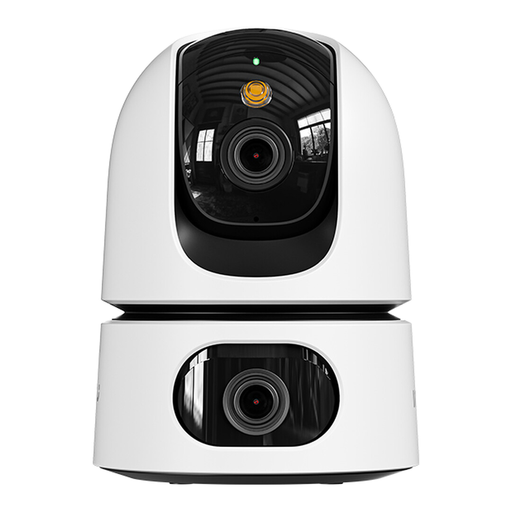
Why it stands out: This hybrid model combines two lenses: one fixed to keep an eye on a specific spot (a crib, an entrance door) and a second, motorised 360° lens to scan the rest of the room. A two-in-one approach that eliminates all blind spots.
Key features:
Who is it for? Ideal for families looking for an advanced video baby monitor that can watch over the crib and the rest of the room. It's also perfect for pet owners who want to cover a large living area with no blind spots.

Why it stands out: More than just a camera, the JOOAN C17C includes a 2.8-inch screen and a video call function. With a single press of a button, a person near the camera (a child, a senior) can initiate a video call to the owner's smartphone.
Key features:
Who is it for? An excellent choice for family caregivers looking for a simple way to communicate with an elderly relative. It's also a reassuring solution for parents who want to let their children easily reach them via video call.
This guide focuses on indoor cameras. However, your needs might extend outdoors to monitor the surroundings of your house or for more specific purposes. For example, if you want to observe the animals that visit your garden, check out our range of Wireless Wildlife Trail Cameras.
1. Does a Wi-Fi security camera use a lot of bandwidth? Consumption depends on your usage. Live streaming and uploading recordings to the cloud are the most demanding activities. Most of the time, the camera is on standby, and its consumption is negligible. Note that continuous recording to a local SD card does not use your internet connection, except when you view the footage remotely.
2. Is SD card storage secure? Local storage on a microSD card (usually not included) has the advantage of keeping your data in-house, with no subscription fees. The main risk is the loss of footage if the camera itself is stolen. This is why many users opt for a hybrid solution: continuous recording to the SD card and backing up important alerts to a cloud service (often subscription-based).
3. As a renter, am I allowed to install a security camera in my apartment? Absolutely. Installing a wireless IP camera inside your home falls under your right to privacy and is therefore fully permitted. Drill-free models, like the ZOSI C680, are perfect for this. The only strict rule is to never film common areas (landings, hallways) or your neighbours' property. The camera's field of view must be strictly confined to the inside of your home.