
Livraison le jour même ou le lendemain

Qualité garantie

Débloquez vos offres de bienvenue: Livraison GRATUITE | Jusqu'à -80 % | 30 jours d'essai gratuits à JoyPlus
Téléchargez l'application
Keeping an eye on your home, checking in on your children, or making sure your pet isn't tearing up the living room?– there are many reasons to get an indoor WiFi security camera. But with an overwhelming number of options on the market, it's hard to know where to start. This guide is here to decode the features that are truly useful and help you make the right choice for your needs and budget, without getting bogged down in technical jargon.
We will review the essential criteria to consider before you buy, then present a selection of models that cater to various uses, whether for general surveillance, as a video baby monitor, or for interacting with your loved ones.
Before diving into our top picks, it's crucial to understand the features that will make a real difference in your day-to-day use. Let's focus on three key points.
This is the most critical factor: resolution. A 2K image (approximately 2304?x?1296 pixels) offers a much higher level of detail than Full HD 1080p, allowing you to zoom in on an area without the image turning into a pixelated mess.
Another crucial point is night vision. While most models settle for a black-and-white image, colour night vision technology is becoming more common and is a real game-changer. It allows you to distinguish important details like the colour of clothing or an object, even in low light.
Modern cameras go far beyond simple motion detection. AI motion detection can differentiate between a human, an animal, or a vehicle and irrelevant motion (like curtains blowing in the wind). The result: you receive more relevant alerts and fewer false notifications.
Also, consider storage. Many cameras operate subscription-free by recording videos to a local microSD card. This option gives you complete control over your data and saves you from monthly fees. Two-way audio is also a very handy feature, allowing you to communicate through the camera, whether to soothe a pet or speak to a family member.
A 360-degree camera, often called a PTZ (Pan-Tilt-Zoom), can rotate horizontally and tilt vertically to cover an entire room with zero blind spots. This is a major advantage for monitoring large spaces. For tenants or anyone who doesn't want to drill into their walls, models with a drill-free installation (using adhesives or a simple stand) are an ideal, practical, and reversible solution.
Here are a few options that stand out for their features and design, meeting specific needs.

What sets it apart
The ZOSI C680 is designed for a highly specific purpose: monitoring the outside from the inside, through a window. Its anti-glare lens technology drastically reduces unwanted reflections caused by the sun or indoor lighting—a recurring problem that renders most other cameras ineffective in this setup.
Highlights
Who is it for? Ideal for apartment tenants or homeowners who want to monitor a driveway, garden, or entrance without installing an outdoor camera. It's a discreet solution that requires no modification to the building's exterior.
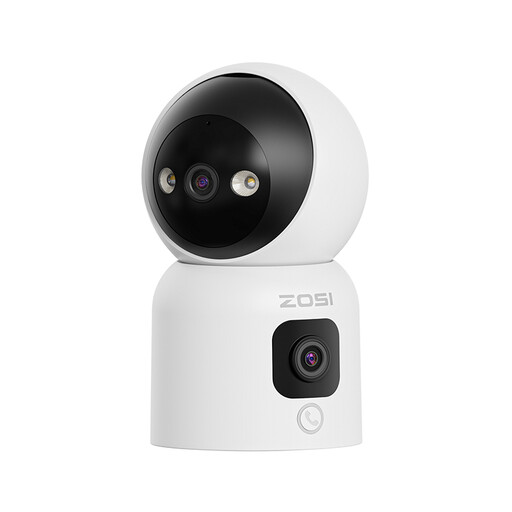
What sets it apart
This model stands out with its dual-lens system and advanced communication features. One lens is motorised for a 360° view, while the other provides a fixed panoramic view. Its call function, activated by a simple button press or hand gesture, makes it particularly well-suited for family use.
Highlights
Who is it for? Perfect for families who want to stay connected. It works equally well as a pet camera to interact with them, or to check on loved ones (children, elderly) who may not be comfortable with technology.
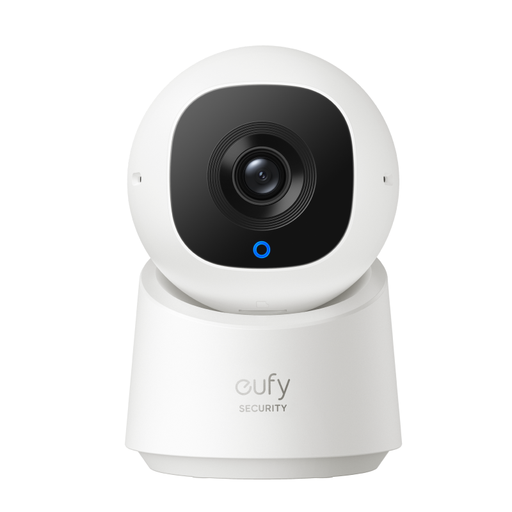
What sets it apart
The eufy C220 is a 360-degree camera that combines performance with respect for privacy. Its ability to rotate to cover the entire room, combined with on-device AI for person tracking and a physical privacy mode, makes it a highly versatile option.
Highlights
Who is it for? An excellent choice for those looking for a versatile security camera to monitor a large living room, a child's bedroom, or an office, while also wanting the ability to disable recording with a simple action to preserve their privacy.
The models featured in this guide are designed exclusively for indoor use. They are not built to withstand rain, dust, or extreme temperatures. For complete protection of your property, it is essential to choose models specifically designed for the outdoors.
? To explore these options, check out our selection of weather-resistant security cameras.
Yes, absolutely. Many models, including those in our selection, offer local storage on a microSD card. This allows you to record and review videos without ever paying monthly fees. Cloud storage remains an option, often for a fee, for those who want an off-site backup.
You have several options. The simplest is to place the camera on a flat surface like a shelf or a piece of furniture. Some models, like the ZOSI C680, come with strong yet non-permanent adhesive mounts, perfect for attaching to smooth surfaces like a window.
Yes, you have the right to film the interior of your private property for security purposes. However, respect for privacy remains paramount. If you employ household staff (such as a cleaner or a nanny), you are legally required to inform them of the cameras' presence. Furthermore, it is illegal to film public spaces (like the street) from your home. For specific cases, it is recommended to consult your local data protection regulations and authorities.