
Livraison le jour même ou le lendemain

Qualité garantie

Débloquez vos offres de bienvenue: Livraison GRATUITE | Jusqu'à -80 % | 30 jours d'essai gratuits à JoyPlus
Téléchargez l'application
Your mouse cable snagging during a clutch duel? The desire to go wireless is tempting, but the jungle of spec sheets leaves you perplexed. Between promises of stratospheric DPI and futuristic designs, it's easy to get lost and make a purchase you'll instantly regret.
Our editorial mission: to clear the path for you, decode the marketing jargon, and give you clear, concrete advice. Before you dive in, watch out for these common pitfalls that cost uninformed gamers dearly.
To make the right choice, focus on the features that have a direct impact on your performance and in-game comfort.
The weight/shape combination is arguably the most personal criterion. A lightweight gaming mouse, typically under 80 grams, is favoured in FPS (shooter) games where it facilitates wide sweeps and lightning-fast repositioning.
Conversely, a more substantial ergonomic gaming mouse (around 100g) can offer better stability and added comfort for long sessions, especially for palm grip users (where the entire palm rests on the mouse). Identify your grip style (palm, claw, or fingertip) to find a shape that will perfectly fit your hand.
The sensor is the heart of the engine. Rather than being mesmerised by a high-DPI gaming mouse, look for the presence of reputable optical sensors (like the PixArt PAW series) that guarantee 1:1 tracking, with no hardware acceleration or spin-outs.
Two other technical terms to keep an eye on:
Wireless technology has made spectacular progress. For gaming, the 2.4?GHz connection (often branded with marketing names like HyperSpeed, SpeedNova, etc.) via a USB dongle remains the gold standard. It offers latency equal to, or even lower than, many wired mice.
A Bluetooth gaming mouse is an excellent secondary option. Its higher latency makes it less suitable for competitive gaming, but it's perfect for office work, mobile use, and saving battery. "Tri-mode" models (2.4?GHz, Bluetooth, wired) offer the ultimate in versatility.
Here are a few models that excel in their category and avoid the pitfalls we've just discussed.
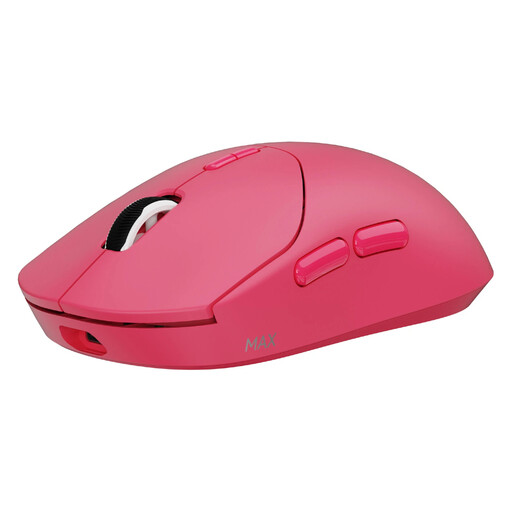
Why it stands out: Designed for FPS players who chase every last gram and millisecond. Its extreme lightness of 53g and its native wireless 8K Hz polling rate deliver absolute responsiveness and smoothness for the most lightning-fast actions.
It doesn't sacrifice battery life (up to 750h in 1000 Hz mode) despite its cutting-edge performance. Its weight is a true functional asset, not just a marketing gimmick.
Native 8K Hz wireless polling rate; Feather-light 53g weight; Durable optical switches (120 million clicks).
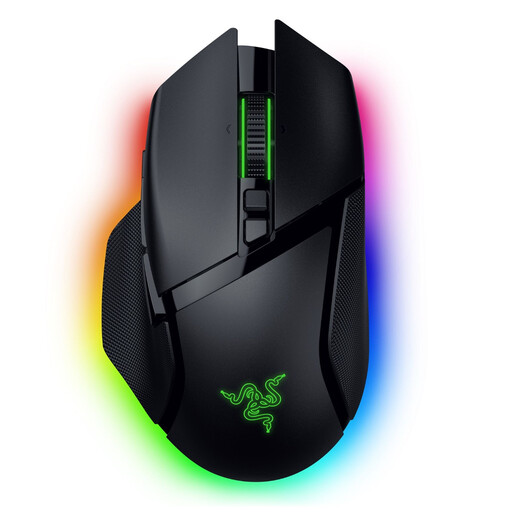
Why it stands out: Perfect for those who juggle between intense gaming sessions and productivity tasks. Its right-handed ergonomic shape, 11 programmable buttons, and smart-reel scroll wheel offer unparalleled comfort and flexibility.
Its ergonomics are proven, and its weight (112g) is a deliberate choice for stability, not a race to be the lightest. The HyperScroll wheel is a real productivity booster, far more than a simple gadget.
HyperScroll Tilt Wheel; Tri-mode connectivity (HyperSpeed, Bluetooth, wired); 13-zone RGB gaming mouse lighting.
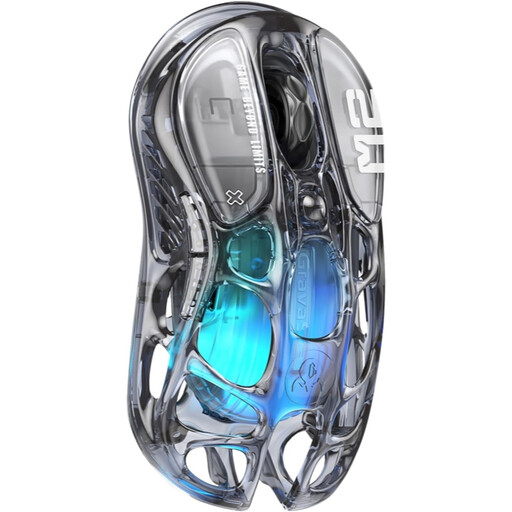
Why it stands out: For gamers who want a stunning setup. Its design with a hollow, transparent structure and RGB lighting makes it a true design object, without sacrificing performance thanks to its PAW3395 sensor and controlled 79g weight.
Beyond its killer looks, it packs top-tier components (26,000 DPI sensor) that place it light-years ahead of simple, flashy gadgets. It's proof that design and performance can go hand in hand.
Unique transparent design; High-performance PAW3395 optical sensor; Versatile tri-mode connectivity.
We've put together a complete selection of mice that meet our strict criteria, tested and approved by our editorial team.
Yes, and sometimes even faster! With modern 2.4?GHz technologies (HyperSpeed, SpeedNova, and the like), latency has become completely imperceptible, even for pros. Models with 4000 or 8000?Hz can even be more responsive than many standard wired mice.
The range is huge: from 30 hours to over 150 hours. It all depends on the use of RGB gaming mouse lighting, the polling rate, and the connection mode (Bluetooth being the most power-efficient). To avoid disappointment, always look for figures given for realistic usage (e.g., at 1000?Hz with RGB enabled).
Most mice work right out of the box for basic functions. However, to customise DPI, RGB lighting, programmable buttons, or create macros, installing the manufacturer's software (Razer Synapse, ASUS Armoury Crate, etc.) is essential. This is what will allow you to unlock the full potential of your new weapon.