
Livraison le jour même ou le lendemain

Qualité garantie

Débloquez vos offres de bienvenue: Livraison GRATUITE | Jusqu'à -80 % | 30 jours d'essai gratuits à JoyPlus
Téléchargez l'application
A pair of headphones can see you through a day of remote working, a train journey, a music session or several hours of gaming. Yet some purchases quickly disappoint: battery life that doesn't hold up depending on which features are switched on, an uncomfortable headband after an hour, or compatibility limited to just one device.
Before choosing a Bluetooth headset, a wired model or noise-cancelling headphones, it's worth distinguishing the genuinely useful features from the marketing claims that can be tricky to compare.
An over-ear headphone encloses your ears and already blocks out some outside sound thanks to its ear cushions. Active noise cancellation (ANC) uses microphones and electronic processing to reduce certain ambient noises, particularly the steady drone of transport.
It won't eliminate all voices, ringtones or sudden sounds. Also check whether there's a transparency mode or ambient mode if you need to hear a station announcement or chat with a colleague.
A quoted battery life of "up to" a certain number of hours usually refers to very specific conditions. Switching on ANC, the listening volume, taking calls and connecting to multiple devices can all significantly affect how long you can use them.
So look at the figures in detail: battery life with noise cancellation, battery life without ANC, charging time and whether there's a quick-charge feature. For daily use, a long-lasting battery cuts down on recharging. An audio cable can also take over when the battery runs flat.
A bulky headset can quickly become uncomfortable on a long journey, even if it's packed with features. Consider the shape of the ear cushions, the pressure from the headband, how the ear cups rotate and the overall weight.
For example, the Apple AirPods Max (USB-C) weighs 384.8 g with its ear cushions, whereas some lighter models are better suited to extended wear. Comfort also depends on your head shape and how well the headset fits.
A wireless Bluetooth headset works with smartphones, tablets and compatible computers. For remote working, go for a headset with a microphone and check the connection quality with your call software.
Multipoint connection lets you pair two devices at the same time. That's handy for switching between a work computer and your phone without having to re-pair. If you use a console, also check the type of connection:
An over-ear design encloses the ear and improves isolation. An on-ear model sits directly on the ear and can be more compact, but it generally lets in more ambient sound.
For listening to music or travelling, foldable noise-cancelling headphones can be very practical. For gaming, look for a microphone suited to conversations, easily accessible controls and clearly stated compatibility with your platform.
The size of the drivers, the frequency response and the codecs give you technical information, but they aren't enough to predict every user's experience. A headset with a microphone should also be judged on where the microphone picks up sound and how well the background noise reduction works.
Some options, such as spatial audio, an equaliser accessible via an app or dynamic head tracking, can be useful in specific situations. They don't necessarily justify the extra cost if you're simply after a headset for calls and videos.
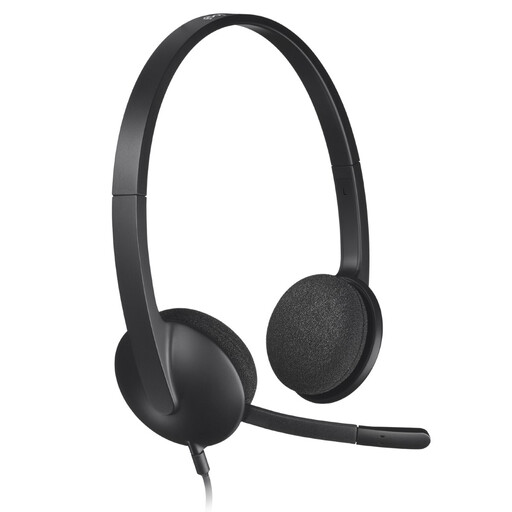
Why this choice suits this profile: This 282 g USB headset is ideal for calls, online classes and remote working on PC or Mac. Its plug-and-play connection requires no software installation.
The USB connection reduces issues linked to a separate audio socket, while the adjustable microphone sits close to your mouth for conversations.
USB connection, microphone with background noise reduction, adjustable headband and swivelling foam ear cushions.
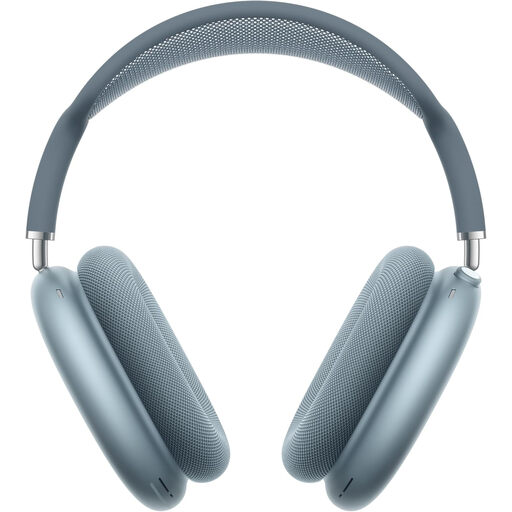
Why this choice suits this profile: This Bluetooth over-ear headset is designed for users with multiple Apple devices who want a seamless experience for music, films and calls.
The noise control button lets you switch from active cancellation to transparency mode, rather than staying isolated in every situation.
Active noise cancellation, personalised spatial audio, Bluetooth connection and battery life quoted at up to 20 hours with ANC or transparency mode switched on.
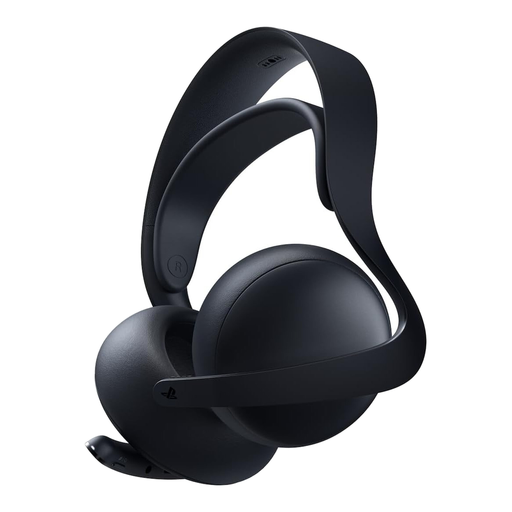
Why this choice suits this profile: Designed for gamers on PS5, PlayStation Portal, PC, Mac and mobile devices, it combines PlayStation Link, Bluetooth and a retractable microphone.
Compatibility is clearly stated for multiple platforms, and the microphone tucks away into the ear cup when not in use.
Planar magnetic drivers, low-latency PlayStation Link connection, Bluetooth, battery life quoted at up to 30 hours and charging stand included.
We've put together a comprehensive, real-time updated selection of products that meet these demanding criteria and European safety standards.
Yes, provided the computer has a compatible Bluetooth connection. If not, you may need an adapter. A USB headset or a wired model with a jack plug is a more straightforward solution. Also check the microphone compatibility in your system and call application settings.
It depends on the battery, the hinges, the ear cushions and how often you use them. Avoid moisture, high temperatures and twisting the cable. On a wireless headset, battery life can gradually decrease over charging cycles. Replaceable ear cushions can extend comfort, but check their availability before you buy.
Active noise cancellation can be very useful on a train, a plane or anywhere with constant background noise. It isn't essential in a quiet room and doesn't replace being alert in public places. Switch on transparency mode when you need to stay aware of announcements and your surroundings.