
Livraison le jour même ou le lendemain

Qualité garantie

Débloquez vos offres de bienvenue: Livraison GRATUITE | Jusqu'à -80 % | 30 jours d'essai gratuits à JoyPlus
Téléchargez l'application
A home security camera can keep an eye on an entrance, garden, garage or indoor room. The problem is that product specifications sometimes combine genuinely useful features with claims that are harder to verify. Before reaching for your bank card, focus on five points: coverage area, connection, power supply, storage and operating conditions.
A 4K camera is not necessarily the most suitable option in every situation. Image quality also depends on brightness, video compression, the distance between the lens and the area being filmed, and the viewing angle. In the dark, a camera equipped with infrared night vision or a spotlight may produce a clearer image than a model that simply offers a higher resolution.
A wireless outdoor camera generally runs on a battery. Its battery life varies depending on the number of detections, recording length, temperature and signal strength. A solar panel reduces the need for manual recharging, but it must be installed somewhere with sufficient exposure to sunlight.
A wired camera, on the other hand, may be suitable for continuous monitoring. However, installation requires a protected power socket and, in some cases, the help of a professional. For a second home or a property without Wi-Fi, a solar security camera compatible with 4G LTE can be a much more practical solution.
Some features, such as cloud video history or advanced person detection, may be reserved for subscribers. Other models accept a microSD card for storing recordings locally. A 4G LTE camera also requires a SIM card and a mobile data plan.
Before confirming your basket, check the following in particular:
For an outdoor security camera, measure the distance between the device and the gate, driveway or façade. A 130° diagonal viewing angle covers a fairly wide area, while a motorised PTZ model adds horizontal rotation and tilt that can be controlled remotely.
A motorised PTZ camera can be useful for a large room or open grounds. However, it will not necessarily film several areas at the same time. To reduce blind spots, several fixed cameras may therefore be more effective than a single adjustable device.
Standard motion detection can be triggered by an animal passing by, a moving branch or a change in brightness. A camera with human detection, capable of distinguishing people from vehicles and animals, can reduce unnecessary notifications — provided the app genuinely offers these features.
Customisable activity zones are just as useful for excluding a road, pavement or part of the garden that does not concern you. A camera with a siren or spotlight can have a deterrent effect, but these features should be configured carefully to avoid turning the neighbourhood into a permanent alert zone.
A Wi-Fi camera should be installed in an area where the signal remains stable. Dual-band models compatible with 2.4 GHz and 5 GHz offer greater flexibility, but actual range always depends on wall thickness and the layout of your property. If you want to communicate with a delivery driver or visitor, choose a model with two-way audio.
For indoor use, look for a physical lens cover or privacy shutter. In all cases, use a unique Wi-Fi password, install updates and limit the field of view to areas that belong to you. In France, a camera must not film neighbouring properties or public roads beyond what is necessary. People affected must also be informed when a private area is being monitored.
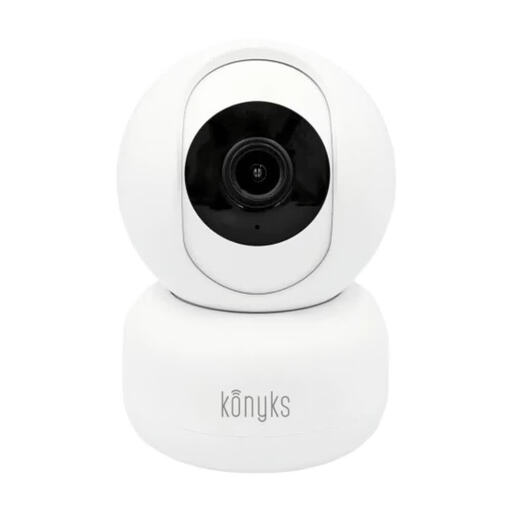
Why this choice suits this profile : This indoor camera connects to 2.4 GHz Wi-Fi and is suitable for a living room, hallway or child's bedroom. Its compact design makes it easy to set up as your first connected camera.
Its advertised 350° horizontal and 85° vertical rotation helps limit areas that cannot be seen from a fixed position. Storage on a microSD card, up to 128 GB, provides an alternative to the cloud.
3 MP resolution, infrared night vision up to 5 m, motion detection with person filtering, two-way audio and built-in siren.
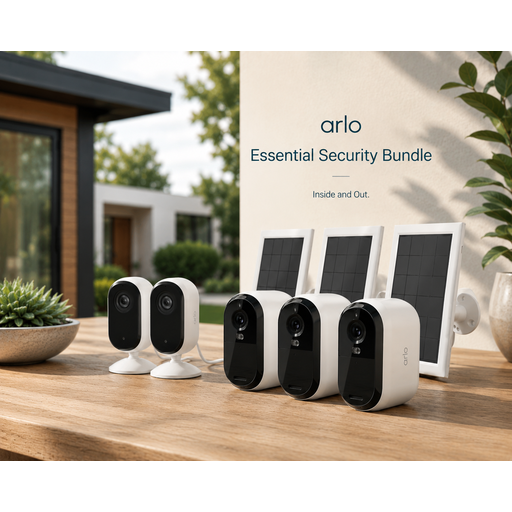
Why this choice suits this profile : This pack combines three 2K outdoor cameras with solar panels and two wired indoor cameras. It is designed for homeowners who want to manage several areas from a single app.
The solar panels reduce the need to intervene with the outdoor batteries. The wired indoor cameras are designed for continuous monitoring and feature a motorised privacy shutter.
2K video, 130° diagonal viewing angle, colour night vision with outdoor spotlight, 80 dB siren and two-way audio.
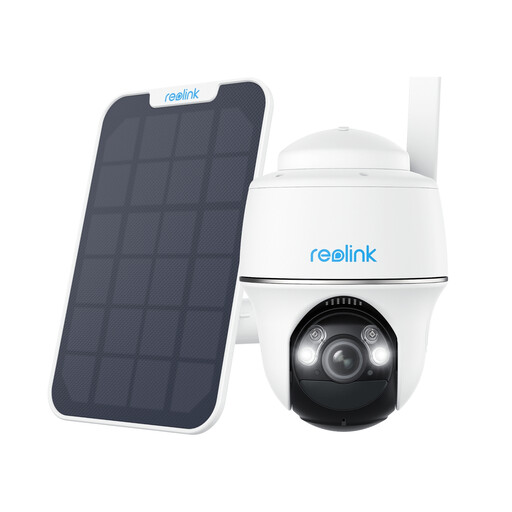
Why this choice suits this profile : This outdoor camera is aimed at agricultural land, second homes, building sites and plots without Wi-Fi or mains power.
The 4G LTE connection works with a Nano-SIM card, without relying on a Wi-Fi network. The solar panel supplements a rechargeable 6,000 mAh battery.
4 MP resolution, rotation up to 355°, tilt up to 140°, person, vehicle and animal detection, microSD card support up to 128 GB.
We have selected a complete, real-time-updated list of products that meet these demanding criteria while also taking European safety regulations into account.
For usable images, install the camera between 2 and 3 metres high whenever the layout of the premises allows. Avoid pointing it towards a direct light source. Then test the alerts from several locations around the property to check that detection works as expected.
Remember to:
A connected video doorbell can complement an outdoor camera by monitoring the doorstep and parcels specifically. For a dark entrance, a model with a spotlight can also replace separate lighting, provided you check its power supply and range.
The camera may sometimes continue recording to a microSD card. However, remote notifications, viewing from a smartphone and cloud storage generally require an internet connection. Check the model's instructions to find out which features are available offline.
There is no universal lifespan. It depends on exposure to the elements, the quality of the mount, the battery and maintenance. A rating such as IP64 indicates protection against dust and water splashes, but does not mean that the device can be submerged.
You need to add a mobile data plan to the purchase price. The cost depends on how often alerts are triggered, video length and the recording mode selected. To limit data usage, configure detection zones and use event-based recording whenever continuous monitoring is not essential.