
Livraison le jour même ou le lendemain

Qualité garantie

Débloquez vos offres de bienvenue: Livraison GRATUITE | Jusqu'à -80 % | 30 jours d'essai gratuits à JoyPlus
Téléchargez l'application
Setting up a home office has become a necessity for millions of professionals, freelancers, and students. But with an overwhelming number of options, it's easy to fall into common traps that turn a significant investment into a source of daily frustration. A wobbly desk, a tangled mess of cables, a posture that leaves your back aching… does any of this sound familiar??
My role as a product expert at Joybuy is to guide you through this maze and help you make the right choice. Let's cut through the marketing jargon and get straight to the point. Here are the most common mistakes to avoid, and our advice for building a workspace that genuinely boosts your productivity and well-being.
The 3 Pitfalls to Avoid When Buying Your Remote Work Equipment?:
To ensure your investment is sound, there are three technical criteria to scrutinize. They are the key to a successful and long-lasting home office setup.
A good desk must be exceptionally reliable. To ensure this, there are two points to check?:
Comfort isn't a luxury; it's a necessity for staying focused and protecting your health. An ergonomic desk adapts to you, not the other way around.
The most flexible solution is an electric sit-stand desk. It allows you to alternate between postures throughout the day, a practice widely recommended for reducing fatigue and back pain. When making your choice, pay close attention to the following?:
For a clean and efficient workspace, good cable management is non-negotiable. The solution? Instead of piling up adapters, a USB-C docking station (or multi-port hub) centralises all your connections. A single cable is all you need to connect your laptop to your monitors, network, power supply, and all your peripherals.
The points to check?:
Different users have different needs. Here are a few solutions designed for specific profiles, all of which meet the quality criteria we've just discussed.

Why this choice? This profile needs a well-compartmentalised workspace with plenty of storage to maintain a clear and focused mind. The L-shape is perfect for dedicating one area to computing and another to paperwork. The drawers and shelves keep essentials within reach but neatly out of sight.
It avoids the flimsy furniture trap thanks to its robust metal frame and high-quality E1-grade panels. Its reversible design (drawers on the left or right) offers a flexibility that entry-level models lack.
It combines an expansive work surface with ample storage capacity in a single piece of furniture, perfectly optimising the often-underutilised corners of a room.
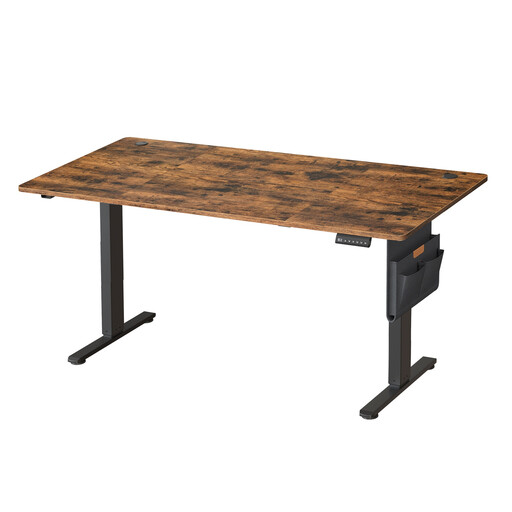
Why this choice? For those who spend long hours in front of a screen, ergonomics are non-negotiable. This desk makes it easy to alternate between sitting and standing, an excellent way to combat a sedentary lifestyle and stay focused. The memory function makes height adjustments nearly instantaneous.
It avoids the "style over substance" trap by integrating an essential ergonomic feature into a piece of modern, minimalist office furniture. Its silent motor and steel frame are guarantees of functional quality, not just aesthetic appeal.
The 4-height memory presets and the USB-C charging port integrated directly into the control panel are significant advantages for maximum convenience in daily use.
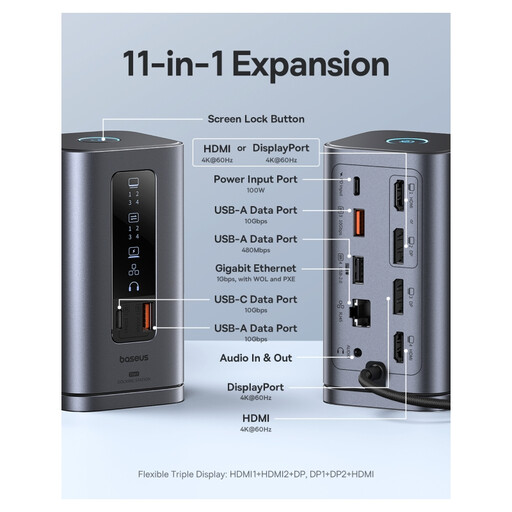
Why this choice? This user relies on their laptop as their primary machine. They need to connect it to a multitude of peripherals (monitors, hard drives, etc.). This docking station becomes the brain of their setup, transforming a single USB-C port into a comprehensive control centre.
It ends the cable nightmare by centralising all connections. It provides 100W Power Delivery, a critical feature often overlooked in entry-level hubs that struggle to adequately power a laptop and its peripherals simultaneously.
Support for three monitors (2x HDMI, 1x VGA) and the inclusion of a Gigabit Ethernet port ensure a stable, wired connection—essential for uninterrupted video conferences and fast file transfers.
We have curated a complete range of products that meet our quality criteria and current standards.
The lifespan of an electric desk primarily depends on the quality of its motor and frame. A well-made motor is designed to withstand tens of thousands of cycles (up/down movements). The warranty period for the motor and frame is an excellent indicator of reliability. To maximise its longevity, respect the manufacturer's recommended maximum load and avoid running the motor continuously, which could trigger its thermal protection.
Yes, and it's crucial if you have a comprehensive setup. Your laptop might only draw 65W to charge, but all connected peripherals (hard drives, monitors, etc.) also draw power from the dock. A 100W (PD) input ensures that your laptop will charge at full speed while providing stable power to all your accessories, preventing unexpected outages or disconnections. It's an essential guarantee of reliability for a high-performance remote work setup.
Not necessarily. A corner desk with storage is perfect for utilising an unused corner and for physically defining different work zones (e.g., one side for the computer, the other for writing). However, in a long, narrow room, a large straight desk (180?cm, for example) might be a more practical choice and create a more open, airy feel. It all depends on your room's layout and your workflow.