
Livraison le jour même ou le lendemain

Qualité garantie

Débloquez vos offres de bienvenue: Livraison GRATUITE | Jusqu'à -80 % | 30 jours d'essai gratuits à JoyPlus
Téléchargez l'application
Balancing focus, well-being, and efficiency in your home office can sometimes be a challenge. Between professional demands, gaming sessions, and the search for a healthy work-life balance, every piece of equipment is a key component. This guide gives you the keys to creating a remote work setup that is functional, ergonomic, and tailored to your daily life—all without the unnecessary marketing jargon.
By the Joybuy editorial team, July 16, 2026
Before jumping on the first product you see, it's crucial to define your needs based on a few essential criteria. A good remote work setup is an ecosystem where every element has its place and serves a specific function.
The desk is the cornerstone of your setup. Its size and sturdiness determine everything else. For optimal comfort, especially if you're juggling multiple screens or heavy equipment, a large 160 cm desk offers a truly generous work surface. It allows you to arrange a computer, documents, and peripherals without feeling cramped. Be sure to check the load capacity and structural stability: a sturdy workstation with a steel frame and reinforcements is a smart choice for a long-lasting investment.
Sitting for hours on end is one of the biggest downsides of remote work. Incorporating physical activity, even light movement, can make all the difference. A foldable under-desk treadmill is an excellent solution for walking at a low speed while checking emails or participating in a video conference. Opt for a compact walking pad that slides easily under a piece of furniture so it doesn't encroach on your living space after the workday is over.
The keyboard is your main point of contact with your machine. A 60% mechanical keyboard is a very smart option for optimising space. By omitting the number pad and certain function keys, this type of compact gaming keyboard frees up valuable surface area for mouse movement. This is a significant advantage for both gaming and productivity. The choice of switches will directly influence the typing feel and noise level—a factor not to be overlooked if your office is in a shared space.
Here is our selection of products that check all the boxes: versatility, performance, and space optimisation. Everything you need to build a complete workstation without compromise.
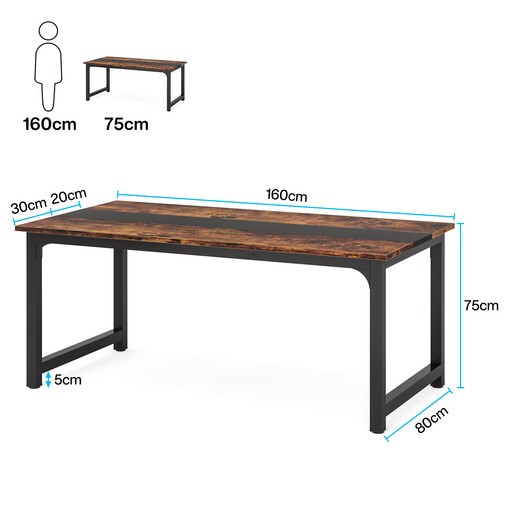
Why we chose it: This desk stands out thanks to its very generous 160 x 80 cm surface and a design engineered for rock-solid stability. Its reinforced steel frame supports a stated load of up to 400 kg, making it an ultra-solid foundation for any home office equipment, even the heaviest.
Advantages:
Who is it for?: For professionals, content creators, and gamers looking for a spacious, stable, and reliable base to build a complete, no-compromise setup.
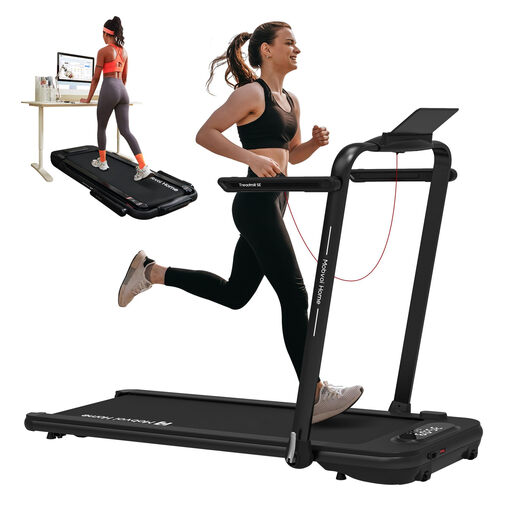
Why we chose it: This is the Swiss Army knife of treadmills. It works equally well as an under-desk walking pad (up to 6 km/h) and a more traditional treadmill (up to 12 km/h). Its foldable, ultra-slim design makes it the perfect companion for apartments and small spaces.
Advantages:
Who is it for?: For remote workers who want to move more throughout the day. It's the ideal solution for those who are short on space but not on motivation.
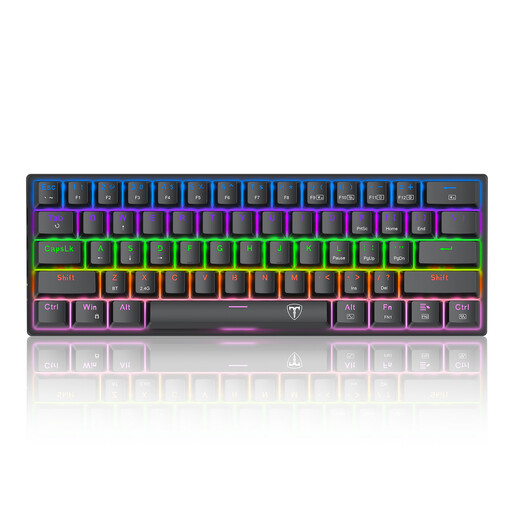
Why we chose it: Its ultra-compact 61-key format (note: it's a US QWERTY layout) is its main selling point. It maximises desk space for mouse movement. Its blue mechanical switches offer a very distinct tactile and audible feedback, a delight for many typing and gaming enthusiasts.
Advantages:
Who is it for?: For gamers (especially FPS players), developers, writers... in short, anyone who values a clean desk and a tactile typing experience, provided the "clicky" noise isn't an issue for those nearby.
Every remote work setup is unique. If our selection doesn't exactly match your needs or if you want to explore other styles and sizes, plenty of alternatives are available.
To discover a wider range of desks suited for all needs and budgets, take a look at our selection of simple desks.
It all depends on your equipment and your work. A 120 cm wide desk is a good starting point. However, to be truly comfortable with two monitors, a laptop, and space to write, a large 160 cm desk is often a smarter choice. It provides all the flexibility needed to organise a sturdy workstation without ever feeling cramped.
Integrating active breaks is key. Solutions like a compact walking pad allow you to walk at a low speed while performing tasks that require little concentration. Placed under a standing desk or used during breaks, it helps break up a sedentary routine. The important thing is to choose a model that is quiet and easy to store.
Absolutely! A 60% mechanical keyboard can be incredibly effective for office work, especially if you do a lot of typing. The extra space for the mouse improves overall ergonomics. However, the absence of a number pad and dedicated function keys requires a short adjustment period to master the shortcuts (using the Fn key). It's a very relevant choice for writers or developers, but perhaps less so for accountants.