
Livraison le jour même ou le lendemain

Qualité garantie

Débloquez vos offres de bienvenue: Livraison GRATUITE | Jusqu'à -80 % | 30 jours d'essai gratuits à JoyPlus
Téléchargez l'application
Setting up your home office or battle station is an exciting project. But with an overwhelming number of options, the risk of making a poor choice is very real, turning a good investment into a source of regret. As a product expert at Joybuy, my mission is to guide you through the jungle of options to make the right choice. Let's review the most common mistakes to avoid at all costs.
gaming chair or a sleek-looking armchair is no guarantee of comfort. The lack of lumbar support, fixed armrests, or a poorly designed seat are the perfect recipe for back pain and fatigue, turning your long gaming or remote work sessions into a real ordeal.To create a successful home office setup or gaming station, rely on objective technical criteria. Here are the points to inspect closely before you check out.
The foundation of any good desk setup is... the desk itself. Its sturdiness is non-negotiable.
Industrial-style furniture is often a safe bet, combining metal and dense wood.Whether you opt for an ergonomic office chair or a gaming chair, certain features are must-haves to protect your back and maintain your focus.
The top of your computer desk must be suited to your needs.
To help you see how these criteria apply in practice, here are a few targeted suggestions.
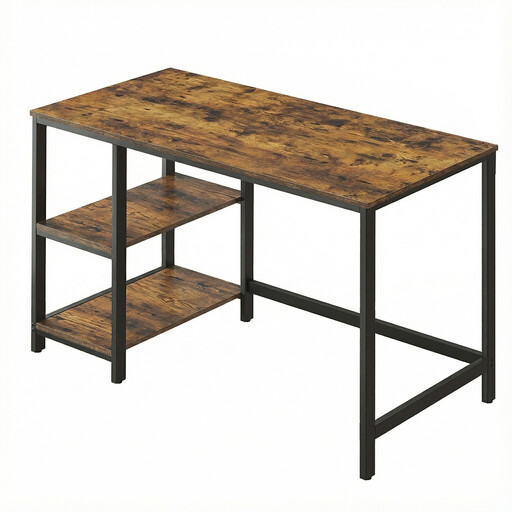
Why we chose it : Ideal for students or remote workers just getting equipped. It offers a functional 120 cm workspace and practical storage, all with a bold style.
Its steel frame and adjustable feet avoid the unstable desk pitfall, ensuring a solid foundation for work.
The two shelves can be assembled on the left or right, offering highly appreciated storage modularity.
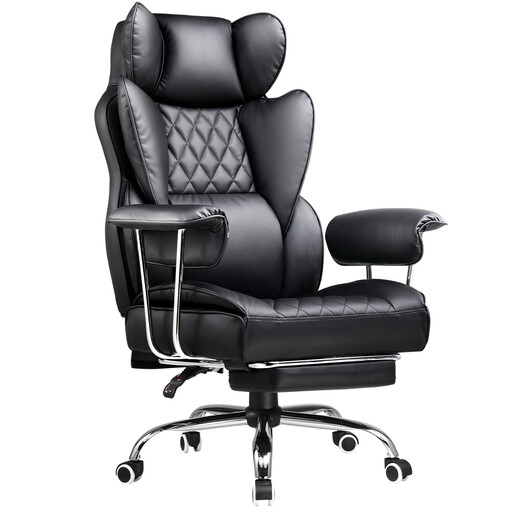
Why we chose it : Designed for those who spend long hours sitting. It combines the features of a gaming chair with an understated design that won't look out of place in an office.
This chair counters the pitfall of sacrificed ergonomics. Its high back, lumbar support, and footrest ensure full-body support.
Its reclining backrest and retractable footrest allow you to switch from a work posture to a relaxation mode in seconds.
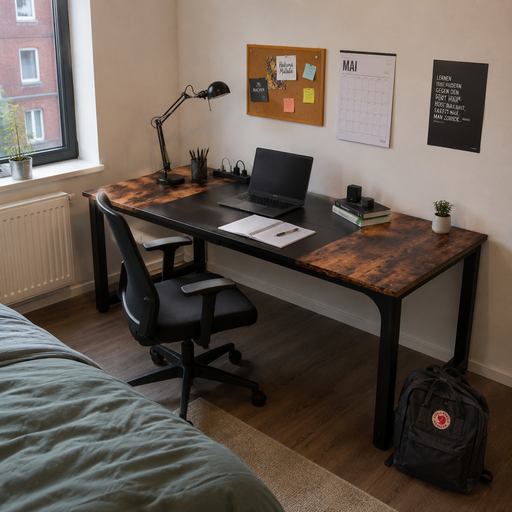
Why we chose it : Perfect for demanding professionals, creatives, or for setting up a shared workspace. Its generous dimensions comfortably accommodate two people or a complex multi-monitor setup.
It solves the problems of size and stability. With a 180 x 80 cm surface and a maximum load of 260 kg, there are no nasty surprises on the horizon.
Its steel frame with 5 x 5 cm tubes guarantees rock-solid stability, even under a heavy load. A true long-term investment.
We have put together a complete selection of products that meet our quality criteria and safety standards.
For optimal comfort with two 24- or 27-inch monitors, a desk width of at least 140?cm is recommended. A 160?cm model or larger will be even better, leaving you room for your speakers, documents, or other peripherals. Depth is just as crucial: aim for at least 70?cm so you're not sitting too close to the screens.
Although both aim for long-term comfort, their philosophies differ. The ergonomic office chair focuses on fine-tuned adjustments and an understated design, optimised for postural support at work. The gaming chair embraces a more distinct style (like a bucket seat) and focuses on immersive features like a deep recline and supportive bolsters. The choice depends on your priorities: subtlety and posture, or immersion and a bold look.
One of the big advantages of industrial-style furniture is its ease of maintenance. A simple dry cloth is enough for the steel frame. For the composite wood top (MDF, particleboard), a slightly damp cloth will take care of dust and stains. Just avoid abrasive cleaning products that could damage the finish.