
Livraison le jour même ou le lendemain

Qualité garantie

Débloquez vos offres de bienvenue: Livraison GRATUITE | Jusqu'à -80 % | 30 jours d'essai gratuits à JoyPlus
Téléchargez l'application
Remote work is here to stay, turning a corner of our living room or bedroom into an office. But creating a workspace that's both comfortable and effective can be a real headache. Faced with an overwhelming number of options, it's easy to make a poor choice that will take a toll on your well-being and your wallet. As a product expert at Joybuy, I'll break down the mistakes to avoid.
Let's cut through the marketing jargon. Here is a practical guide to help you identify the pitfalls and choose the right equipment for a truly successful home office setup.
Before you pull out your credit card, watch out for these common mistakes that can turn a promising purchase into a costly regret.
To build a durable and complete workstation, three key criteria should guide your choice.
Ergonomics isn't a luxury; it's the foundation of a healthy workspace.
A computer desk must be a reliable foundation for your equipment.
A tidy desk promotes focus. Think about storage solutions from the very beginning. A desk with built-in drawers or shelves is a good option. If you opt for a more minimalist model, an external desk organiser (pen holder, document sorter) becomes essential to maintain a clutter-free workspace.
Every remote work situation is unique. Here are a few home office furniture options tailored to specific needs.
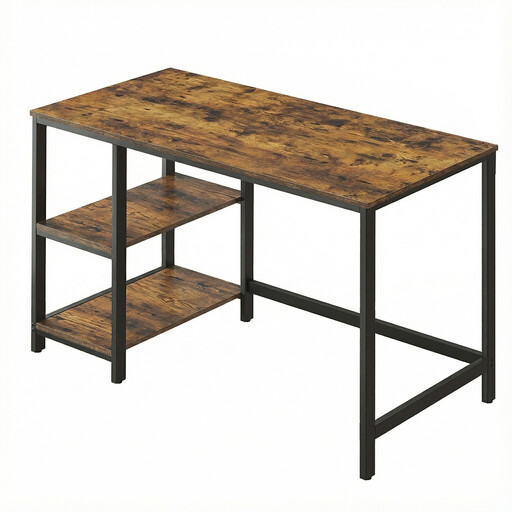
Why this choice? This desk combines a standard size (120x60 cm), sufficient for a laptop and a monitor, with an industrial-style desk that's right on trend. It integrates easily into a living room or bedroom without clashing with your decor.
It doesn't sacrifice sturdiness for style. Its steel frame and adjustable feet ensure good stability, avoiding the "wobbly desk" effect typical of poorly designed entry-level models.
An excellent balance of functionality, style, and price. The removable shelves offer welcome storage flexibility for a model in this range.
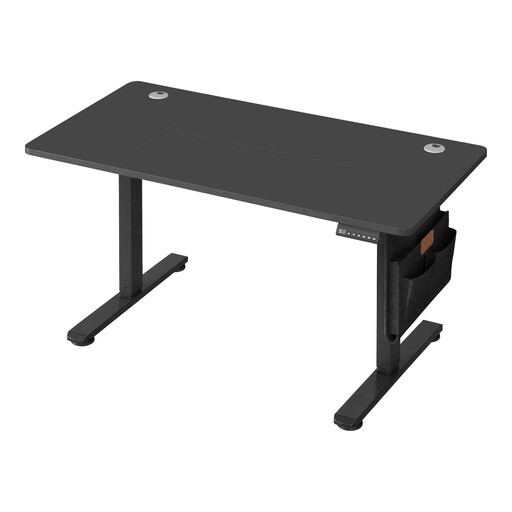
Why this choice? For those who spend more than 8 hours a day at their desk, the ability to change posture is essential. This motorised sit-stand desk is the ideal solution, adding modern features like position memory and a USB-C port.
It tackles the pitfall of long-term discomfort. Instead of keeping you static, it encourages movement, which is a direct investment in your well-being and productivity. The quiet motor ensures a discreet transition.
The electric height adjustment (72-120 cm) with 4 memory presets. It's a feature that is a daily game-changer.

Why this choice? Ideal for those who need a generous work surface and plenty of storage. The L-shape optimises the use of a room corner and allows you to dedicate one area for the computer and another for writing or reviewing documents.
It solves the pitfall of insufficient space and storage right from the start. With 4 drawers and 2 shelves, it offers an integrated complete workstation solution, which avoids the need for multiple storage units.
The large work surface and storage capacity. Its reversible design allows the drawers to be placed on the left or right to fit the room's layout.
To complete your setup, don't forget an ergonomic office chair. Models like the JOYFURNOS mesh chair offer adjustable lumbar support, flip-up armrests, and a comfortable seat, which will pair perfectly with the desks featured.
For more specific needs, such as small spaces, we have selected models that meet strict selection criteria and safety standards.
If you spend more than two hours a day sitting at a desk, the answer is a resounding yes. Unlike a standard chair, an ergonomic office chair is designed to support your body for long periods. Its adjustments (height, lumbar support, armrests) allow you to tailor it to your body, which helps maintain good posture and prevent fatigue and muscle pain.
The easiest method is to visualise it. Measure the available space in your room, then use masking tape on the floor to mark out the dimensions of the desk you're considering. Don't forget to allow for at least 80 cm of clearance behind the desk for your chair. Also, consider the surface area you'll need on the desktop: a single monitor and a laptop will fit on a 120 cm wide desk, but for two monitors, you should aim for 140 or 160 cm.
The durability of a sit-stand desk primarily depends on the quality of its motor and steel frame. A high-quality motor is typically designed to withstand tens of thousands of up/down cycles. With normal use, you can expect a lifespan of 5 to 10 years. It's advisable to check the warranty period offered for the motor and frame, as it's often a good indicator of the manufacturer's confidence in their product.