
Same-day & Next-day Delivery

Quality Guaranteed

Unlock Your Welcome Offers: FREE Delivery | Up to 80% OFF | Free 30-day JoyPlus trial
Download the APP
Remote work is now a part of our daily lives, but our homes aren't always ready to accommodate a workspace that's both functional and comfortable. Choosing the right furniture can quickly become a headache. To avoid investment regret, it's best to know the common mistakes. Here are the 3 pitfalls to avoid for a successful home office setup.
To make the right choice, focus on the technical features that are true game-changers.
An ergonomic office chair isn't a luxury; it's the cornerstone of a healthy workstation. A good desk chair must offer multiple adjustments to adapt to your body type.
The desk is the centrepiece of your setup. Your choice will depend on your work habits and the space you have available.
A calm and efficient workspace starts with smart storage solutions.
To move from theory to practice, here are a few products that cater to different needs and budgets.
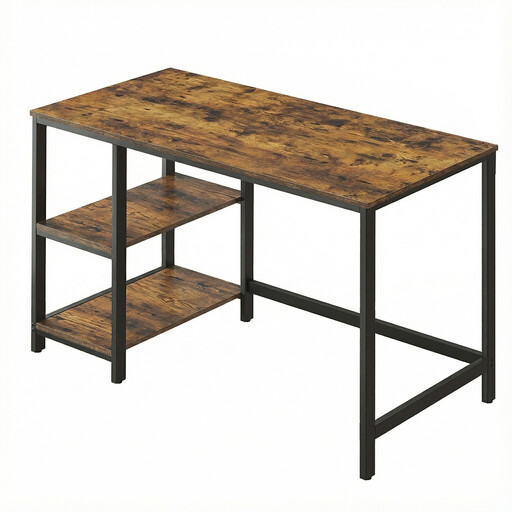
Why we chose it: Ideal for setting up a first office or a student corner without breaking the bank. Its understated industrial style fits in anywhere, and its 120 cm desktop provides enough space for a laptop and an external monitor.
It provides a stable work surface and minimal storage, thus avoiding the trap of a desk that's too small and lacks any organisational features.
Its steel frame and adjustable feet ensure rock-solid stability, even on uneven floors.

Why we chose it: For those who put in long hours at their desk, being able to alternate between sitting and standing is a real health benefit. Its large 160 cm desktop comfortably accommodates a multi-monitor setup.
This desk tackles the pitfall of sacrificed ergonomics head-on. The height memory presets and integrated USB-C port meet the demands of a modern, productive workstation.
Its quiet motor, sturdy steel frame, and 4 memory presets for switching positions in the blink of an eye.
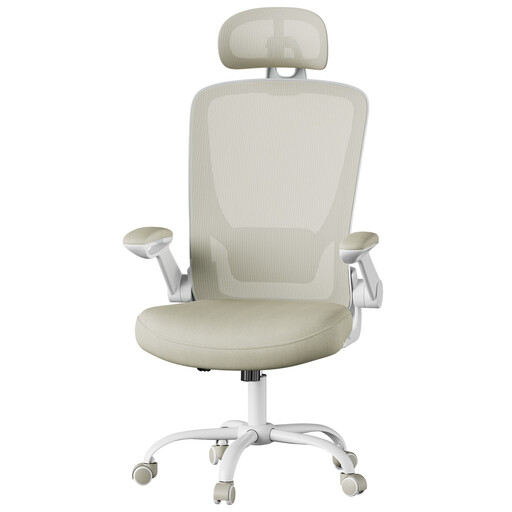
Why we chose it: Perfect for studios or multi-purpose rooms. Its flip-up armrests allow it to slide completely under the desk, freeing up valuable space after the workday is over.
This model proves that a compact design can still be ergonomic. It avoids the trap of the gimmicky and uncomfortable "small chair" by including real adjustable lumbar support and a headrest.
Its flip-up armrests, which offer maximum space-saving benefits without sacrificing essential ergonomic adjustments.
For more specific needs, like an auxiliary desk that's easy to fold and store, other options are available. Discover our selection of hand-picked products.
A chair's lifespan depends on the quality of its materials and the intensity of its use. A model with a steel base, good casters, and a high-density foam seat can last you for 5 to 10 years. Regular maintenance (tightening screws, cleaning the mechanism) also extends its longevity.
Absolutely. A height-adjustable desk is an excellent way to vary your posture throughout the day. Changing positions helps you stay more dynamic, focus better, and relieve pressure points. Models with height memory presets make switching from sitting to standing nearly instantaneous, which encourages you to do it more often.
Start by measuring your floor space, and don't forget to allow at least 80 cm of clearance for your chair. For the desktop size, 120 x 60 cm is a good minimum for a single-monitor setup. If you use two monitors or need space to spread out your work, a width of 140 cm or 160 cm will be much more comfortable.