
Livraison le jour même ou le lendemain

Qualité garantie

Débloquez vos offres de bienvenue: Livraison GRATUITE | Jusqu'à -80 % | 30 jours d'essai gratuits à JoyPlus
Téléchargez l'application
Setting up a home office that is both functional and pleasant is a real challenge. Faced with an overwhelming number of options, the pitfalls are numerous and can quickly become costly, not to mention hamper your productivity. As the Head of Product Recommendations at Joybuy, my mission is to help you gain some clarity. Let's explore how to build a complete remote work office without making any mistakes.
Before you get started, let's review the most common errors. Knowing them will help you avoid disappointment and unnecessary expenses.
To build a workspace that lasts, a few technical criteria are non-negotiable. They are the foundation of your comfort and productivity.
The size of the desktop should primarily match your needs.
remote work setup.The computer is the engine of your productivity. Instead of a laptop, which tends to overheat and has limited ergonomics, the office mini PC option deserves your full attention. These ultra-compact machines offer a host of benefits:
A good wireless keyboard and mouse set is a game-changer. No more tangled cables; you have the freedom to position your peripherals however you like. Opt for a model with an ergonomic keyboard to protect your wrists during long days of typing.
Every remote worker has different needs. Here are a few typical configurations, designed for various profiles, to help you envision your future home office equipment.
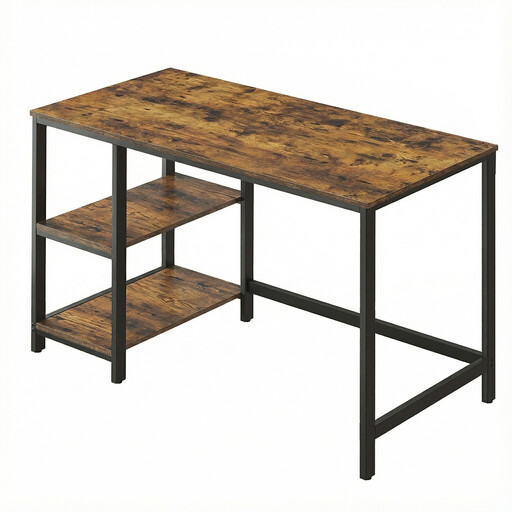
Why we chose it: Ideal for creating your first real office nook in an apartment or living area. Its dimensions offer an excellent balance between usable surface area and overall footprint.
It counters the lack-of-storage pitfall with its two modular shelves (can be assembled on the left or right) to keep essentials within easy reach.
Its steel frame and adjustable feet ensure perfect stability, even on an uneven floor. A detail that matters to prevent your monitor from wobbling.

Why we chose it: Perfect for those who juggle multiple projects and need a large desktop with ample storage. It allows for a clear separation between the computer space and the document review area.
It solves the problem of clutter by combining a large corner desktop with a massive storage solution (4 drawers, 2 shelves). Lack of space will no longer be an issue.
Its reversible design is its greatest strength: the storage module can be assembled on the left or right, offering maximum flexibility to adapt to any room layout.
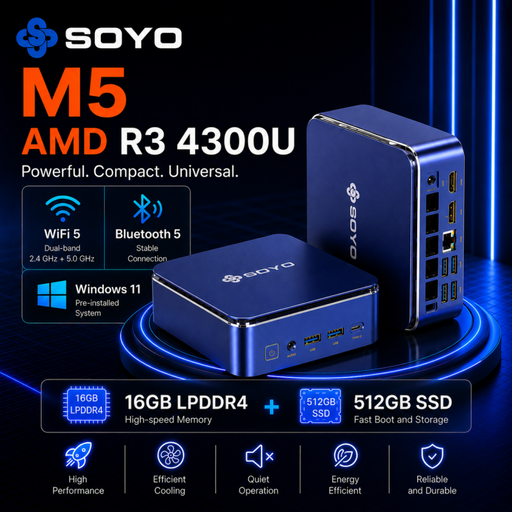
Why we chose it: For those who want desktop PC power without the bulk. It's the heart of a clean, high-performance setup capable of driving multiple monitors. It would be perfect on a **large desk** like the LANTINE 160 x 80 cm.
It sidesteps the underpowered PC trap. With its Ryzen processor, 16 GB of RAM, and 512 GB SSD, it ensures rock-solid fluidity for office tasks and multimedia.
Its ability to drive three 4K monitors simultaneously (via HDMI, DP, and USB-C) makes it a productivity beast in an ultra-compact form factor of less than 13 cm per side.
To complete your setup, an accessory like the ET 2.4G Wireless Keyboard and Mouse Set is an excellent choice for keeping your desk clear and enjoying a comfortable typing experience.
Explore our complete, up-to-date selection of products that meet our strict selection criteria and current safety standards.
To be comfortable with two 24- or 27-inch monitors, a width of 140 cm is the bare minimum. A 160 cm wide desktop will offer optimal comfort, allowing you to centre the monitors properly while still having space on each side for your accessories.
It all depends on your mobility needs. If you work exclusively from home, the mini PC offers a better price-to-performance ratio, richer connectivity for monitors, and better heat dissipation. Paired with a good monitor and an ergonomic keyboard, it creates a much more comfortable workstation for the long term. The laptop retains its advantage if you are frequently on the move.
Durability obviously depends on the quality of the chosen components. A desk with a sturdy steel frame and a thick particleboard top can last for many years. On the computing side, a well-equipped mini PC (quality processor, RAM, SSD) will remain performant for office use for at least 5 to 7 years before its power starts to show its limits against next-generation software.