
Livraison le jour même ou le lendemain

Qualité garantie

Débloquez vos offres de bienvenue: Livraison GRATUITE | Jusqu'à -80 % | 30 jours d'essai gratuits à JoyPlus
Téléchargez l'application
With the rise of remote work, creating a dedicated workspace at home is no longer a luxury, but a necessity. However, faced with an overwhelming number of options, it's easy to fall into common traps that can be costly, both in terms of comfort and your wallet. As the Head of Product Selection at Joybuy, my mission is to help you gain clarity and cut through the marketing jargon to focus on what truly matters.
Before you start shopping, watch out for these frequent errors that can quickly turn a good investment into a source of regret.
For a sustainable and effective home office setup, certain technical criteria are simply non-negotiable. Here are the points to examine carefully.
Ergonomics isn't a luxury; it's a necessity for protecting your health in the long run.
The quality of materials has a direct impact on the sturdiness and lifespan of your equipment.
When your office shares a living space, versatility is key.
Different users have different needs. Here are a few products we've selected for their ability to meet specific use cases while avoiding the pitfalls mentioned earlier.
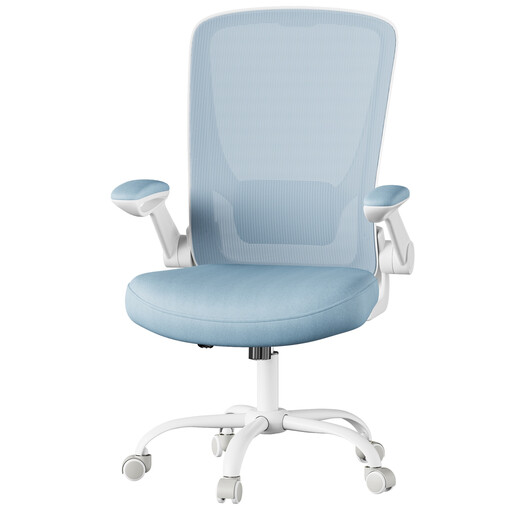
Why this model: Perfect for students or for occasional remote work, when the office needs to be discreet in a bedroom or living room. Its flip-up armrests are a game-changing feature for sliding the chair under the desk to optimise space after the workday is done.
It directly tackles the problem of a large footprint. Its smart design maximises space without compromising on essential ergonomic adjustments like lumbar support.
The 90° flip-up armrests offer a versatility that's rare in this price range, optimising living space when the office corner is not in use.
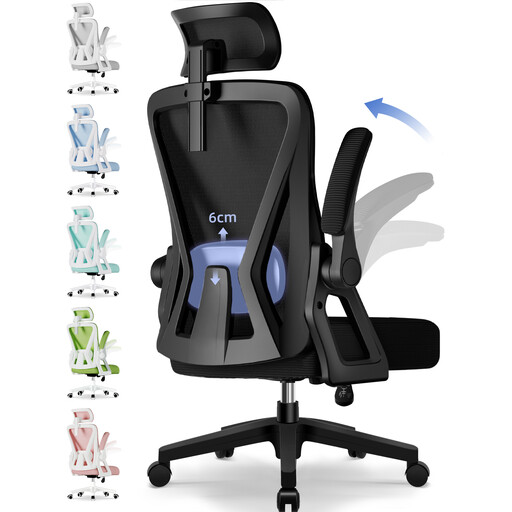
Why this model: Built for freelancers and intensive remote workers who spend more than 7 hours a day at their screen. It offers a full suite of adjustments to precisely fit any body type and prevent musculoskeletal disorders (MSDs).
It tackles the "aesthetics over ergonomics" pitfall head-on. Every adjustment (headrest, lumbar, armrests, tilt) has a specific function, turning this chair into a genuine workplace health tool.
The S-shaped backrest and the 6 cm adjustable lumbar support provide targeted, dynamic support, which is essential for maintaining good posture during long work sessions.
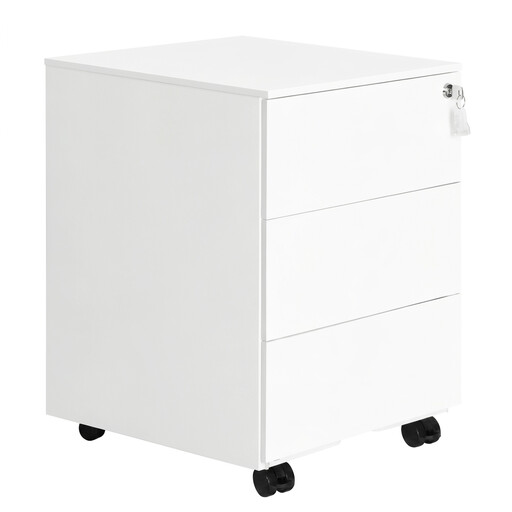
Why this model: For anyone who wants to keep their workspace perfectly tidy and secure. This steel cabinet offers substantial storage for documents and supplies, while remaining easy to move around as needed.
It avoids the "gimmicky features" trap by focusing on a single mission, but executing it perfectly: storage. Delivered fully assembled, its setup is a breeze.
Its all-steel construction, full-extension drawer slides, and lock make it a storage solution that is as durable as it is secure. The fifth anti-tip caster is a clever detail that guarantees rock-solid stability.
For a workspace that combines style and functionality, exploring more integrated solutions is often a good idea. We've put together a selection of desks that meet these demands for simplicity and efficiency.
It all depends on the quality of the materials and the intensity of your use. An entry-level model will show signs of wear after just 1 or 2 years. Conversely, a high-quality ergonomic office chair with a steel base, quality casters, and a certified gas lift can easily last between 5 and 10 years. The presence of a warranty (often 2 years on many models) is a good indicator of the manufacturer's confidence in its product.
For anyone who spends long hours at their desk, the answer is a resounding yes. Alternating between sitting and standing helps combat the negative effects of a sedentary lifestyle, relieves pressure on the spine, and can even boost concentration. An electric sit-stand desk with height memory presets makes switching so simple and quick that it becomes a daily habit.
Start by measuring the exact spot where you want to place it. Allow for a clearance zone of at least 80 cm behind the desk so you can push your chair back without restriction. The desktop surface, meanwhile, should be large enough to accommodate your monitor(s), keyboard, and mouse, while still leaving you space to take notes or place documents. A depth of 60 to 80 cm is generally recommended to ensure optimal visual comfort.