
Livraison le jour même ou le lendemain

Qualité garantie

Débloquez vos offres de bienvenue: Livraison GRATUITE | Jusqu'à -80 % | 30 jours d'essai gratuits à JoyPlus
Téléchargez l'application
Choosing high-tech accessories is not simply a matter of comparing a specification sheet or a photograph. A case can interfere with wireless charging, a keyboard may have a different layout from the one you expect, and a gaming mouse can offer an impressive resolution without being comfortable to use.
To avoid unpleasant surprises, it is best to check compatibility, the features that really matter and the conditions in which the product will be used. Here are the criteria to review before choosing an iPhone Pro case, a Philips keyboard and mouse set or a wireless gaming mouse.
The names iPhone 17 Pro case, iPhone 18 Pro case, iPhone 17 Pro Max case and iPhone 18 Pro Max case may seem similar. However, the dimensions, buttons and camera module must match your model exactly. Some products claim compatibility with two generations: check this in the product details, particularly the position of the lenses and Action button.
A poorly fitting case can press on the buttons or leave part of the screen exposed. Before ordering, check the exact model in your iPhone settings and compare it with the list of compatible devices.
The presence of a magnetic ring alone does not guarantee a successful experience with every accessory. For a MagSafe case, make sure it includes a ring and that its compatibility with chargers, wallets and magnetic mounts is clearly stated.
The same applies to a case with a rotating stand: it can be useful for watching a video, but it may also add a noticeable amount of thickness. If you regularly use a car mount, check the position of the mechanism and whether it is compatible with your setup.
A 32,000 DPI gaming mouse offers a very wide adjustment range, but most players only use a small part of it. In everyday use, the weight, shape, sensor stability and connection quality generally have a much greater impact on comfort.
RGB mouse lighting lets you customise the appearance of the device, but it does not improve accuracy. Very lightweight mice can make rapid movements easier, but their perforated chassis is more exposed to dust and moisture.
For a keyboard, the French version designation is far from insignificant. An AZERTY keyboard and mouse should provide the keys and symbols suited to typing in French. Also check whether it has a numeric keypad if you regularly work with figures, as well as the type of connection used.
A wired set avoids having to manage batteries and reduces the number of devices that need recharging. Wireless offers greater freedom, but you still need to know which technology it uses: a 2.4 GHz USB receiver, Bluetooth or a dual connection.
A 2.4 GHz Bluetooth mouse may in fact refer to two different modes: Bluetooth and a wireless connection via a 2.4 GHz receiver. Bluetooth is convenient with a compatible laptop, while a receiver may be preferable if you want a dedicated connection. So-called ‘tri-mode’ models generally combine wired, Bluetooth and 2.4 GHz connections.
For devices equipped with a lithium battery, check the charging, storage and cleaning instructions. The advertised battery life depends on the connection mode, lighting and intensity of use. It therefore does not represent a guaranteed duration in every configuration.
For a case, look for a frame that properly covers the edges, precise cut-outs and a surface that helps prevent slipping. A shockproof iPhone case can provide extra protection against minor everyday accidents, but no case eliminates the risk of damage in the event of a significant fall.
For a lightweight gaming mouse, weight provides an initial point of reference: the models presented below weigh 49 g, 79 g or 88 g, depending on the product. However, this figure should be considered alongside the shape, dimensions and grip style.
From a regulatory perspective, check the information provided by the seller, the applicable marking and, where required, whether an EU-based responsible person is identified. Also keep your proof of purchase: you will need it to exercise your statutory guarantee of conformity with the seller if there is a problem.
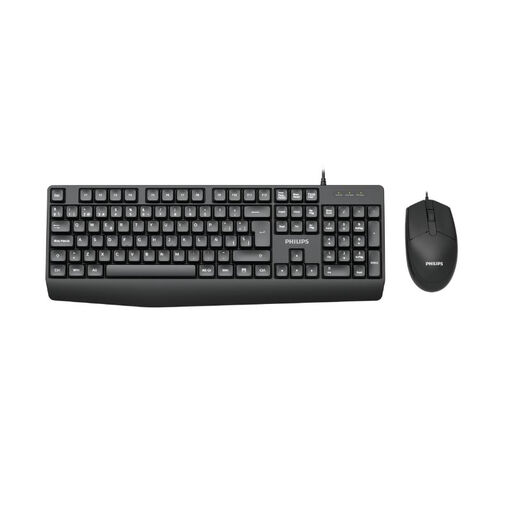
Why this choice suits this profile : This wired Philips set is ideal for a simple setup for studying, office work or a first computer. The French version meets the needs of AZERTY typing, subject to checking the configuration stated in the product details.
The wired connection eliminates batteries and battery-life concerns. The ‘French Version’ designation reduces the risk of receiving a layout that is not suitable.
Wired keyboard and mouse set with the French version stated in the product name.
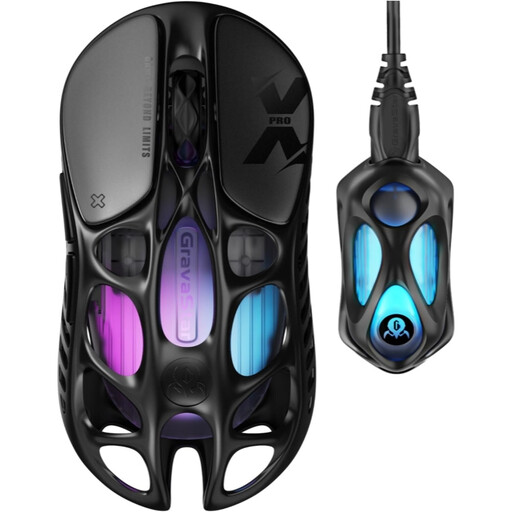
Why this choice suits this profile : Players looking for a lightweight, highly configurable device benefit from a sensor advertised at up to 32,000 DPI, an 8,000 Hz polling rate and five programmable buttons.
The stated figures are supported by clearly identified components: a PAW 3950 sensor, an 8K receiver and three connection modes. It is still essential to check that the software is compatible with your computer.
Advertised weight of 49 g, with wired, Bluetooth 5.1 and 2.4 GHz connectivity, plus customisable RGB lighting.
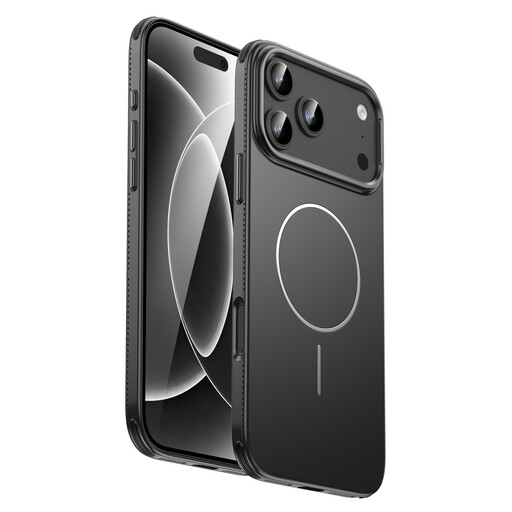
Why this choice suits this profile : This case is aimed at iPhone Pro Max users who regularly use magnetic charging, play games or watch videos and want to retain a design advertised as slim.
The product details mention a MagSafe magnetic ring and a design intended to promote heat dissipation around the edges. Even so, check exact compatibility before buying.
Integrated magnetic ring, stated access to buttons and ports, and a slim black profile.
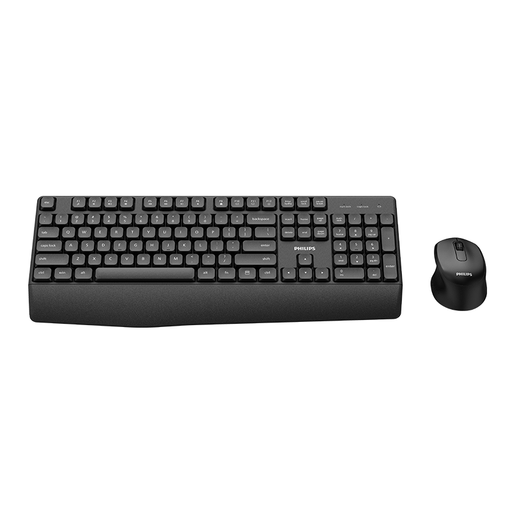
Why this choice suits this profile : This wireless Philips set is suitable for a desk where you want to get rid of cables. The advertised French version is intended for users looking for an AZERTY keyboard and mouse, subject to checking the technical details.
The product details identify a Philips series and a French version. Before use, check the type of receiver, the batteries required and compatibility with your computer.
Wireless keyboard and mouse set, 3000 Series, with the French version clearly stated.
We have put together a complete, real-time updated list of products that fully meet these strict selection criteria and European safety regulations.
It depends on the presence and positioning of the magnetic ring, as well as the charger being used. Check the product details and make sure that the diameter, alignment and stated power output match your accessory. If in doubt, remove the case to determine whether the problem lies with the case or the charger.
Bluetooth works directly with compatible devices and generally frees up a USB port. The 2.4 GHz connection uses a dedicated receiver, often supplied with the mouse. It can be convenient on a desktop computer, while Bluetooth is suitable for laptops that already support it.
Its lifespan depends on how often it is used for gaming, battery cycles, maintenance and button wear. Clean the surfaces with a dry cloth, avoid liquids and recharge the battery according to the manufacturer’s instructions. With a mouse featuring an integrated battery, battery life may gradually decrease over time.