
Livraison le jour même ou le lendemain

Qualité garantie

Débloquez vos offres de bienvenue: Livraison GRATUITE | Jusqu'à -80 % | 30 jours d'essai gratuits à JoyPlus
Téléchargez l'application
With an overwhelming number of options, finding a desktop audio system that blends performance, durability, and a fair price can be a complex task. As consumers, we primarily seek reliable products that are built to last, not gadgets with fleeting marketing promises. High-resolution audio, or Hi-Res Audio, is no longer a luxury reserved for studios but a reasonable expectation for anyone looking to rediscover their music, films, or games. This guide aims to provide you with clear benchmarks to make an informed choice.
Before diving into specific models, it's helpful to understand a few technical criteria that separate a great speaker from a standard one.
The Hi-Res Audio logo guarantees that a device can reproduce sound frequencies far beyond CD quality (16-bit/44.1kHz). In practical terms, this means a richer, more detailed reproduction of recordings. For wireless audio, Bluetooth LDAC technology is a key performance indicator. It transmits three times more data than standard Bluetooth, thereby preserving the quality of high-resolution audio files from a compatible device (like most recent Android smartphones).
A good Hi-Res desktop speaker must adapt to your current and future ecosystem. The inclusion of a USB-C port is a mark of modern design, enabling a direct and stable digital connection to a laptop or desktop computer. Wireless options like Bluetooth 5.0 (or higher) and AirPlay 2 (for Apple device users) offer welcome flexibility, especially for effortlessly creating a stereo audio system or multi-room setup.
Power, expressed in Watts RMS, indicates the continuous power the speakers can deliver. However, this number isn't the whole story. The quality of the cabinet materials (MDF wood is often preferred for its acoustic properties) and the design of the drivers (tweeters for highs, woofers for lows) are just as crucial for achieving a balanced, distortion-free sound.
Taking these criteria into account, here are two options that stand out for their technical specifications and versatility.
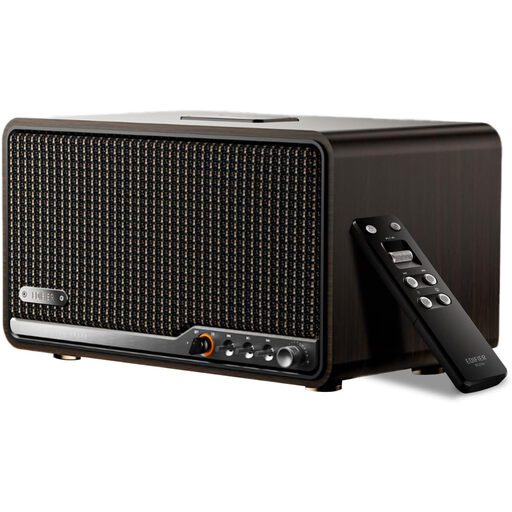
Why we recommend it
The Edifier S300 is a complete system that meets the demands of modern audiophiles. It combines a refined retro aesthetic with comprehensive connectivity. AirPlay 2 support makes it particularly appealing for users in the Apple ecosystem who want seamless, lossless multi-room streaming. Its Hi-Res Audio certification, paired with the LDAC codec, ensures a high-quality wireless listening experience. The MDF wood construction and 80W RMS power make it a robust solution, equally at home on a desk or in a living room as a Bluetooth bookshelf speaker.
Key Features
Who is this for? For music lovers and content creators seeking an all-in-one audio solution that is both high-performing and aesthetically pleasing. It's an excellent choice for those who switch between Apple (for AirPlay 2) and Android (for LDAC) devices and want an uncompromising stereo audio system for their desk or living room.
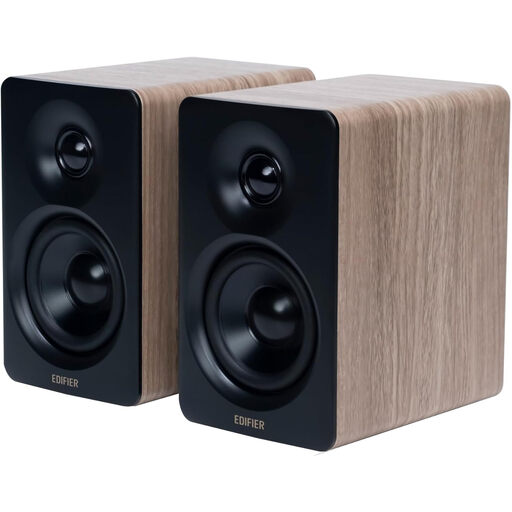
Why we recommend it
The Edifier M60 proves that a compact size doesn't have to compromise on quality. This high-fidelity PC speaker is certified for both Hi-Res Audio and Hi-Res Wireless Audio, guaranteeing excellent sound reproduction despite its small footprint. Its key strength is its desktop-focused design: the included angled aluminium stands direct the sound towards the listener, reducing reflections and improving clarity. With Bluetooth 5.3 LDAC and a USB-C input, it integrates perfectly into any modern work or gaming setup.
Key Features
Who is this for? For remote workers, gamers, and anyone with limited desk space who refuses to compromise on audio quality. It's a practical and powerful solution to significantly upgrade your computer's sound.
Good connectivity is the foundation of any audio system. If your current speakers have an analogue input but the sound seems to lack clarity, a simple change can sometimes make a difference. A high-quality, well-shielded AUX cable can reduce interference and ensure a cleaner signal transmission between your source (computer, smartphone) and your speakers.
Discover our selection of AUX cables to optimise your existing setup.
1. What is the difference between a Hi-Res speaker and a standard Bluetooth speaker? The main difference lies in the amount of audio information they can process and reproduce. A standard Bluetooth speaker heavily compresses the audio signal, resulting in a loss of detail. A Hi-Res Audio speaker, especially one compatible with codecs like LDAC, preserves a much larger portion of the original recording's data, delivering a richer, more nuanced sound that is closer to the artist's vision.
2. Do I need special equipment to enjoy Hi-Res sound? Yes, your entire audio chain needs to be consistent. To fully experience high-resolution audio, you need three components:
3. Is a USB-C speaker better than one with a 3.5mm jack? A USB-C connection has the advantage of transmitting a digital signal from the source to the speaker. The speaker's internal digital-to-analogue converter (DAC)—which is often of higher quality than the one in a computer or smartphone—then handles the conversion. In contrast, a 3.5mm jack transmits an already converted (analogue) signal, which can be more susceptible to interference. For a high-fidelity PC speaker, a USB-C connection is therefore generally preferable to ensure maximum signal integrity.