
Livraison le jour même ou le lendemain

Qualité garantie

Débloquez vos offres de bienvenue: Livraison GRATUITE | Jusqu'à -80 % | 30 jours d'essai gratuits à JoyPlus
Téléchargez l'application
Working from home, studying, digital creation or gaming: spending several hours in front of a screen requires an adaptable workstation. A height-adjustable electric standing desk allows you to switch between sitting and standing at the touch of a button, without having to move all your equipment.
Product pages can sometimes place more emphasis on design or the number of features than on the criteria that really matter. Before placing your order, it is therefore worth checking the adjustment range, stability, maximum load and cable management.
A stated maximum load does not guarantee that the desk will remain perfectly stable when set to its maximum height. You should also examine the design of the frame, the type of feet and whether there are adjustment options to compensate for minor unevenness in the floor.
Add up the weight of your monitor, computer, speakers, books and accessories. Leave enough headroom to avoid running the desk constantly at its stated limit.
A compact 120 x 60 cm model may be suitable for a laptop, one monitor and a few documents. For two monitors, a desktop computer or a more complete gaming setup, a 160 x 70 cm desktop provides more space, both in width and depth.
The latter dimension is particularly important: a monitor positioned too close to your eyes can affect comfort, while an overcrowded desktop leaves less room for the keyboard and mouse.
Height memory, a USB-C port or a cable-management system are only genuinely useful if they match your needs. In particular, check:
An ergonomic electric desk should offer a range suited to your height and chair. The models featured here generally offer a range of between 72 and 118 cm or 72 and 120 cm. Measure the height of your elbows when sitting and standing, then compare it with the specifications in the product listing.
The height-adjustable desk with memory function allows you to save one or more positions. This saves you from having to find the right height manually every time you change posture. However, this feature does not replace properly adjusting your chair, monitor and keyboard.
For an electric desk for working from home, choose smooth movement and a motor described as quiet. In a shared home or student bedroom, the noise produced while the desk moves up and down can quickly become annoying.
Take the time to read the safety instructions as well. Some models include obstacle detection or a control-panel lock. JOYFURNOS products also state that they have overheating protection after two minutes of continuous electric adjustment, with a required delay before the mechanism can be operated again.
The selected models state a maximum static load of 70 kg. This figure should be compared with the weight of all your equipment, without forgetting the desktop if the specifications list it separately.
The frames generally combine steel with chipboard panels. When buying in France, check the compliance information supplied with the product. The JoySelect model featured below mentions CE certification and compliance with European standards in its description. This does not remove the need to follow the assembly instructions, keep electrical components away from liquids and carefully check all connections.

Why this choice suits this profile : Its compact format is ideal for a bedroom, small home office or study area equipped with a standard computer.
The listing states an adjustment range of 72 to 118 cm, two savable positions, a digital display and a static load of 70 kg.
120 x 60 cm desktop, two storage hooks and a description mentioning CE and European certifications.

Why this choice suits this profile : Its generous surface makes it easy to set up several monitors, a desktop computer and numerous work accessories.
The listing details the dimensions, 70 kg load capacity, adjustable feet, controller lock and overheating protection.
160 x 70 cm desktop, USB-C port, height memory, two cable grommets, pouch and hook.
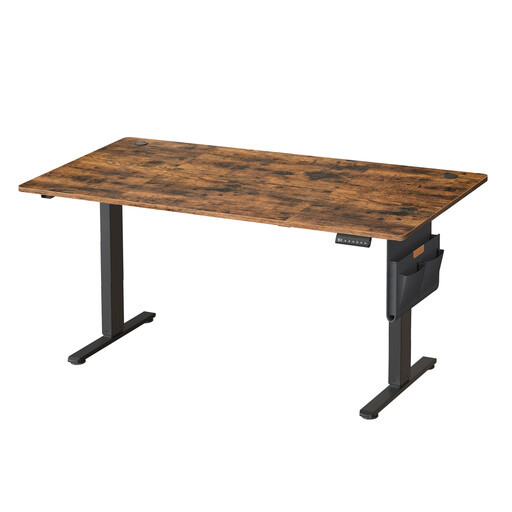
Why this choice suits this profile : It is designed for users looking for a large surface for working from home, studying or a height-adjustable gaming desk.
The listing provides four savable height settings, obstacle detection and precise recommendations for avoiding walls and liquids.
Stated adjustment range of 72 to 120 cm, motor described as quiet, steel frame and integrated storage solutions.
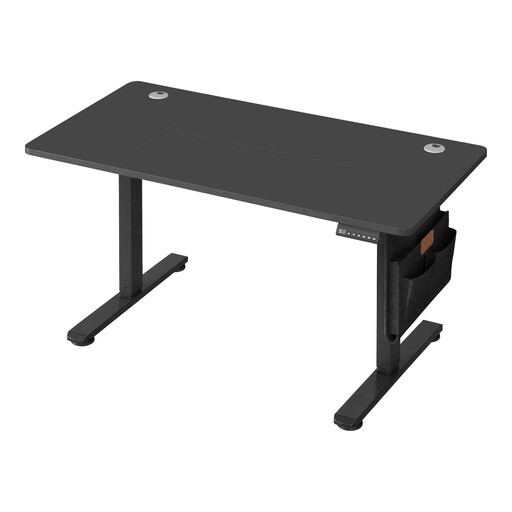
Why this choice suits this profile : Its mid-sized format offers a good balance between workspace, footprint and practical features in a French home.
The design includes two cable grommets, a pouch, a hook, adjustable feet and a locking mechanism.
140 x 60 cm dimensions, 72 to 120 cm adjustment range, height memory and USB-C port stated on the controller.
We have put together a complete selection, updated in real time, of products that meet these strict criteria and European safety requirements.
Before assembly, check that the floor is level and that the desktop will not hit a wall, shelf or window as it moves. Leave enough space around the desk and secure the cables properly to prevent them from becoming taut when the height changes.
Once the desk has been assembled, check the screws, connections and stability of the feet. Clean the desktop with a soft, slightly damp cloth, without abrasive products or excess water. With regular use, do not exceed the stated static load and follow the manufacturer's recommended pause times when the thermal protection is activated.
Position the keyboard so that your shoulders remain relaxed and your elbows stay close to your body. The screen should remain directly in front of you, with its top edge at a comfortable height. The ideal setting depends on your height, footwear and peripherals. Use the memory function as a starting point, then adjust it if necessary.
Power consumption depends on the motor, how often you adjust the desk and standby consumption. Models with a controller featuring an energy-saving mode can limit consumption when not in use. For an accurate estimate, check the power rating shown on the mains adapter or in the instructions.
Assembly time varies depending on the model and your equipment. Prepare a clear space, follow the steps using the numbered parts and ask for help when positioning the desktop. Once assembly is complete, test the desk moving up and down with nothing on it to check that no cable or obstacle is interfering with the mechanism.