
Livraison le jour même ou le lendemain

Qualité garantie

Débloquez vos offres de bienvenue: Livraison GRATUITE | Jusqu'à -80 % | 30 jours d'essai gratuits à JoyPlus
Téléchargez l'application
An electric height-adjustable standing desk can transform a home-office corner, study area or gaming setup. However, it is important to look beyond the motor or design highlighted on the product page. In everyday use, stability at standing height, the desk’s actual footprint, load capacity and cable management often matter more.
Before placing an order, here are the most common pitfalls, the features to check and a selection of models suited to different needs in France.
A stated maximum load of 70 kg, for example, does not guarantee that the desktop will remain perfectly stable when raised. Rigidity also depends on the steel frame, leg design, desktop weight and foot adjustment.
A compact desk may be perfectly adequate for a laptop and monitor. With several monitors, a desktop tower, speakers and gaming peripherals, it is best to add up the weight of each item and distribute everything properly across the desktop.
A 120 × 60 cm desktop will generally accommodate a laptop, monitor and keyboard. However, it may quickly feel cramped with two monitors or paper documents. A 160 × 70 cm model provides considerably more room, but it also requires greater clearance and more space in the room.
Remember to measure the movement area as well. The desktop must not hit a wall or become trapped against another piece of furniture while moving up or down.
Height memory is convenient, but the number of presets varies from one model to another. A height-memory desk may store two or four positions. Also check for obstacle detection, control locking and overheating protection.
On several models in this selection, around two minutes of continuous motor use is enough to trigger thermal protection. You then have to wait before adjusting the desk again. This is worth bearing in mind if you switch frequently between seated and standing positions.
A height-adjustable desk should lower far enough to suit your chair and rise high enough to provide a comfortable standing position. The models featured here generally cover a range between 72 and 118 or 120 cm.
Adjust the desktop so that your forearms remain almost horizontal when using the keyboard. When standing, you should also have enough legroom without needing to raise your shoulders.
An electric standing desk is easier to adjust than a manual model, especially when several people share the same workstation. Look for smooth movement, a motor advertised as quiet and a steel frame.
The technical specifications should also outline the necessary precautions: do not raise the desktop against an obstacle, protect electrical components from liquids and observe the maximum static load. These guidelines do not replace reading the instructions supplied with the desk.
Effective cable management prevents monitor, charger and power-strip cables from hanging down as the desktop rises. Cable grommets, pouches and hooks are therefore particularly useful for a home-office desk or an adjustable gaming desk.
A desk with a USB-C port can also make it easier to charge a phone or compatible peripheral. However, check the output specified by the manufacturer: an integrated USB-C port does not necessarily replace a laptop charger.

Why it suits this profile : its compact format fits easily in a bedroom, small office or first home-working setup. It offers four programmable height presets and an adjustment range from 72.1 to 120.1 cm.
The dimensions and 70 kg maximum static load are clearly stated. Cable grommets, a hook and a pouch help keep clutter under control without requiring additional accessories.
Four height presets, a steel frame, a motor advertised as quiet and easier assembly thanks to labelled components.

Why it suits this profile : its 160 × 70 cm desktop provides ample room for several monitors, documents and work accessories.
The generous surface reduces the risk of running out of room. Adjustable feet compensate for minor unevenness in the floor.
Two cable grommets, a memory function, a USB-C port advertised on the control panel and a maximum static load of 70 kg.

Why it suits this profile : its mid-sized format provides room for a monitor, keyboard and essential accessories without taking up as much space as a 160 cm desktop.
The four presets eliminate the need to start from scratch each time. Cable management, the pouch and hooks meet the needs of a fully equipped workstation.
Continuous adjustment from 72 to 120 cm, an advertised USB-C port, a motor presented as quiet and a 70 kg static load capacity.
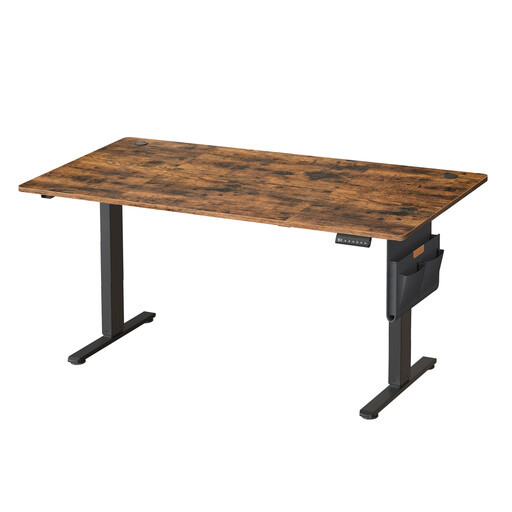
Why it suits this profile : this version is designed for anyone who wants to keep their monitor, keyboard, documents and accessories organised across a spacious desktop.
The dimensions and adjustment range, from 72 to 120 cm, are clearly specified. Cable grommets and the pouch help keep the workstation organised.
Steel frame, four programmable height presets, 70 kg maximum static load and an advertised net weight of 27.2 kg.
Explore our complete selection of electric standing desks and compare dimensions, memory functions and storage solutions to find the right fit for your space.
Consumption depends on how often you adjust the desk, motor power and the standby consumption of the control box. Height adjustments generally take only a few seconds, but consult the technical specifications for an accurate estimate. If the desk will be unused for an extended period, you can unplug it if permitted by the instructions.
A 120 × 60 cm desk is sufficient for a laptop or a monitor with its keyboard. To accommodate two monitors, a desktop tower, documents and several accessories, a 160 × 70 cm desk provides a considerably more comfortable working surface. Also take the available depth in the room into account.
Its lifespan depends on the supported load, frequency of movement, assembly quality and compliance with the usage instructions. Do not exceed the stated static load, avoid prolonged continuous cycles and regularly inspect the fixings. Using the desk in accordance with the instructions helps preserve both the mechanism and the desktop.