
Livraison le jour même ou le lendemain

Qualité garantie

Débloquez vos offres de bienvenue: Livraison GRATUITE | Jusqu'à -80 % | 30 jours d'essai gratuits à JoyPlus
Téléchargez l'application
A height-adjustable electric standing desk lets you switch from sitting to standing without moving your monitor or interrupting your work. It is particularly practical for remote workers, students, gamers and home-office professionals. However, not all models offer the same performance or meet the same needs.
Before placing an order, it is therefore worth checking stability, adjustment range, maximum load and the space actually available in the room. A product listing may highlight a powerful motor or height memory while overlooking details that are essential for everyday use.
A high maximum load does not guarantee freedom from vibrations. The stated weight generally refers to a static load distributed across the desktop. Two monitors mounted on an articulated arm do not exert the same leverage as a laptop placed in the centre.
Examine the frame structure, the number of lifting columns, the foot design and whether adjustable levelling pads are included. On a slightly uneven floor, these can minimise movement and help prevent scratches.
A 120 × 60 cm adjustable desk is suitable for a laptop, one monitor and a keyboard. However, space can quickly become limited with two monitors, a speaker or gaming accessories. For a more substantial setup, a 140 × 60 cm desk provides additional width, provided you have enough room available.
The adjustment range should also be compatible with your height and chair. A range of 72 to 118 cm or 72 to 120 cm covers many use cases, but you should still check the desktop height in relation to the armrests and chair you already use.
Actual noise levels can vary depending on the load, floor type and motor speed. For a home-office desk installed in a shared room, favour smooth, gradual movement and a mechanism described as quiet. Also check what safeguards are provided for prolonged operation.
Some models specify overheating protection after two minutes of continuous movement, followed by a waiting period before operation can resume. This is worth taking seriously if you plan to adjust the desk height regularly.
A desk with height memory allows you to save two or four positions, depending on the model. There is no need to manually find the right setting every time you change posture. A digital display makes the height easier to read, but it obviously cannot replace an adjustment suited to your body shape.
Controls with up and down buttons are straightforward to use. Some desktops also offer break reminders or shortcuts. These features make it easier to alternate between positions, but they should not be considered a medical guarantee.
Compare the stated static load with the total weight of your equipment: monitor(s), monitor arm, computer, lamp, books and accessories. The models featured here advertise capacities of up to 70 kg, while the fixed Ochama 120 × 60 cm desk supports up to 50 kg.
Particleboard desktops and steel frames are common in this category. Check the information relating to material emissions, care instructions and the compliance details stated by the seller. The CE marking corresponds to a declaration of conformity applicable to the product concerned, but it is still advisable to consult the technical specifications and assembly instructions.
A desk with a USB-C port can simplify charging a phone or compatible accessory, depending on the port’s exact specifications. It does not necessarily replace a power strip and may not always provide sufficient power to charge a laptop.
Cable management, cable grommets, hooks and storage pouches are particularly useful on a sit-stand desk. Leave enough slack in the cables to accommodate the desktop’s movement without putting them under tension.
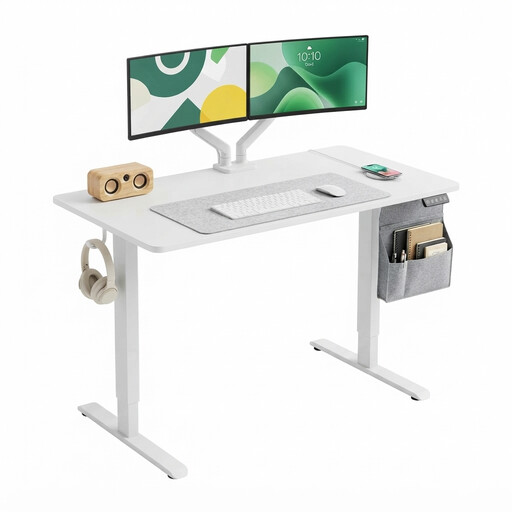
Why this choice suits this profile: its compact format fits easily into a bedroom, study nook or workspace, with an adjustable height of 72 to 118 cm.
The listing specifies a maximum load of 70 kg, two memory presets and a digital display, so the essential information is available before purchase.
120 × 60 cm desktop, two storable positions, included hooks and CE compliance stated on the product page.

Why this choice suits this profile: it combines a 120 × 60 cm desktop with storage and thoughtfully designed cable management for everyday work.
The listing specifies the 70 kg static load, the 72 to 120 cm adjustment range, overheating protection and the precautions to take around obstacles.
Height memory, USB-C port, hooks, organiser and a motor described as quiet.

Why this choice suits this profile: its 140 cm width is ideal for users working with multiple monitors, documents or gaming accessories.
The desktop surface and 70 kg static load limit are clearly specified, making it easier to compare with a gaming or professional setup.
Four storable heights, USB-C port, cable management, hooks and continuous adjustment from 72 to 120 cm.

Why this choice suits this profile: its format, close to 120 × 60 cm, fits easily into a workspace or study area, with a rustic brown finish.
The listing mentions a 70 kg load capacity, anti-collision sensors and precise instructions to prevent contact with a wall.
Four storable heights, fabric pouch, hook, cable grommets and a stated adjustment range of 72.1 to 120.1 cm.
We have put together an up-to-date selection of products that meet these criteria, with detailed specifications for the French market.
Before assembly, check that the floor is level and that a power socket is close enough. Leave space between the desktop and the wall so that vertical movement does not cause friction. Cables should remain long enough and be secured in a way that does not restrict the desktop’s travel.
Do not exceed the stated static load. Keep electrical components away from liquids and clean the desktop with a soft, slightly damp cloth. For an adjustable gaming desk, distribute the weight of the monitors and tower rather than concentrating all the accessories on one side.
Running costs mainly depend on motor power, operating time and your electricity tariff. The motor only runs during the raising and lowering phases, so the impact on energy consumption depends on how often you adjust the desk. For a personalised estimate, check the power rating shown on the adapter and multiply it by the actual operating time.
Adjust the desktop so that your shoulders remain relaxed and your forearms are approximately horizontal. When sitting, adjust the chair first, then the desk. When standing, maintain a natural posture without raising your shoulders. A range of 72 to 118 or 120 cm suits many users, but each person’s setup remains decisive.
Power consumption is concentrated during motor operation and depends on how frequently the desk is moved. If you are away for an extended period, you can unplug the adapter if the manufacturer’s instructions permit it. Also avoid power strips or adapters whose voltage does not match the product specifications.
Its lifespan depends on motor quality, supported load, movement frequency and the care taken during assembly. Staying within the weight limit, keeping liquids away, allowing overheating protection to engage and regularly tightening the fasteners all help preserve the mechanism. Always check the warranty and service terms before buying.