
Livraison le jour même ou le lendemain

Qualité garantie

Débloquez vos offres de bienvenue: Livraison GRATUITE | Jusqu'à -80 % | 30 jours d'essai gratuits à JoyPlus
Téléchargez l'application
For working from home, studying or gaming, a height-adjustable electric sit-stand desk lets you switch between sitting and standing without interrupting what you are doing. However, product listings do not always tell the whole story. Stability at maximum height, the desk’s actual footprint, load capacity and motor operating limits are all important details that can sometimes be overlooked.
Here are the key criteria to check before buying, along with a selection of models suited to different uses in the UK.
A wide adjustment range does not, by itself, guarantee a comfortable position. Check the minimum height for shorter users, but also the maximum height once the desktop is loaded with the keyboard and monitor. A desk may rise high enough while becoming less stable at its maximum setting or under a heavy load.
The stated capacity generally refers to the maximum static load. You therefore need to add together the weight of the monitor or monitors, computer, speakers, books, lamp and various accessories. A 70 kg electric desk provides useful headroom, but this figure does not remove the need to distribute items properly across the desktop.
An electric motorised desk should be installed close to a power socket, with cables long enough to follow the movement of the desktop. Without cable grommets or suitable cable management, wires may pull on devices or catch against the wall. Make sure there is also enough clear space around the desk as it moves up and down, to reduce the risk of collisions.
A 120 x 60 cm sit-stand desk is suitable for a laptop, monitor, keyboard and a few documents. It is easier to fit into a bedroom, studio flat or compact workspace.
A 160 x 70 cm sit-stand desk provides more width and depth. It is better suited to a dual-monitor setup, a desktop computer or a gaming station. Before choosing, measure the available space, taking into account the desktop’s vertical travel and the room needed to move around the desk.
The models featured here generally offer an adjustment range of between 72 and 118 or 120 cm. This range suits many users, but the ideal height also depends on your chair, armrest position and monitor placement.
A height-adjustable desk with memory presets lets you save two or four positions, depending on the model. This is useful for quickly switching from a seated working height to a standing height, without having to find the right setting each time.
Look at the steel frame, leg design, maximum static load and whether adjustable feet are included. The models in this selection state a maximum load of 70 kg. Digital controls, button locking and obstacle detection are also valuable features for everyday use.
An ergonomic electric desk is about more than just its motor. Desktop depth, the ability to position the monitor at the correct distance, stability and cable management matter just as much. A USB-C port can make it easier to charge a phone or compatible accessory, but check its output before expecting it to power a laptop.
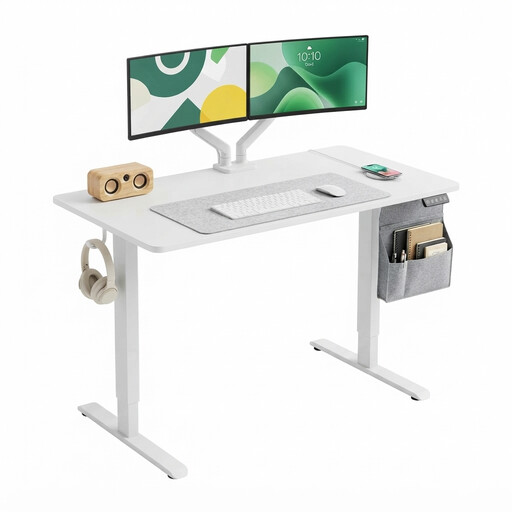
Why this choice suits this profile : its compact format is ideal for a bedroom, study area or first home-working setup.
The stated 70 kg capacity and 120 × 60 cm dimensions provide clear reference points before you place your order.
Adjustment from 72 to 118 cm, digital display, two height memory presets and two included hooks.

Why this choice suits this profile : it is designed for people who want to customise several positions while keeping their workspace well organised.
The four memory presets prevent imprecise adjustments, while the USB-C port helps keep some cables off the desktop.
Continuous adjustment, four height memory presets, stated cable management and a 70 kg static load capacity.

Why this choice suits this profile : its spacious surface easily accommodates several monitors, peripherals and gaming or work accessories.
The two cable grommets, fabric organiser and hook help reduce clutter in a fully equipped setup.
160 × 70 cm desktop, height adjustment from 72 to 120 cm, memory function, USB-C port and adjustable feet.

Why this choice suits this profile : its large surface and accessories are ideal for a home office shared between work, study and personal activities.
The instructions specify the operating limits, including overheating protection after two minutes of continuous movement.
Height memory presets, USB-C port, cable management, organiser and three included hooks.
Before assembly, check that the floor is level and that all parts match the instructions. Once the desk has been assembled, check the connections and test the lifting function without a load. During adjustment, the desktop should not be positioned directly against the wall.
To protect the mechanism:
The CE markings and references to European standards mentioned for some models are details to check on the product listing and in the supplied documentation. They do not replace proper installation and usage precautions.
When seated, your forearms should remain roughly horizontal when your hands are resting on the keyboard. The monitor should be positioned directly in front of you, with the top of the display close to eye level. When standing, adjust the height again rather than automatically keeping the setting used while seated.
This depends on the quality of the motor, how frequently the height is adjusted, the weight placed on the desktop and whether the recommended operating cycles are followed. Consult the instructions for the recommended pause times, load limits and maintenance guidelines. A properly secured frame and well-balanced desktop help keep the desk in good condition over time.
The motor mainly runs for the few seconds needed to change the height. Actual consumption varies according to the model, how often you adjust it and the control panel’s standby consumption. Where available, energy-saving mode can reduce consumption when the desk is not being adjusted.