
Livraison le jour même ou le lendemain

Qualité garantie

Débloquez vos offres de bienvenue: Livraison GRATUITE | Jusqu'à -80 % | 30 jours d'essai gratuits à JoyPlus
Téléchargez l'application
A height-adjustable electric desk lets you switch from sitting to standing at the touch of a button. Whether you work from home, study or game, this flexibility can make your everyday setup considerably more comfortable. The key is to choose a model that suits your available space, offers sufficient stability and is convenient to use.
Before buying an electric sit-stand desk, watch out for three common pitfalls:
When choosing an ergonomic height-adjustable desk, do not settle for the word “adjustable”: check the exact height range. The models featured here include:
The ideal height depends on your height, chair, tabletop thickness and equipment. Measure the position of your elbows while seated, then assess the available space above the desk when standing. This will give you a more reliable indication than a generic ergonomic promise.
A motorised height-adjustable desk should remain stable while moving. Examine the steel frame, leg design, adjustable feet and stated maximum load.
The selected models indicate a static load capacity of up to 70 kg. This is sufficient for a laptop, monitor or several everyday devices, provided the load is distributed correctly. Remember to include the weight of the tabletop and accessories in your calculations.
A quiet motor is useful in a shared room or during a video call. However, bear in mind that “quiet” does not necessarily mean inaudible. Actual noise levels can vary depending on the floor, load and quality of assembly.
A 120 × 60 cm desktop will generally accommodate a laptop, monitor, keyboard and a few documents. To install two monitors, speakers or a gaming setup, a 160 × 70 cm format provides more viewing distance and freedom of movement.
The control panel may offer:
These features do not replace a well-organised setup, but they reduce repetitive adjustments and make it easier to maintain an orderly workspace.
The products below were selected based on their dimensions, features and stated specifications. Always consult the product page to confirm the price, availability, included accessories and delivery terms.
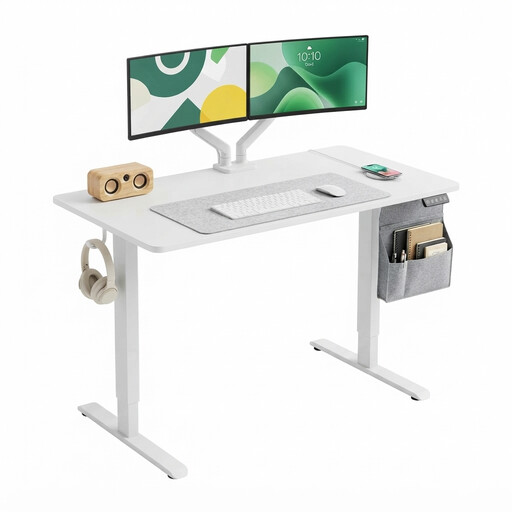
Why it suits them: its compact footprint fits easily in a bedroom, small office or home-working corner. Its height adjusts from 72 to 118 cm.
The height range and 70 kg static capacity are clearly stated. The digital control panel allows two positions to be saved.
120 × 60 cm desktop, digital display, two included hooks, metal frame and CE compliance stated on the product page.

Why it suits them: its storage pouch, hook and cable-management ports simplify everyday work in a home office.
The product page specifies the dimensions, 70 kg maximum load and overheating protection after two minutes of continuous adjustment.
Four programmable height presets, adjustable feet, a safety sensor and integrated storage accessories.

Why it suits them: its generous desktop provides more distance for two monitors, documents or a gaming setup.
The dimensions and maximum load are listed separately. The adjustable feet also help compensate for a slightly uneven floor.
160 × 70 cm desktop, four programmable height presets, USB-C port, two cable-management ports and a stated 70 kg static capacity.
Explore an up-to-date selection of products that meet these criteria, with a range of dimensions, features and configurations.
An electric height-adjustable desk must be assembled at home. Before plugging it in:
Several product pages mention overheating protection after approximately two minutes of continuous adjustment, followed by a waiting period before the mechanism can be used again. It is therefore better to adjust the height in stages rather than run multiple consecutive cycles.
For maintenance, use a soft, slightly damp cloth. Avoid abrasive products and excess water, particularly near the control panel and power supply.
The motor only operates while the desk is moving up or down. Consumption therefore depends on how often you adjust the height and on the model you choose. A control panel with an energy-saving mode may reduce standby consumption, but check the available technical specifications before buying.
A 120 × 60 cm format is suitable for a laptop or a monitor with its keyboard. For two monitors, bulky documents or a gaming setup, a 160 × 70 cm desktop provides more room. Remember to measure the width of the room and the clearance around the desk as well.
The time required depends on your experience, the number of parts and the tools available. The featured models are supplied with labelled components and instructions. Prepare a clear workspace, then check the tightness of the mechanical components and the electrical connections before using the desk for the first time.