
Livraison le jour même ou le lendemain

Qualité garantie

Débloquez vos offres de bienvenue: Livraison GRATUITE | Jusqu'à -80 % | 30 jours d'essai gratuits à JoyPlus
Téléchargez l'application
A height-adjustable desk can transform your home-working, study or gaming space. But not every model meets the same needs. A wide adjustment range cannot make up for a structure that lacks stability, a desktop that is too narrow or poorly planned connectivity.
Before comparing computer desks and electric models, three pitfalls deserve your attention.
A sit-stand desk should allow you to move from sitting to standing without making your screen, keyboard or cables difficult to use. Check the actual adjustment range, as well as the minimum and maximum heights. A model that starts too high may not be suitable for a shorter person or a particular chair.
A wide desktop loaded with several screens, a computer tower and various accessories places considerable pressure on the structure. Adjustable feet can correct a slight unevenness in the floor, but they cannot replace a sturdy frame. For a fixed desk, also examine the thickness of the panel, the metal structure and the stated static load capacity.
Position memory, a USB-C port or a cable-management system are only useful if they genuinely suit your habits. For an electric model, check the information on liquid protection, maximum load, anti-collision safety and operating cycles. The break reminder is simply a practical aid, not medical advice.
For a compact home office desk, a surface measuring 120 × 60 cm can accommodate a laptop, a monitor and everyday accessories. If you use two monitors or share your workstation, a depth of 70 to 80 cm provides more viewing distance and useful surface area.
A large 180 cm desk is suitable for two users, a substantial computer setup or activities requiring plenty of documents. However, remember to measure the available width, the position of the skirting boards and the door opening before placing your order.
Compare:
The models featured here offer an adjustment range of 72 to 120 cm and a maximum static load of 70 kg, according to their product specifications. The fixed 120 cm model, meanwhile, states a maximum load of 50 kg.
A desktop made from chipboard or laminated MDF should be protected from moisture and cleaned with a suitable cloth. A steel structure can improve the rigidity of the unit, but the quality of the assembly and how tightly the screws are fastened also play an important role.
Cable management prevents wires from hanging down when the desktop rises. A USB-C port can make it easier to charge a compatible device, but check the power output and supported uses in the detailed specifications. It does not necessarily replace a laptop charger.
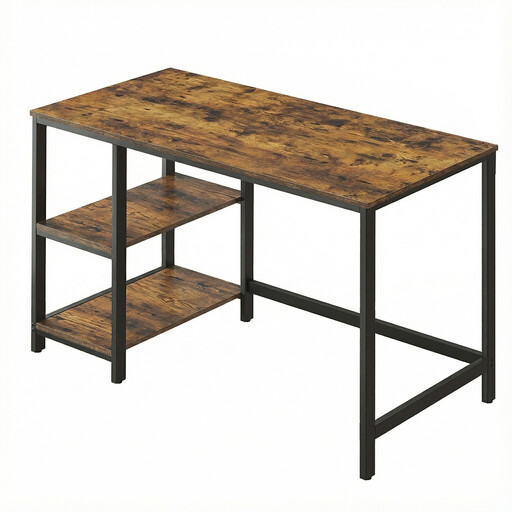
Why this choice suits this profile : This fixed desk is suitable for a first setup, a student bedroom or a limited workspace. Its 120 × 60 cm format fits easily into most rooms.
The two removable shelves and adjustable feet mean you do not have to sacrifice storage or stability on a slightly uneven floor.
120 × 60 cm surface, stated load capacity of up to 50 kg, shelves that can be installed on the left or right, and a steel structure.

Why this choice suits this profile : Its 160 × 70 cm desktop is designed for home workers who use several monitors and want to switch regularly between different heights.
Position memory and cable management address two common drawbacks of electric desks that are impractical for everyday use.
Adjustment from 72 to 120 cm, USB-C port, three hooks, storage space and a stated maximum static load of 70 kg.
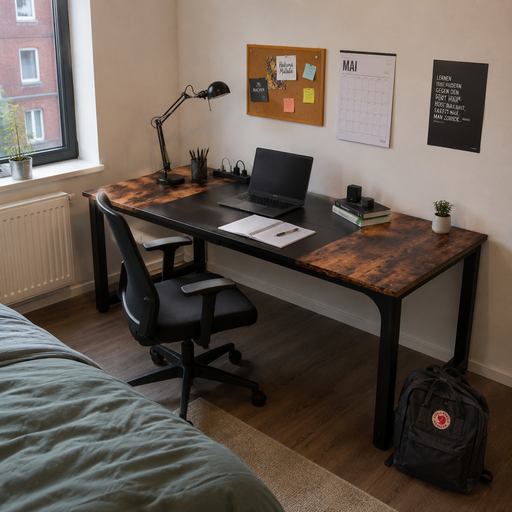
Why this choice suits this profile : This fixed industrial desk is suitable for setups with several monitors, large projects or a workstation shared by two people.
The adjustable feet and metal frame reduce the risk of tipping or movement on an uneven floor.
180 × 80 cm desktop, 1.5 cm laminated MDF panel, steel frame and stated load capacity of up to 260 kg.

Why this choice suits this profile : This electric desk combines a medium-sized format with four memory presets. It may suit a home worker or gamer who switches between several setups.
The saved settings eliminate the need to repeat manual adjustments, while cable management moves with the desktop.
140 × 60 cm dimensions, four presets, USB-C port, motor advertised as quiet and maximum static load of 70 kg.
We have put together a complete, real-time updated list of products that meet these strict selection criteria, as well as European safety regulations.
Before assembly, check the contents of the parcel and identify each part using the instructions. Tighten the screws gradually, then make sure the desktop remains level. For an electric model:
Gentle cleaning and periodically retightening the fixings help maintain the desk’s proper operation. Avoid moving a motorised model by pulling it by the desktop or cables.
A depth of 70 cm generally provides more viewing distance than a 60 cm desktop. However, the ideal setup depends on the size of the monitors, their stands and the distance recommended by the manufacturer.
Consumption depends on the motor’s power, how often you adjust the desk and how long it remains plugged in. The motor operates mainly while the desk is moving up or down. To estimate the cost, check the power shown on the adaptor, multiply it by the actual operating time, then by your electricity tariff.
The time varies depending on the number of parts, the tools required and your experience with assembly. Labelled components and illustrated instructions can make installation easier. Have a second person help you handle a large desktop or turn the frame over without straining.