With a jungle of available models, finding the right headphones can feel like a daunting task. Technologies, form factors, features... it's easy to get lost. This guide is here to cut through the noise and help you choose THE pair that will go with you everywhere: on your commute, at the office, for music, or for gaming.
Key Criteria for Your Next Headphones
Before diving into our top picks, let's review the essential criteria that will make all the difference in your day-to-day experience.
Wired vs. Wireless: A Matter of Mobility
The choice between wired and wireless is primarily a question of use case and mobility.
- Wireless headphones (or Bluetooth headphones) are the king of freedom of movement. Perfect for commuters, athletes, or anyone who wants to say goodbye to tangled cables on their desk. In this case, battery life becomes a crucial deciding factor.
- Wired headphones remain the champion of reliability: a stable connection, zero latency, and no battery anxiety. They are the preferred choice for stationary use (on a PC headset, for example) and for audio purists seeking uncompressed audio quality.
Sound Isolation: With or Without Active Noise Cancellation?
Your listening environment is a key factor.
- Active Noise-Cancelling (ANC) headphones analyse ambient sounds to create an inverse signal that neutralises them. This is a true game-changer on public transport, on a plane, or in an open-plan office, allowing you to retreat into your music bubble or focus.
- Other headphones rely on passive isolation, which depends directly on their design (closed-back, open-back) and their ability to create a good seal around the ear.
Use Case First: Gaming, Music, or Calls?
There's a perfect pair of headphones for every purpose.
- A gaming headset is built for immersion. It often features virtual surround sound (like 7.1) to pinpoint enemies by their footsteps, and a high-quality headset with a mic for clear communication with your team. Remember to check compatibility with your gaming platform (PC headset, PS5 headset).
- For music lovers, the priority will be sound fidelity and the most neutral, balanced frequency response possible.
- For professional use, microphone clarity for calls and long-term comfort are the two pillars.
Our Recommended Headphones
Here are our top picks—models that have caught our attention, each excelling in its own category.
Sony WH-CH720N: Wireless Versatility
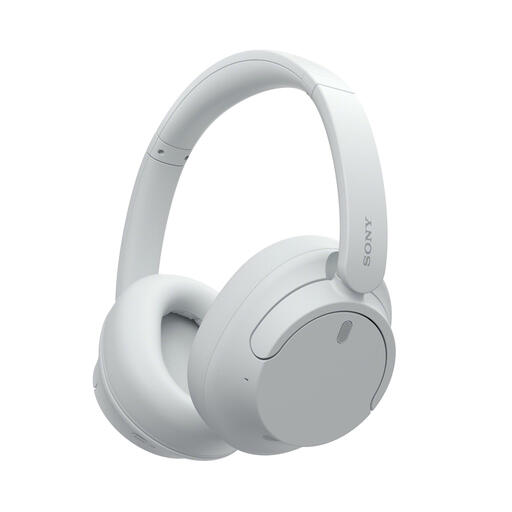
Why we love it The Sony WH-CH720N is the ultimate all-rounder for daily use. It combines the freedom of Bluetooth headphones with effective active noise-cancelling technology, all in a lightweight and comfortable package.
Advantages
- Active Noise Cancellation: Effective technology to block out ambient noise.
- Marathon Battery Life: Up to 35 hours of listening with ANC on, and 50 hours without.
- Feather-light: At just 192g, you'll forget you're even wearing them after hours of listening.
- Comprehensive Connectivity: Multipoint Bluetooth 5.2 and the option to switch to a wired connection with the included 3.5mm jack cable.
Who is it for? For commuters, students, and remote workers who want versatile wireless headphones that can seamlessly switch between music and calls while creating a bubble of silence.
Sony MDR-ZX310AP: Simple and Effective Wired Performance
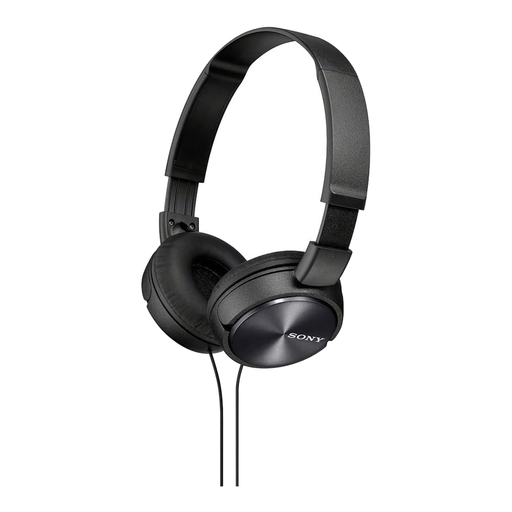
Why we love it This model gets straight to the point: simplicity, reliability, and efficiency. It's the quintessential portable wired headset: lightweight, foldable, and always ready to go, without major compromises on everyday sound quality.
Advantages
- Foldable and Ultra-Light Design: Its 125g weight allows it to slip into any bag.
- Integrated Microphone: The in-line remote includes a convenient mic for taking calls on the fly.
- Universal Connector: Its 3.5mm jack ensures compatibility with almost any device.
- Dynamic Sound: Equipped with 30mm neodymium drivers for a clear and punchy audio experience.
Who is it for? For those who prioritise efficiency above all, at an accessible price point. An excellent choice as a primary portable headset or as a reliable backup pair you can always count on.
ASUS TUF Gaming H1 Gen II: Gaming Immersion
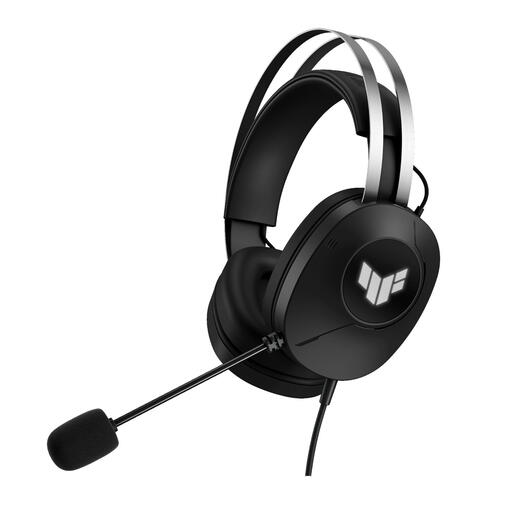
Why we love it Built for gaming, the ASUS TUF Gaming H1 Gen II gaming headset focuses on immersion and communication clarity. Its dual compatibility as both a PC headset and PS5 headset makes it a prime choice for multi-platform gamers.
Advantages
- Virtual 7.1 Surround Sound: For precise audio spatialisation that gives you a real in-game advantage.
- Unidirectional Microphone: Certified by Discord and TeamSpeak, it isolates your voice for crystal-clear communications.
- Long-Lasting Comfort: A suspension headband and enveloping ear cushions designed for gaming marathons.
- Wired USB Connectivity: For the stability and zero latency essential in competitive gaming.
Who is it for? For PC and PlayStation gamers who want a high-performance, immersive headset with a reliable mic to dominate their online matches.
Looking for Other Options or Accessories?
A wired headset is great. A cable snaking all over your desk, not so much. For a flawless gaming setup or remote work space, cable management is key. Take a look at our solutions, like our selection of cable management straps, and keep your desk clean and organised.
FAQ: Your Questions Answered
What's the difference between on-ear and over-ear headphones?
It's all about how the earcups sit on your ears:
- On-ear (or supra-aural): the cushions rest directly on your ears. They are generally more compact and lightweight (e.g., the Sony MDR-ZX310AP).
- Over-ear (or circumaural): the cushions completely enclose the ear. This design offers better passive isolation and superior long-term comfort (e.g., the Sony WH-CH720N).
Are gaming headsets good for listening to music?
Absolutely. A gaming headset will do the job for listening to music. Just keep in mind that its sound signature is often tuned for gaming: boosted bass for more impact and surround sound that can alter the original stereo mix. For an audiophile listening experience, a hi-fi headset with a more neutral response will always be a better choice.
How do I connect Bluetooth headphones to a computer?
It's very simple:
- Enable Bluetooth on your computer in the settings.
- Turn on your Bluetooth headphones and put them in pairing mode (this usually involves a long press on the power button, but check your manual if you're unsure).
- From your computer, search for Bluetooth devices and select your headphones when they appear in the list.
- Once connected, make sure they are selected as the default audio output device.


