
Livraison le jour même ou le lendemain

Qualité garantie

Débloquez vos offres de bienvenue: Livraison GRATUITE | Jusqu'à -80 % | 30 jours d'essai gratuits à JoyPlus
Téléchargez l'application
A GravaStar Mercury wireless gaming mouse immediately stands out with its open-frame design, RGB lighting and features designed for PC gamers. However, a detailed specification sheet does not necessarily guarantee an experience that suits every user. In everyday use, weight, connectivity, shape and customisation software often matter more than the number printed on the box.
Before placing your order, here are the main pitfalls to avoid and the key criteria to consider when comparing the available Mercury models.
A 32,000 DPI mouse may appeal to users who like to fine-tune sensitivity. In practice, few gamers use this maximum setting all the time. Perceived accuracy also depends on the sensor, mouse mat, tracking consistency and in-game settings.
The PAW3950 sensor in the Mercury X Pro is rated at up to 32,000 DPI. This is an adjustment range, not an invitation to play at maximum sensitivity by default.
An 8K wireless mouse can transmit its position up to 8,000 times per second when used with the compatible receiver. This polling rate may appeal to competitive players, but it places greater demands on your computer and can reduce battery life depending on your setup.
So, check that the 8K dongle is included, that you have a suitable USB port available and that the software is compatible before buying. For many gaming setups, a 1,000 Hz polling rate is still perfectly adequate.
An open-frame structure made from magnesium alloy can make the mouse lighter and give it a distinctive look. However, it requires slightly more regular maintenance, particularly when dust builds up in the openings. The dimensions of the Mercury X Pro — 124.6 × 63.5 × 40.5 mm — and the Mercury M2 — 124 × 64.5 × 39.5 mm — should also be considered in relation to the way you hold your mouse.
Whether you use a palm grip, fingertip grip or claw grip, you will not necessarily be looking for the same proportions. A lightweight mouse is not automatically an ergonomic PC mouse for everyone.
The Mercury X Pro weighs 49 g, compared with 79 g for the Mercury M2. The former falls into the ultra-lightweight gaming mouse category and may suit fast movements or long sessions, with less inertia. The latter remains relatively light while featuring a transparent, open-frame structure.
Magnesium and perforated sections should be handled carefully. Avoid liquids and use the supplied cloth or a dry cloth for cleaning. The product warnings also state that these devices contain a lithium battery and must be kept out of reach of children.
The Mercury X Pro’s PAW3950 sensor is rated at 32,000 DPI, while the Mercury M2 features a PAW3395 rated at 26,000 DPI and up to 650 IPS. These figures make it possible to compare the available adjustment options, but they are not enough to measure real-world accuracy during gameplay.
For versatile use, focus mainly on whether you can save multiple profiles, adjust sensitivity in increments and retain your settings in the built-in memory. The Mercury X Pro lists non-volatile profile memory.
The Mercury models featured here offer three connection modes: wired USB-C, Bluetooth 5.1 and 2.4 GHz wireless. Bluetooth may be suitable for a laptop or Mac when simplicity is the priority. For gaming, the 2.4 GHz receiver is generally the best choice, provided you have a free USB port.
The X Pro comes with an 8K wireless receiver and offers up to 110 hours of battery life, although actual usage time may vary depending on your settings and computer. It features five programmable buttons, customisable RGB effects and profile memory. The M2 also offers five macro-compatible buttons, five RGB modes and a 1K receiver.
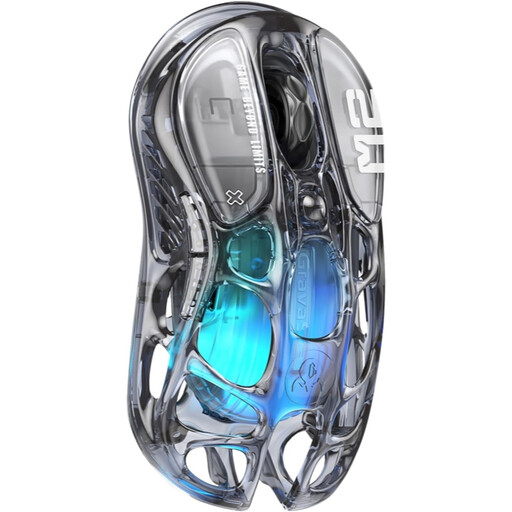
Why this choice suits this profile : Its 79 g weight, three connection modes and PAW3395 sensor make it a good starting point if you want a customisable mouse without jumping straight to an 8K polling rate.
It does not rely solely on a high DPI figure and also offers wired, Bluetooth 5.1 and 2.4 GHz modes.
PAW3395 sensor up to 26,000 DPI, five customisable buttons, five RGB modes and advertised macro memory.
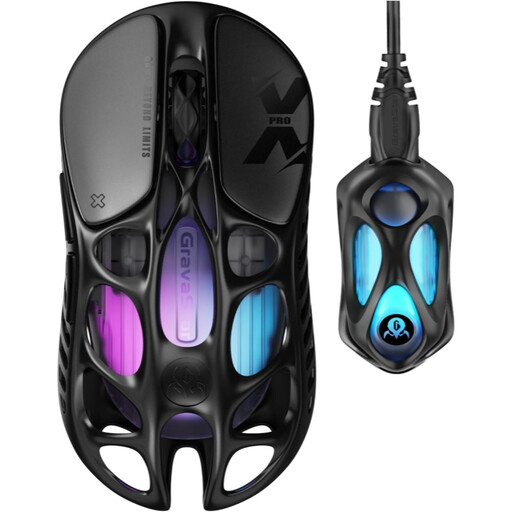
Why this choice suits this profile : Its open-frame magnesium-alloy chassis, PAW3950 sensor and 8K receiver are aimed at users who want to fine-tune their peripheral.
The specifications cover the weight, dimensions, connection modes and inclusion of the 8K dongle, allowing for a practical comparison.
49 g, advertised 32,000 DPI, 8,000 Hz polling rate, five programmable buttons and advertised battery life of up to 110 hours.
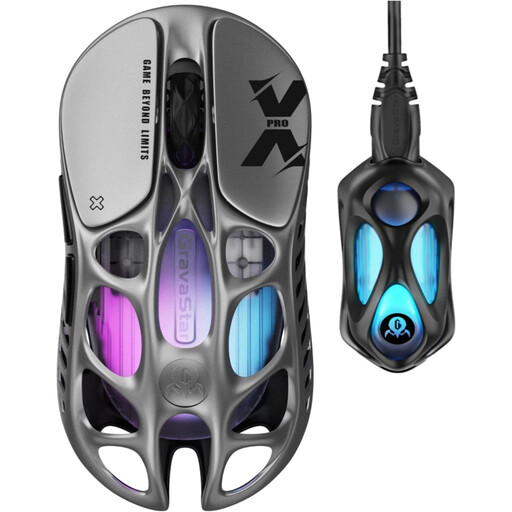
Why this choice suits this profile : This variant retains the X Pro’s specifications and may appeal to streamers, content creators and gamers who care as much about their desk setup as they do about performance.
Its three connection modes let you switch from 2.4 GHz gaming to Bluetooth or USB-C cable, depending on the device you are using.
Open-frame magnesium chassis, adjustable RGB lighting, profile memory and included 8K wireless receiver.
We have put together a complete, real-time updated list of products that meet these strict selection criteria and European safety regulations.
Charge the mouse, plug in the corresponding USB receiver, then select 2.4 GHz mode by following the instructions in the manual. To change the DPI, RGB lighting or five programmable buttons, install the driver recommended by the manufacturer and check that it is compatible with your system.
The product specifications state Windows/OS compatibility, along with three connection modes: Bluetooth 5.1, wired USB-C and 2.4 GHz wireless. Before buying, check which functions are available with your version of macOS, particularly button and lighting customisation.
The Mercury X Pro offers up to 110 hours, but battery life varies according to the polling rate, RGB lighting, connection mode and intensity of use. An 8,000 Hz polling rate and active lighting may require more frequent charging than Bluetooth or wired use.