
Livraison le jour même ou le lendemain

Qualité garantie

Débloquez vos offres de bienvenue: Livraison GRATUITE | Jusqu'à -80 % | 30 jours d'essai gratuits à JoyPlus
Téléchargez l'application
Whether you're a digital artist, a student searching for the perfect notebook, or a professional on the go, finding the ideal graphics tablet can be a real challenge. The market is flooded with models featuring such a wide range of specifications that it's easy to get lost. Our goal is to give you clear benchmarks and practical advice to help you unearth that hidden gem—the one that truly fits your needs, cutting through the marketing jargon.
Our mission at Joybuy is to offer a selection that ticks all the boxes: performance, versatility, and an unbeatable price-performance ratio.
Before diving into our selection, let's review the essential points to check to ensure you make the right choice.
The screen is your digital canvas. An Android tablet over 12 inches with a high resolution (2K, for example) offers unparalleled visual comfort, whether for precision drawing or video streaming. The panel technology is just as crucial:
For creative work, a tablet with a stylus isn't an option—it's a necessity. Pressure sensitivity (measured in levels, such as 4096 levels) is what allows you to vary the thickness and opacity of your strokes, just like with a real pencil. Check if the stylus is included and whether it's passive (battery-free) or active. Adding a keyboard transforms your device into a 2-in-1 tablet with a keyboard and stylus, a real bonus for versatility.
A tablet isn't just for drawing. Consider your other uses:
A closer look at three models that stand out for their unique features and value for money.
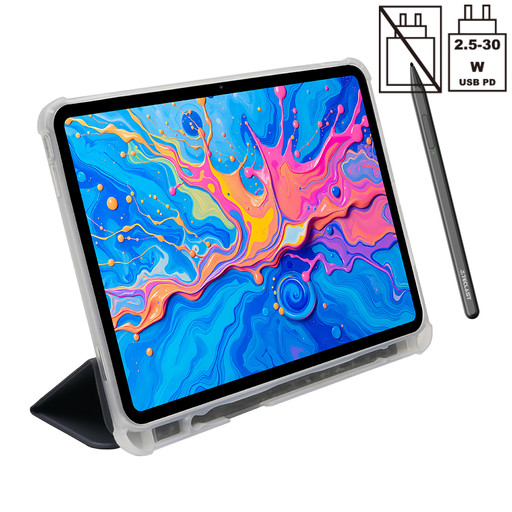
Why it stands out: The Teclast ArtPad Pro is the all-in-one solution for creatives looking for a high-performance drawing tablet without breaking the bank. Its large 12.7-inch 2K screen provides a very comfortable workspace. Under the hood, the Helio G99 processor and its 20 GB of RAM (8 GB physical + 12 GB virtual) ensure exemplary smoothness, even with the most demanding drawing apps and multitasking.
Key features:
Who is it for? For digital artists, illustrators, and art students who want a responsive tablet with a large screen for their creations. It's also perfect for relaxing with a series, thanks to its Widevine L1 certification.

Why it stands out: Déjà vu? Not quite. This version adds a Bluetooth keyboard to the excellent ArtPad Pro. It becomes a true 2-in-1 tablet with a keyboard and stylus, perfect for juggling graphic design and writing. A genuine mobile workstation.
Key features:
Who is it for? For mobile professionals, students, and content creators looking for a single device to draw, write, answer emails, and manage their projects with complete freedom.

Why it stands out: Note: the iFLYTEK AINOTE 2 is not a conventional graphics tablet. It's a new kind of digital notebook. Its 10.65-inch E-Ink screen perfectly mimics the feel of paper. With no backlight, it's incredibly comfortable for long reading or note-taking sessions. At just 4.2 mm thick and feather-light, it's the ideal travel companion.
Key features:
Who is it for? For professionals, researchers, students, and anyone who takes a lot of handwritten notes. It's the dream tool for saying goodbye to paper notebooks and digitising your workflow.
Our selection focuses on specific use cases, but the world of tablets is vast. To discover other models, particularly those with built-in stands or different configurations, feel free to explore our full catalogue.
? Discover all our tablets with stands
1. What's the difference between a graphics tablet with and without a screen? A screenless tablet is a drawing surface connected to your computer: you draw on the tablet but look at the PC screen. Tablets with screens, like the Teclast models in our selection, are all-in-one devices. You draw directly on the screen, which is far more intuitive for most users.
2. Can an Android tablet replace a computer for drawing? For many artists, the answer is a resounding yes. Modern Android tablets, with their speedy processors, ample RAM, and high-quality screens, can run professional drawing applications without any issues. Their main advantage is portability, a huge plus over a desktop setup. While the most complex workflows may still require a powerful computer, the tablet has become a more than credible alternative.
3. Is an E-Ink tablet suitable for drawing? Absolutely, but for a specific purpose: sketching, line art, and visual note-taking. The paper-like feel and lack of parallax (the slight offset between the stylus tip and the line) are real advantages. However, since E-Ink screens are almost always monochrome, you can forget about digital painting and colour work. It's a niche tool, but an excellent one for what it does.