
Livraison le jour même ou le lendemain

Qualité garantie

Débloquez vos offres de bienvenue: Livraison GRATUITE | Jusqu'à -80 % | 30 jours d'essai gratuits à JoyPlus
Téléchargez l'application
A graphics card isn’t chosen solely by its memory capacity or the name of its range. Whether you’re a PC gamer, a content creator, or simply looking to replace an older graphics chip, three pitfalls crop up time and again: a card that’s too big for the case, an underpowered power supply, and video memory that bears no relation to the GPU’s actual performance.
Hardware and software compatibility also deserve your full attention. A modern gaming graphics card may require a dedicated power connector, several expansion slots, and a well-ventilated case. Conversely, a low-power, low-profile graphics card will easily fit into a compact computer, but it won’t work miracles on the most demanding games.
The graphics processing unit, or GPU, plays a decisive role in performance. NVIDIA graphics cards, particularly the GeForce RTX models, incorporate dedicated features for real-time rendering, artificial intelligence, and video encoding. AMD Radeon cards, on the other hand, are based on the RDNA architecture and can be an interesting option for high-definition gaming.
Video memory, also known as VRAM, should be examined with its type and bus width in mind:
A graphics card with 12 or 16 GB of GDDR7 cannot, therefore, be directly compared to a model equipped with 4 GB of DDR4. The amount of memory, taken in isolation, is not enough to determine performance.
Measure the length, height, and thickness available inside your case. A PCIe graphics card can occupy two, three, or even nearly four slots. Also check that its fans won’t be obstructed by a drive cage or another expansion card.
In a mini-PC or a compact professional case, a low-profile graphics card with passive cooling can be particularly handy. The MSI GeForce GT 1030 2GHD4 LP OC, for example, measures 153 × 69 × 38 mm, adopts a single-slot form factor, and has an advertised power consumption of 20 W. Its fanless heatsink promotes quiet operation, provided air circulates properly inside the case.
A modern graphics card may require an 8-pin or 12V-2x6 connector, as well as a power supply that’s powerful enough for the entire system. The ZOTAC GeForce RTX 5070 SOLID OC recommends a 650 W power supply, while some RTX 5090 models recommend 1,000 W or more.
Before placing your order, check:
A cooling system with multiple fans can keep temperatures reasonable under load, but it takes up more space and may also be noisier. A graphics card with a fan-stop mode limits noise during light tasks, without doing away with the need for good ventilation during long gaming or rendering sessions.
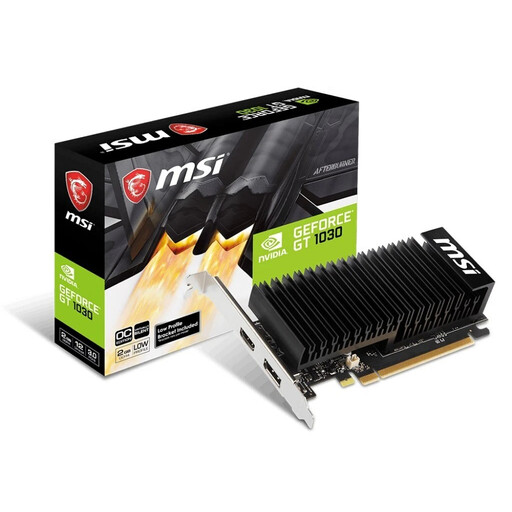
Why this choice suits this profile: Its low-profile form factor and advertised 20 W power consumption make it a suitable solution for upgrading a compact, office, or multimedia PC.
With its dimensions of 153 × 69 × 38 mm, it minimises the risk of incompatibility with a narrow case. Its passive cooling also avoids the noise of a small fan.
2 GB of DDR4 memory, HDMI and DisplayPort outputs, PCI Express 3.0 x16 interface operating in x4 mode.
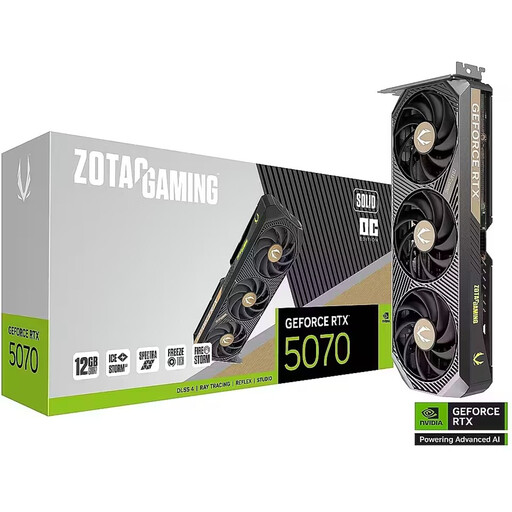
Why this choice suits this profile: This gaming graphics card is aimed at modern games, ray tracing, streaming, and some creative tasks.
Its 12 GB of GDDR7 and PCIe 5.0 x16 interface provide concrete technical benchmarks, rather than just a marketing promise of smoothness.
NVIDIA Blackwell architecture, GDDR7 memory, DLSS 4 support, three DisplayPort outputs and one HDMI output.
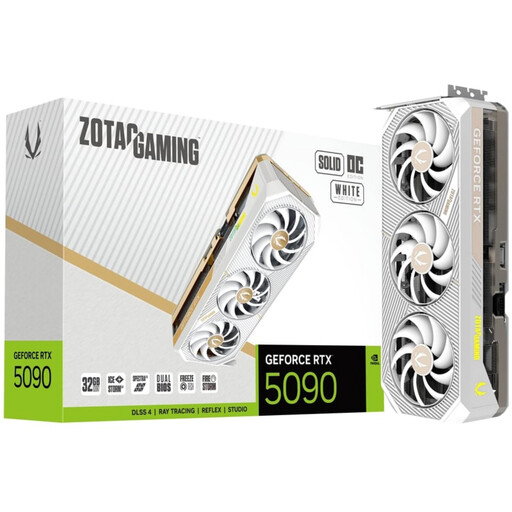
Why this choice suits this profile: Its 32 GB of GDDR7 and 512-bit interface are built for very high-resolution gaming, 3D rendering, and the heaviest graphical workloads.
Its dimensions of 330 × 68 mm, its 12V-2x6 connector, and the included support bracket allow you to anticipate installation constraints before you buy.
32 GB of GDDR7 memory, three DisplayPort 2.1b, HDMI 2.1b, triple-fan cooling and dual BIOS.
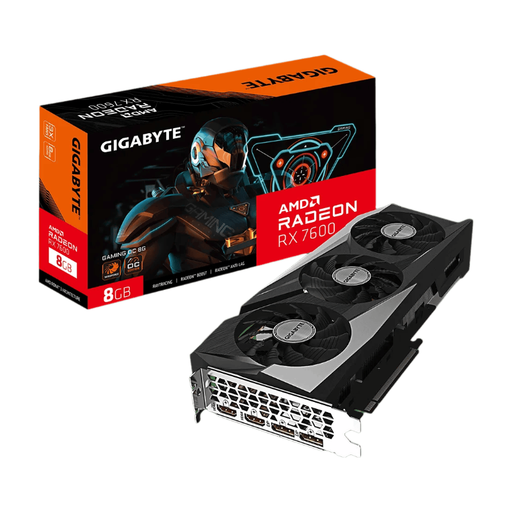
Why this choice suits this profile: This AMD graphics card can accompany a PC dedicated to gaming or creation, equipped with a 550 W power supply and an 8-pin connector.
The recommended power rating of 550 W, the 8-pin connector, and the dimensions of 282 × 115 × 50 mm allow you to check compatibility precisely.
8 GB of GDDR6, 128-bit memory bus, four video outputs and DirectX 12 Ultimate support.
Before installing the card, turn off the PC, unplug the mains cable, and discharge any static electricity. Insert it into the designated PCIe slot, secure the backplate to the case, then connect the required power cable. Next, install the NVIDIA or AMD drivers from the manufacturer’s official website.
Power consumption varies depending on the model and the load. A 20 W card will generally have a limited impact on an office PC’s power draw, whereas a model rated at 300, 350, or 600 W can significantly increase consumption during a gaming session or a render. To estimate the cost, multiply the average power consumed, expressed in kilowatts, by the number of hours of use and by your electricity tariff.
For 4K gaming, a graphics card needs a sufficiently powerful GPU, an appropriate amount of video memory, and outputs compatible with your monitor. Models equipped with GDDR7 and image upscaling technologies can be suitable for this resolution, but the result also depends on the game, the graphics settings, and the processor.
The lifespan depends on the load, temperature, dust accumulation, and software evolution. Regular maintenance, proper ventilation, and a suitable power supply all help to preserve the hardware. Also remember to check the availability of drivers for your system.
Compatibility depends on the connector, the case, the power supply, and the motherboard’s firmware. A modern PCIe card can often work with an older generation, at the cost of reduced bandwidth. Before ordering, however, check its dimensions, its connectors, and the requirements stated by the manufacturer.