
Livraison le jour même ou le lendemain

Qualité garantie

Débloquez vos offres de bienvenue: Livraison GRATUITE | Jusqu'à -80 % | 30 jours d'essai gratuits à JoyPlus
Téléchargez l'application
Buying an RTX 50 graphics card isn’t simply a matter of choosing the highest number in the model name. Between the RTX 5070, RTX 5070 Ti, RTX 5080 and RTX 5090, differences in power consumption, size and memory can make some models incompatible with your setup.
Spec sheets also highlight NVIDIA Blackwell architecture, GDDR7 memory, DLSS 4 and ray tracing. These technologies can make a difference, but they can’t compensate for a case that’s too small, an underpowered PSU or a monitor that can’t make the most of the card.
An OC version has a slightly higher clock speed than the reference model. This can improve performance in some situations, but it won’t turn an RTX 5070 into an RTX 5080. Start by comparing the GPU, CUDA core count, video memory and memory bus width.
A graphics card with three fans can take up between 2.5 and 3.5 slots. RTX 5080 and RTX 5090 models can sometimes exceed 329 mm and weigh more than 1.5 kg. Check the available space between the rear expansion slots, drive cage and front fans.
SFF cards make it easier to install a graphics card in a compact case, but the ‘SFF-Ready’ label doesn’t guarantee compatibility with every small case. You’ll also need to check the card’s width, airflow and the space around the power connector.
A 650 W PSU may be suitable for some RTX 5070 cards, while an RTX 5070 Ti generally needs 750 W and an RTX 5080 around 850 W, depending on the model. The ZOTAC RTX 5090 mentioned here has a maximum power consumption of 575 W, with a 1,000 W PSU recommended.
Use a certified 12V-2x6 cable, making sure it’s fully inserted and not sharply bent near the connector. This helps reduce the risk of poor contact and localised overheating.
Video memory capacity matters for high-resolution textures, 3D creation, video editing and AI applications. The RTX 5070 cards featured here have 12 GB of GDDR7 on a 192-bit bus. The RTX 5070 Ti and RTX 5080 have 16 GB of GDDR7 on a 256-bit bus.
The ZOTAC RTX 5090 stands out with 32 GB of GDDR7 and a 512-bit bus. This capacity is best suited to demanding workloads and professional use. For 1440p gaming, a card with less memory may already be perfectly suited to your monitor and software.
The AMD RX 9070 and RX 9070 XT included in the comparison have 16 GB of GDDR6, according to their product listings. They’re an interesting alternative if memory capacity and price matter more to you than access to the NVIDIA ecosystem. However, they aren’t among the three models featured in the selection below.
RTX 50 cards use a PCIe 5.0 x16 interface, which is generally backwards compatible with earlier PCIe generations. So, a PCIe 5.0 card can work with a compatible PCIe 4.0 motherboard, although performance will depend on the rest of your setup.
Also check:
A triple-fan cooling system distributes heat more effectively across longer cards, but needs more room. Fan-stop features such as FREEZE Fan Stop or a 0 dB mode can help keep noise down when the card isn’t under much load. They’re no substitute for good airflow.
If you’re planning to game in 4K for several hours a day, choose a card with a suitably large heatsink, a support bracket and a case with clear, unobstructed air intakes and exhausts.
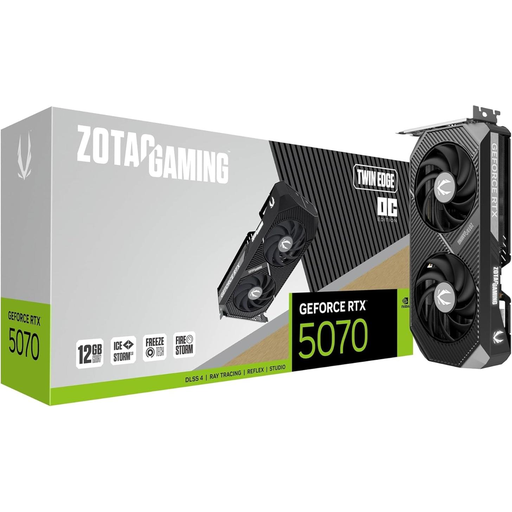
Why it suits this profile : Its 2-slot design and stated length of 241.5 mm make it easy to install in many PCs. It comes with 12 GB of GDDR7 and 6,144 CUDA cores, and requires a recommended 650 W PSU.
Its clearly stated dimensions reduce the risk of buying a card that’s too large. You’ll still need to check the usable length inside your case and the 12V-2x6 cable compatibility.
2-slot design, two 90 mm fans, PCI Express 5.0 x16 and DLSS 4 support.
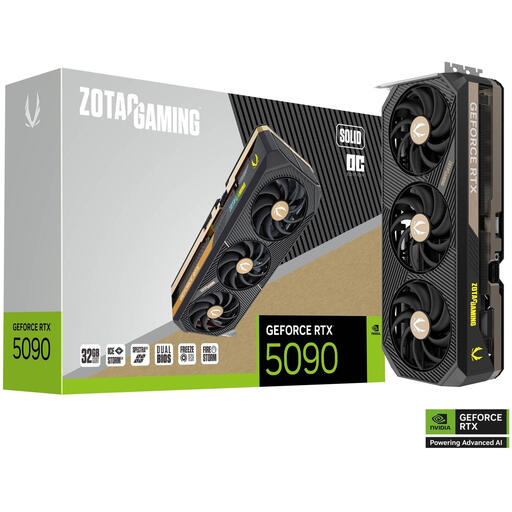
Why it suits this profile : With 32 GB of GDDR7 and 21,760 CUDA cores, this card is made for systems designed for 4K, content creation and demanding computing workloads.
The product listing specifies its maximum power consumption of 575 W, recommended 1,000 W PSU and 3.5-slot design.
32 GB of memory, 512-bit bus, IceStorm 3.0 cooling and dual BIOS.
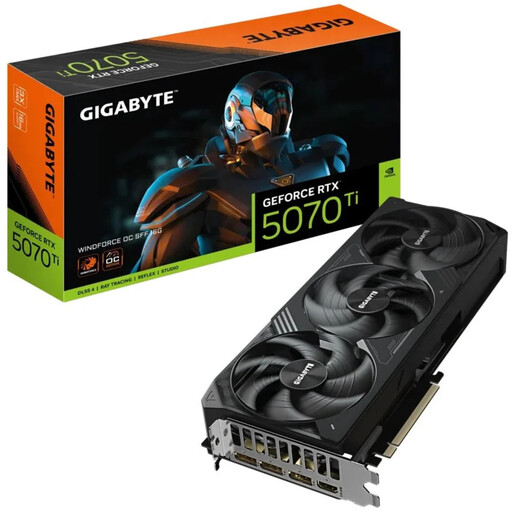
Why it suits this profile : This RTX 5070 Ti combines 16 GB of GDDR7 with a triple-fan system and an SFF form factor measuring 304 × 126 × 50 mm, making it ideal for demanding compact builds.
SFF-Ready certification and detailed dimensions make it easier to check compatibility, rather than relying on the word ‘compact’ alone.
16 GB of GDDR7, dual Performance/Silent BIOS, PCIe 5.0 and a recommended 750 W PSU.
We’ve put together a comprehensive, real-time list of products that meet these strict selection criteria and European safety regulations.
Yes. PCIe 5.0 x16 models are generally backwards compatible with a compatible PCIe 4.0 motherboard. The card will work with the bandwidth available on the platform. You should still check your processor, PSU and the space available inside your case.
Product listings generally recommend 650 W for some RTX 5070 cards, 750 W for an RTX 5070 Ti and 850 W for an RTX 5080. Take these figures into account alongside your processor’s power consumption, the number of drives and your other components. A certified PSU with a suitable 12V-2x6 cable is still the best choice.
How long a card stays capable depends on your resolution, preferred level of detail, games and software. A model with enough memory and suitable cooling will generally give you more room to manoeuvre. Clean the air intakes regularly, keep an eye on temperatures and avoid installing an overly powerful card in a poorly ventilated case.