
Livraison le jour même ou le lendemain

Qualité garantie

Débloquez vos offres de bienvenue: Livraison GRATUITE | Jusqu'à -80 % | 30 jours d'essai gratuits à JoyPlus
Téléchargez l'application
Choosing a new graphics card in 2026 can be a daunting task. Between new architectures like NVIDIA Blackwell, GDDR7 memory, and the promise of 8K gaming, it's easy to get lost in a sea of technical specs. The challenge is to find the model that truly fits your needs—whether you're a passionate gamer or a content creator—while sidestepping marketing traps.
This guide breaks down the key points to help you buy a graphics card intelligently, avoiding unnecessary spending and unpleasant surprises.
Manufacturers' marketing often bombards us with technical arguments that aren't always relevant to your use case. Here's a rundown of common mistakes that can cost you dearly.
Focusing solely on the amount of video memory (VRAM) is a classic mistake. A card with 16 GB of VRAM isn't necessarily better than a 12 GB card for all purposes. The quality and speed of that memory (like GDDR7) and the memory bus width are just as crucial. For 1440p gaming, 8 to 12 GB is more than enough. Paying extra for VRAM you'll never use is a poor investment.
A high-end NVIDIA graphics card like an RTX 5080 or RTX 5090 can be particularly massive. Many buyers end up with a card that doesn't fit in their case or, once installed, chokes the airflow. Poor cooling leads to thermal throttling, which literally tanks the performance you paid for.
Modern graphics cards, especially those based on the PCIe 5.0 interface, are power-hungry and sometimes use new power connectors (like the 16-pin 12V-2x6). Buying a card without checking the recommended wattage for your power supply unit (PSU) and the availability of the right connectors is a perfect recipe for instability, crashes, or a PC that simply refuses to boot.
To make the right choice, focus on these three pillars that determine the performance and compatibility of your future graphics card.
Beyond just the amount (in GB), check the memory type. GDDR7 offers significantly higher bandwidth than GDDR6, which is essential for high resolutions and ultra-detailed textures. The memory bus (expressed in bits, e.g., 128-bit, 192-bit, 256-bit) is the highway for data. A wider bus allows more information to be processed simultaneously—a critical advantage for 4K gaming or professional applications.
Before you buy, take out your measuring tape and measure the available space in your case (length, width, and height in PCIe slots). Compare these measurements with those of the card you're considering, available on the product pages from manufacturers like ASUS, GIGABYTE, or Palit. A dual- or triple-fan cooling system isn't just a gimmick: it ensures the card maintains its maximum clock speeds without overheating, even during long gaming sessions.
Check two things:
To help you make an informed decision, here is our curated selection based on user profiles, helping you find the model that's truly right for you.
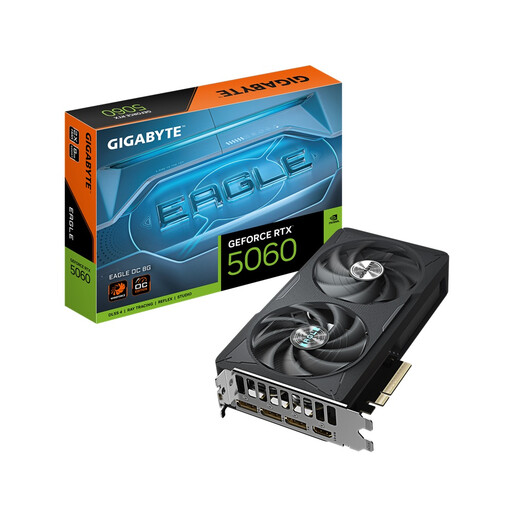
Why this model? Perfect for stepping into the new generation without breaking the bank, while still enjoying comfortable 1080p and 1440p gaming. Its price-to-performance ratio is unbeatable for a smooth, budget-friendly gaming experience.
Its 8 GB of fast GDDR7 memory is perfectly calibrated for its target (1440p), avoiding the extra cost of excessive VRAM. Its compact form factor (208 mm) ensures compatibility with most cases.
Low power consumption (450 W PSU recommended) and a compact design. Access to the Blackwell architecture and DLSS 4 at an accessible price point.
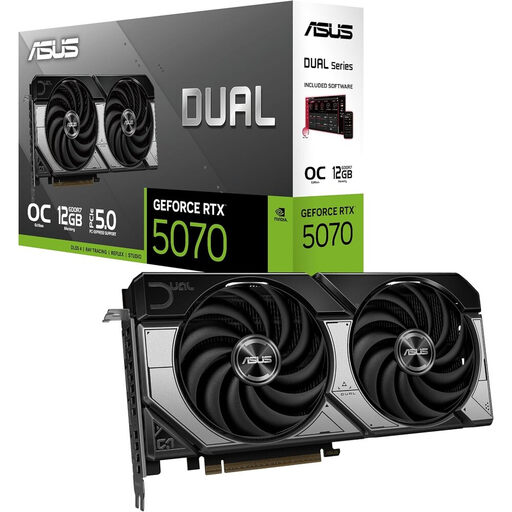
Why this model? An excellent sweet spot for 4K gaming and creative tasks (video editing, 3D). It offers a significant performance leap over the 60-series, making it both versatile and future-proof.
With 12 GB of VRAM and a 192-bit bus, it's built for 4K without forcing you to break the bank for an RTX 5080. Its dual-fan Axial-tech cooling system is effective while remaining relatively compact (249 mm).
Balanced performance for 4K gaming and content creation. The Dual BIOS allows switching between a quiet mode and a performance mode.
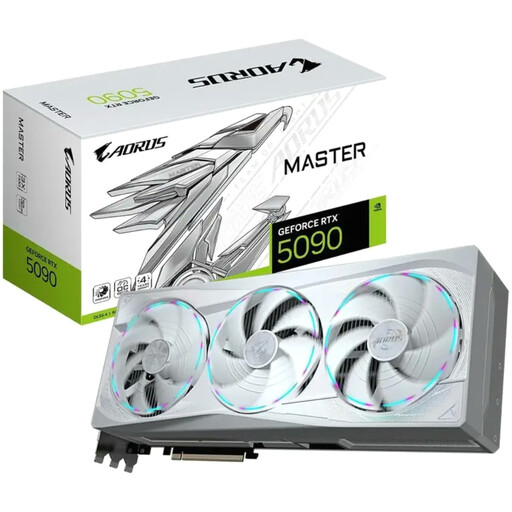
Why this model? For those who want to make absolutely zero compromises. This is a powerhouse built for **8K** gaming, training AI models, or complex 3D rendering. A true technological showcase.
This is not an impulse buy. Here, the 32 GB of VRAM isn't a luxury but a necessity for its intended uses. Be warned: its dimensions (360 mm) and power draw (1000 W+ PSU) demand a system built to match.
Top-tier performance with 32 GB of GDDR7 on a 512-bit bus. Ultra-efficient WINDFORCE cooling system and an integrated LCD screen for monitoring.
Explore our full selection of graphics cards, all tested and approved by our editors based on strict performance and reliability criteria.
Yes, the PCI Express interface is backward-compatible. A PCIe 5.0 card will work in a PCIe 4.0 slot, but its bandwidth will be limited to PCIe 4.0 speeds. For most games, the performance difference is often negligible, giving you the freedom to upgrade your graphics card without immediately changing your motherboard.
It all depends on the model. An RTX 5060 Ti can get by with a 550W to 650W power supply, while an RTX 5070 Ti or RTX 5080 will likely require 750W to 850W. For a powerhouse like the RTX 5090, a unit of at least 1000W is essential. The golden rule: always check the manufacturer's recommended wattage and the required connectors.
Graphics card prices in 2026 remain highly volatile, influenced by chip availability and global demand. The arrival of the new generation with GDDR7 memory and the Blackwell architecture sets new performance standards, which naturally drives down the prices of the previous generation. The smart move is to always compare the price-to-performance ratio against your actual needs and budget.