
Livraison le jour même ou le lendemain

Qualité garantie

Débloquez vos offres de bienvenue: Livraison GRATUITE | Jusqu'à -80 % | 30 jours d'essai gratuits à JoyPlus
Téléchargez l'application
A German QWERTZ 75 % wireless mechanical keyboard can be just as useful for a gaming session as it is for a day of working from home, coding or studying. But between the key layout, claimed battery life and different connection modes, product listings can make comparing your options more complicated than it needs to be.
Before you place an order, watch out for these three common pitfalls:
A German QWERTZ keyboard should have the corresponding layout, with the correct key legends and an Enter key that matches the configuration stated. Also check its compatibility with Windows, macOS, Linux, Android or iPadOS, depending on the devices you use.
If you regularly switch between operating systems, the physical layout may not be enough. You may need to select the German keyboard in your device settings. Checking this first helps avoid surprises when typing symbols, passwords or programming commands.
A tri-mode Bluetooth 2.4 GHz USB-C mechanical keyboard will usually offer three connection options:
A USB-C port doesn’t necessarily mean that a cable is included or that every feature is available on every operating system. Check the list of accessories and the manufacturer’s information before completing your purchase.
A high-capacity battery means fewer recharges, but RGB lighting can significantly reduce battery life. The AJAZZ AK820 MAX listing specifies an 8 000 mAh battery, with up to 120 hours without backlighting or 55 hours with RGB. These figures are theoretical, though, and depend on your settings and connection mode.
Hot-swapping lets you replace compatible switches without soldering. It’s handy if you want to change how the keys feel or replace a worn component. However, make sure the switches are compatible with the keyboard’s stabilisers and circuit board.
Finally, an RGB mechanical keyboard with PBT keycaps will generally keep its appearance better than a model made with plastic that’s more prone to developing a shine. Durability also depends on how intensively you use and maintain the keyboard.
The cards below distinguish between the keyboard itself and accessories that can complement a workspace or gaming setup. The listed features are based on the information available on the product pages.

Why it suits this type of user : This model combines a German QWERTZ layout, a 75 % form factor and three connection modes, without taking up as much space as a full-size keyboard.
It retains the function row and arrow keys, unlike some 60 % keyboards. The listing also mentions hot-swapping and an included USB-C cable.
82-key layout, claimed 8 000 mAh battery, pre-lubricated linear Flying Fish switches and an aluminium volume wheel.
Why it suits this type of user : Enthusiasts who like to customise their switches, keycaps or RGB settings get a more adaptable foundation than they would with a closed-design model.
Hot-swapping means you’re not tied to a single switch type. The onboard memory can retain functions, macros and RGB settings configured in the compatible software.
Gasket-mounted design, five advertised foam layers, PBT keycaps and per-key RGB lighting.
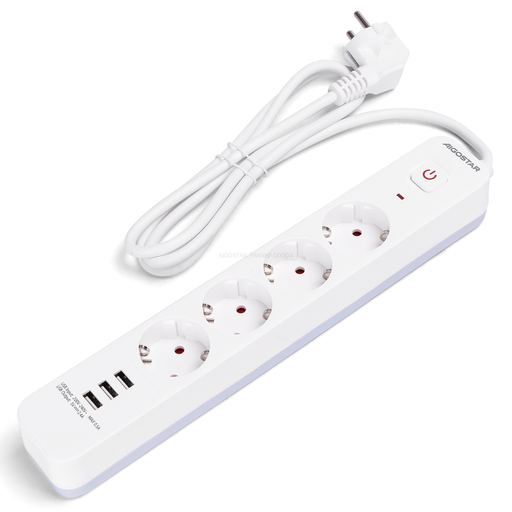
Why it suits this type of user : It’s a useful addition to a workstation with a computer, monitor, charger and peripherals when you need several sockets.
The listing states a maximum power rating of 3 680 W, a 1.5 m cable and child protection. You’ll still need to stay within the total load and use the power strip indoors only.
Four sockets, a switch and a USB output rated at 5 V and 2.4 A, with CE and RoHS compliance stated.
We’ve brought together a comprehensive, regularly updated selection of products that meet these strict criteria, as well as European safety requirements.
Yes, as long as you select the German layout in your system settings. The physical keyboard and configured language need to match for the correct characters to appear. You can usually switch between layouts using a system keyboard shortcut.
Bluetooth works perfectly well for work, browsing and mobile devices. For gaming, a 2.4 GHz connection or wired USB-C mode is often preferable to reduce variations in latency caused by the wireless environment. The best option depends on your computer, the distance and your preferences.
Power consumption is generally low, but RGB lighting uses more energy and reduces the claimed battery life. To go longer between charges, switch off the backlighting while you work or use the USB-C cable during longer sessions. Battery life will also depend on the battery itself, the switches and how heavily you type.