
Livraison le jour même ou le lendemain

Qualité garantie

Débloquez vos offres de bienvenue: Livraison GRATUITE | Jusqu'à -80 % | 30 jours d'essai gratuits à JoyPlus
Téléchargez l'application
Who hasn't cursed the tangled mess of chargers taking over their desk or the bottom of their travel bag?? One block for the laptop, another for the smartphone, a third for the tablet… This pile-up of cables and adapters is a logistical nightmare that eats up precious space.
GaN (Gallium Nitride) technology is here to bring order to the chaos. By replacing traditional silicon, GaN chargers deliver impressive power in a much more compact form factor, all while being more energy-efficient. In this guide, we'll break down the essential criteria for making the right choice and present our selection of the best models for every use case. The goal?? To help you find the perfect GaN charger for your needs.
To help you see clearly, let's review the few features that make all the difference.
Expressed in watts (W), power determines not only the charging speed but also which devices you can power. For an ultrabook-style laptop, a 65W charger is an excellent starting point. For less power-hungry devices like a smartphone or tablet, 30?W is more than enough.
It's essential to check for compatibility with the Power Delivery (PD) standard. This USB-C fast charger protocol establishes a smart dialogue between the charger and the device to deliver optimal power safely.
A multi-port charger is the dream solution for finally centralizing everything. The most common configurations combine?:
Note?: the total power is shared between the ports when used simultaneously. For example, a 65?W charger might allocate 45?W to one port and 20?W to another if two devices are plugged in.
This is one of the superpowers of GaN technology?: miniaturization. A compact charger slips easily into a briefcase or pocket. For on-the-go use, opt for a wall-style travel charger, ideally with retractable prongs. For the office, a "desktop" model with a power cable is often more practical for bringing the USB ports within easy reach.
Here is our selection of models that cater to various profiles, from the desk-bound professional to the globetrotter.
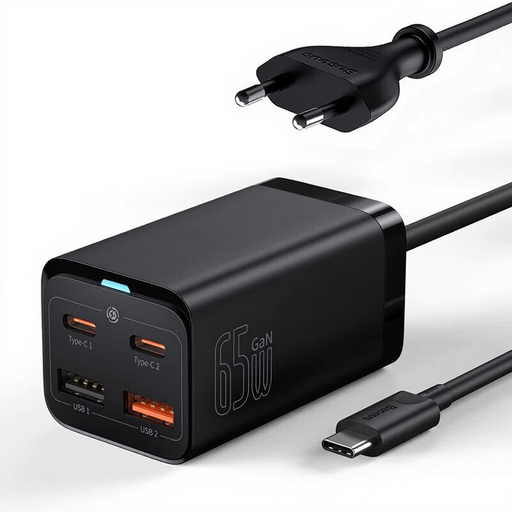
Key Features This model is designed as a true desktop charging station. Its 1.5?m power cable allows you to place the unit directly on your work surface, making its 4 ports (2 USB-C and 2 USB-A) perfectly accessible. No more gymnastics trying to plug in a cable under your desk?!
Pros
Who is it for?? For professionals and students who want a pristine workspace (at home or in the office) and want to centralize charging for all their devices.
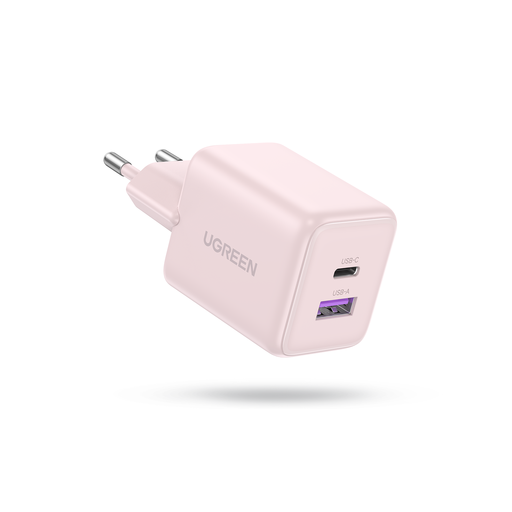
Key Features This charger is all about maximum compactness. Barely larger than a standard smartphone charger, it nonetheless packs GaN technology and two ports (one USB-C and one USB-A). It's an excellent replacement for the original charger that came with your phone.
Pros
Who is it for?? For those who mainly need to charge a smartphone and an accessory (earbuds, smartwatch) and are looking for the most portable solution for daily use.
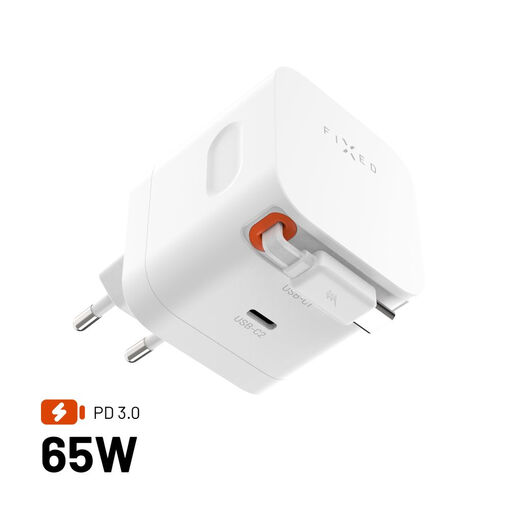
Key Features This travel charger incorporates a solution as simple as it is ingenious?: a 64?cm USB-C cable that automatically retracts into the housing. No more carrying a separate cable for your main device?! It even offers a second USB-C port for more flexibility.
Pros
Who is it for?? For frequent travelers and digital nomads who count every gram and cable in their bag. The integrated cable is a decisive advantage for staying organized under any circumstances.
Our selection highlights specific use cases, but the GaN charger market is much broader. You can find ultra-powerful models (100?W, 140?W, and more) for the most demanding laptops, as well as countless port configurations.
If these models don't check all your boxes, feel free to explore our complete selection to find the perfect fit for your gear.
Discover Our Full Range of Fast USB Charging Solutions
A GaN charger replaces traditional silicon with Gallium Nitride (GaN) components. This next-generation semiconductor material can handle higher voltages and generates much less heat. The result?: chargers that are smaller, lighter, and have better energy efficiency than their silicon counterparts.
As a general rule, choose a charger with a wattage at least equal to your original charger. Most modern ultrabooks are fine with a 65W charger. For mobile workstations or gaming laptops, 100?W or more is often required. This information is always written, often in very small print, on your original power adapter.
Yes, and this is a crucial point. The maximum advertised wattage (e.g., 65?W) is the total power the charger can deliver. When you plug in multiple devices, this power is intelligently distributed among the ports. The logic for this distribution varies by model. For example, a 65?W charger might deliver 65?W on a single port but switch to a 45?W + 20?W configuration if two devices are connected. Always be sure to check this distribution logic in the product's technical specifications.