
Livraison le jour même ou le lendemain

Qualité garantie

Débloquez vos offres de bienvenue: Livraison GRATUITE | Jusqu'à -80 % | 30 jours d'essai gratuits à JoyPlus
Téléchargez l'application
A gaming PC case is about far more than a front panel covered in LEDs. It directly affects airflow, noise levels, ease of assembly and component compatibility. Yet some purchases can prove disappointing after just a few weeks: the graphics card is too long, cables cannot be hidden properly or temperatures rise because the front panel is poorly ventilated.
Before comparing an ATX PC case, a compact model or a version with tempered glass, it is therefore worth checking the specifications that will have a real impact on your build.
An RGB PC case can look fantastic while allowing very little air to circulate. A solid front panel, openings that are too narrow or too few fans can all restrict air exchange. The components will continue to work, but the fans will have to spin faster — and noise levels will rise as a result.
For a gaming build, prioritise a mesh or perforated front panel, removable filters and clearly identified intake positions. The included fans are useful, but simply having a large number of them does not guarantee consistent airflow.
The term mid-tower PC case covers a wide range of dimensions. Two ATX-compatible models can offer very different amounts of internal space. The maximum graphics card length may also vary depending on whether a radiator or fans are installed at the front.
Before ordering, compare the case dimensions with those of your graphics card, CPU cooler, power supply and radiator. The words “ATX compatible” do not guarantee that all your components will fit together without restrictions.
A tempered-glass side panel shows off your build, but it also leaves cables clearly visible. A rear compartment that is too narrow can make installation more difficult and put pressure on the side panel. Likewise, filters that are difficult to remove often discourage regular cleaning.
A good case should include cable-routing openings, tie-down points or a second chamber. It should also be easy to access when removing dust, particularly if the PC is placed on the floor or in a heated room.
Start by checking the motherboard format: Mini-ITX, Micro-ATX, ATX or E-ATX. An ATX PC case will generally accept smaller formats, but the reverse is not always true. Also check the maximum power supply length.
Take care with compact dual-chamber models: some Lian Li O11D Mini V2 Flow cases only accept an SFX or SFX-L power supply, rather than a standard ATX model. This restriction can have an impact on the overall cost of your build.
Note down the exact dimensions of your graphics card, particularly if you are using an anti-sag bracket or a vertical adapter. The length stated by the manufacturer may be reduced when a radiator is installed at the front.
For the processor, compare the maximum CPU cooler height with the figure specified by the case manufacturer. If you are considering a water-cooling PC case, check the radiator format — 240, 280, 360 or 420 mm — as well as its thickness and the remaining clearance above the RAM.
A typical setup involves positioning the front and bottom fans as intakes, then using the top and rear fans as exhausts. The aim is to create a consistent airflow path without blocking the intakes with cables or storage cages.
Filters at the front, on top and beneath the power supply help reduce dust build-up. However, they do not remove the need for regular maintenance: clean them with a soft brush or a low-power vacuum cleaner after switching off and unplugging the device.
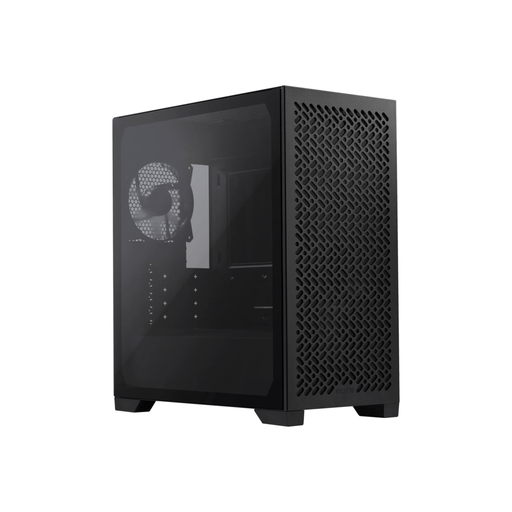
Why this choice suits this type of user : This compact format supports Mini-ITX and Micro-ATX motherboards, while accommodating graphics cards up to 365 mm and ATX power supplies up to 160 mm.
Its magnetic mesh front panel makes the filters easy to access and promotes more direct airflow than a completely closed front panel.
Three 120 mm ARGB fans are installed at the front, and the case can accommodate a radiator of up to 360 mm in this position.
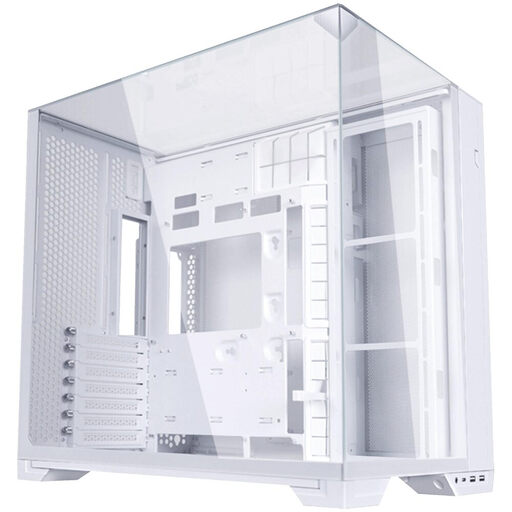
Why this choice suits this type of user : Its dual-chamber design and tempered-glass panels are ideal for users who want to showcase a particularly well-organised ATX build.
The cables are routed into the rear chamber, while the side and bottom mounting positions allow intake and exhaust to be planned separately.
It supports graphics cards up to 408 mm, ATX power supplies up to 220 mm and 360 mm radiators on both the side and bottom of the case.
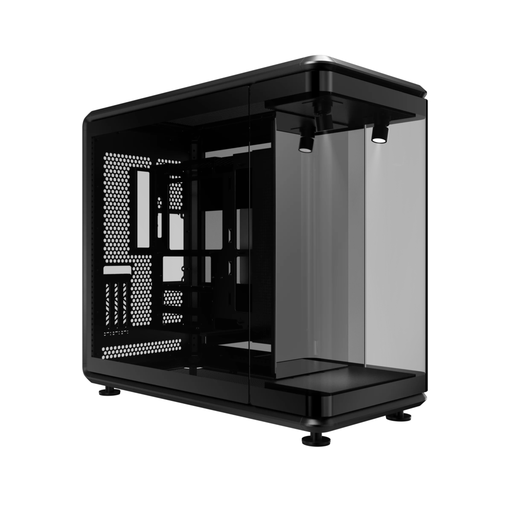
Why this choice suits this type of user : This spacious chassis is designed for builds with an E-ATX motherboard, a long graphics card or a custom cooling loop.
Its 93 L volume and 110 mm of dedicated cable-routing space reduce restrictions when installing multiple radiators.
It supports graphics cards up to 430 mm and radiators up to 360 mm, while providing space for a reservoir and pump.
It depends first and foremost on the motherboard and graphics card. An ATX model offers more space for components and cooling. A compact PC case will fit more easily on a shallow desk, but you will need to check the available space for cables, the CPU cooler and the radiator more carefully.
There is no universal rule. Two intake fans and one exhaust fan provide a well-balanced starting point. For a powerful graphics card or processor, make sure there are enough mounting positions and adjust the airflow according to the temperatures and noise levels recorded.
The structure can support several generations of components as long as it remains sturdy, clean and protected from moisture. The parts that generally wear out most quickly are the fans, filters and certain mounting mechanisms. Regular dusting and unobstructed airflow help keep the entire build in good condition.