
Livraison le jour même ou le lendemain

Qualité garantie

Débloquez vos offres de bienvenue: Livraison GRATUITE | Jusqu'à -80 % | 30 jours d'essai gratuits à JoyPlus
Téléchargez l'application
A gaming headset with a microphone does more than simply deliver game audio. It must also transmit your voice clearly, remain comfortable for several hours and work with your equipment. However, some features highlighted in product listings can be misleading.
Before buying a gaming headset for PS5, a gaming headset for PC or a model compatible with Xbox, review the following points.
A headset described as ‘multiplatform’ may work with several devices, but not necessarily with the same type of connection. A wired gaming headset with a 3.5 mm jack will usually connect to the controller or directly to the console, while a wireless model may require a dedicated USB receiver.
On Xbox, wireless headset compatibility is not always the same as on PC or PS5. Check the detailed list of supported devices and make sure you know which accessories are included: adapter, USB receiver, cable or audio splitter for computers.
The advertised battery life of a wireless gaming headset depends on several factors: whether the lighting is switched on, listening volume, connection type and the audio features in use. A figure preceded by ‘up to’ applies to specific conditions; it is not a duration you will achieve every time.
If you regularly forget to recharge your devices, a wired model will probably be more convenient for everyday use. Some wireless headsets can even continue to deliver basic audio when the battery is flat, although features that require power may then be disabled.
50 mm drivers do not, by themselves, guarantee more precise sound than 40 mm models. The comfort of the ear cushions, passive isolation, audio tuning and microphone quality also play a decisive role.
A headset fitted with a noise-cancelling microphone can reduce the background noise picked up by the mic, but it will not necessarily eliminate every sound around you. Also check whether this feature requires software, a compatible computer or a particular setup.
The 3.5 mm gaming headset remains a simple, versatile option for consoles, compatible computers and mobile devices. It does not require a battery and avoids pairing issues. The trade-off is that the cable can restrict your movement, so it needs to be long enough.
A Bluetooth gaming headset is best suited to smartphones, tablets and computers equipped with this technology. When gaming, latency can vary depending on the device and protocol used. 2.4 GHz models with a USB receiver are generally designed to provide a more direct wireless connection to a console or PC. However, make sure they are fully compatible with your platform.
A pivoting or retractable microphone can be positioned easily close to your mouth. The flip-to-mute function, which automatically mutes the microphone when you raise the boom, is particularly useful for quickly interrupting a conversation.
For team gaming, check for a mute button, mic monitoring and, if necessary, software-based reduction of ambient noise. These features can improve voice transmission in certain setups, but they do not guarantee identical results on every device.
A comfortable gaming headset should apply moderate pressure and surround your ears without squeezing them. Memory foam or leatherette ear cushions often improve the fit, but they can also feel warmer during long sessions.
Check the weight stated by the manufacturer, the flexibility of the headband and the quality of its padding. If you wear glasses, double-layer cushions or softer foam may reduce the pressure on the arms of your glasses.
Clean the headset regularly with a soft, dry cloth. Avoid water, abrasive products and storing it somewhere damp. To protect your hearing, start at a moderate volume and avoid prolonged listening at high levels.
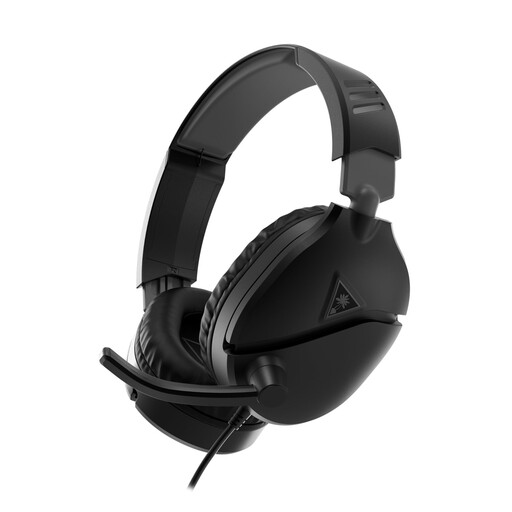
Why it suits this user profile: its 3.5 mm jack connection and 2 m cable make it a great entry-level choice for gaming on PC, PS5, Xbox, Switch or compatible mobile devices.
As it works without a battery, you will not have to interrupt your game to recharge it. A PC splitter is included to separate audio and microphone connections if required.
40 mm drivers, flip-up microphone for muting and leatherette ear cushions.
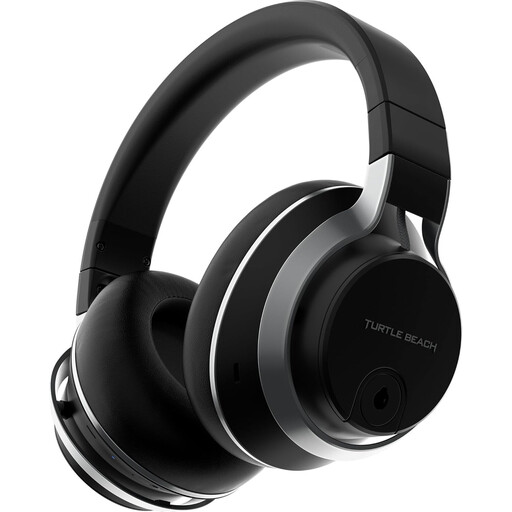
Why it suits this user profile: this multiplatform headset is aimed at gamers who switch between PS5, PC, Mac, Steam Deck and mobile devices.
It combines a proprietary wireless transmitter with Bluetooth. The removable microphone lets you take off the boom when voice chat is not needed.
50 mm drivers, advertised active noise cancellation and memory foam ear cushions.
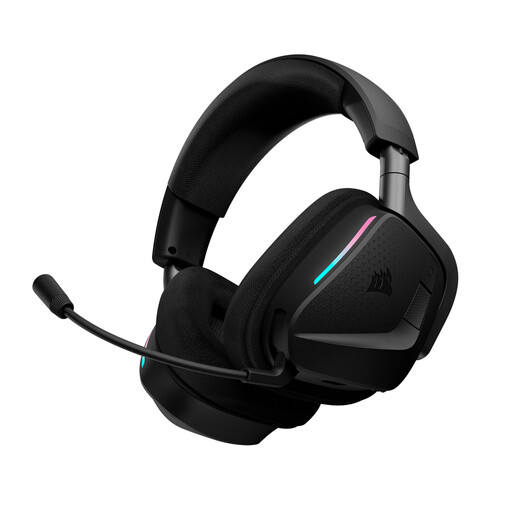
Why it suits this user profile: its dual 2.4 GHz and Bluetooth connectivity is designed for those who game on PC or console while keeping their phone connected.
Battery life can reach 70 hours in 2.4 GHz mode with RGB lighting switched off. The usage conditions are therefore clearly stated.
Flip-up microphone, memory foam ear cushions and adjustments via Corsair iCUE software on PC or Mac.
We have put together a complete, real-time updated selection of products that meet these demanding criteria and European safety standards.
Yes, provided that the controller has a compatible headset socket. Plug the connector directly into the controller, then check the audio settings to make sure the headset is selected for sound output and input. On PC, a splitter may be required if the audio and microphone ports are separate.
It depends on the battery, how often it is recharged, storage and care. A wired headset avoids the wear associated with an integrated battery, but the cable and connectors are still subject to wear. For a wireless model, use the correct cable and follow the manufacturer’s recommendations.
Bluetooth can be suitable for mobile devices, tablets or computers, but latency and microphone handling depend on the device and the Bluetooth profile used. On a console, check exact compatibility before buying: a 2.4 GHz receiver may be essential for game audio and voice chat.