
Livraison le jour même ou le lendemain

Qualité garantie

Débloquez vos offres de bienvenue: Livraison GRATUITE | Jusqu'à -80 % | 30 jours d'essai gratuits à JoyPlus
Téléchargez l'application
Buying a gaming graphics card is about more than comparing a clock speed or the amount of video memory. Whether you’re a PC gamer, content creator or simply looking to speed up AI-powered applications, several practical considerations can turn a bargain into a disappointing purchase.
A card that’s too long may not fit inside your case. An underpowered PSU can cause unexpected restarts. And a model advertised as compatible with 4K may not have enough video memory to run recent games with high-definition textures. Here are the key points to check before placing your order.
A card with 8 or 12 GB of video memory is not necessarily faster than a model with less. You also need to consider the memory type, bus width, GPU clock speed, cooling system and architecture.
GDDR7 is used in several recent cards, including the RTX 5070, RTX 5060 Ti, RTX 5080 and RTX 5090. However, it cannot compensate for a GPU that is not powerful enough for the resolution and level of detail you want to use.
A substantial PCIe 5.0 graphics card can take up between 2.5 and 3.8 slots. In a compact case, it could block an expansion card, obstruct cables or make installation impossible altogether.
Before ordering, compare the card’s dimensions with the space genuinely available inside your case. Check its length, height and thickness in slots, as well as whether an anti-sag bracket is included.
The graphics card’s stated power consumption is not enough to determine how much power your PC needs. You also need to account for the processor, drives, fans and any potential power spikes.
Depending on the model, an RTX 5090 may require a recommended 1 000 W PSU, while an RTX 5070 may be suitable with a 650 W unit. A card such as the MSI GeForce GT 1030, rated at 20 W, obviously places very different demands on your system. The connector also matters: 8-pin, 16-pin and 12V-2x6 connectors are not interchangeable without the correct cable or adapter.
For a graphics card for a gaming PC, 8 GB may be enough for Full HD gaming in many cases. Particularly demanding games, high-definition textures and content creation may nevertheless justify a higher capacity. Models with 12, 16 or 32 GB provide more headroom for complex scenes, video editing and certain AI tasks.
If you’re looking for a graphics card for content creation, also check the video outputs, compatibility with your software and support for hardware encoders. An RTX card compatible with DLSS 4 may offer image optimisation and frame-generation features in compatible applications. Results vary depending on the game, software, settings and drivers used.
The PCIe 5.0 standard relates to the connection between the graphics card and the motherboard. A PCIe 5.0 card will generally work on an older PCIe platform, provided there is a compatible, correctly wired slot.
To make the most of a high-refresh-rate display, check the DisplayPort and HDMI outputs, along with their respective versions. Some models advertise a maximum resolution of 8K, but that does not mean they will run every game at 8K and a high refresh rate. This figure refers to the signal output capability, not guaranteed performance in every piece of software.
Active cooling with two or three fans is suitable for more power-hungry cards, provided the case can effectively expel hot air. Semi-passive systems can switch the fans off when the load is low, helping to reduce noise during office work or video playback.
By contrast, a low-profile graphics card with passive cooling, such as the MSI GeForce GT 1030 2GHD4 LP OC, prioritises a compact design and 20 W power consumption. It is mainly suitable for upgrading a small PC, displaying video or playing less demanding titles, rather than powering a computer designed for recent games at high resolution.
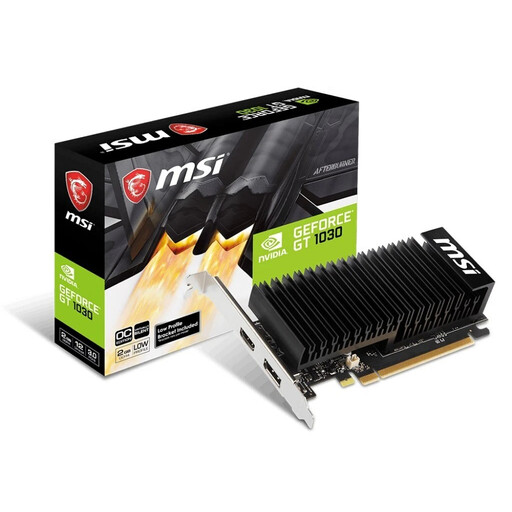
Why this choice suits this user profile : Its low-profile design and 20 W power consumption make it easy to upgrade a compact computer without an external power connector.
Its dimensions of 153 × 69 × 38 mm and passive cooling are clearly specified. However, sufficient airflow must still be provided.
2 GB of DDR4 memory, HDMI and DisplayPort outputs, single-slot design.
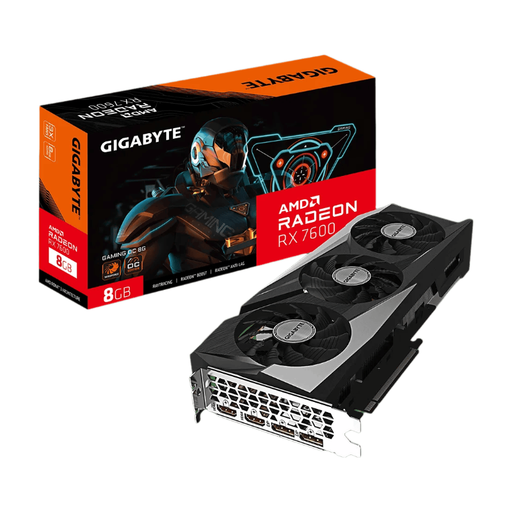
Why this choice suits this user profile : This AMD Radeon RX 7600 combines 8 GB of GDDR6, a WINDFORCE cooling system and four video outputs, making it suitable for both gaming and content creation.
The product details specify a recommended 550 W PSU, an 8-pin connector and dimensions of 282 × 115 × 50 mm.
RDNA 3 architecture, 8 GB of GDDR6, two HDMI ports and two DisplayPort ports.
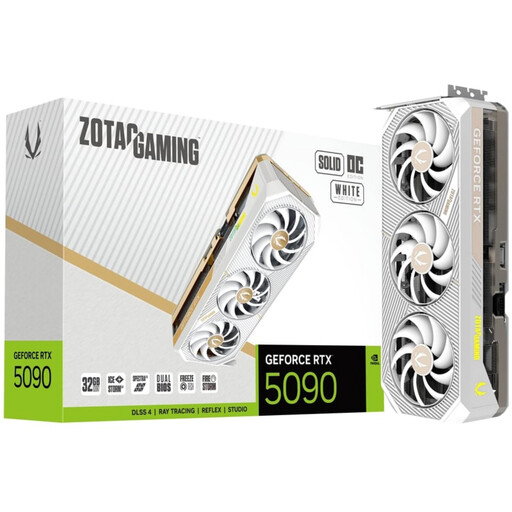
Why this choice suits this user profile : With 32 GB of GDDR7 and a PCIe 5.0 x16 interface, it is aimed at systems dedicated to high-resolution gaming, 3D rendering and certain AI-related workloads.
The product details mention a 12V-2x6 connector, a weight of 2.08 kg and an included support bracket. These points should be taken into account during installation.
32 GB of GDDR7, three DisplayPort ports, HDMI 2.1b and triple-fan cooling.
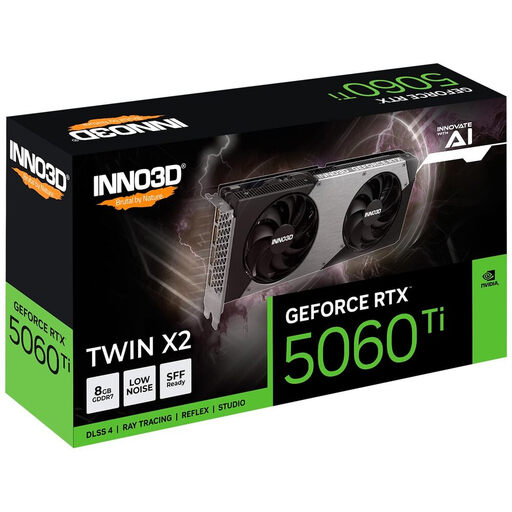
Why this choice suits this user profile : With its PCIe 5.0 x8 interface, two fans and HDMI 2.1b and DisplayPort 2.1b outputs, it is designed for modern systems dedicated to gaming and creative work.
The product details specify 180 W power consumption, an 8-pin connector, a length of 250 mm and a recommended 650 W PSU.
8 GB of GDDR7, 4 608 CUDA cores, four video outputs and a stated 0 dB mode.
We’ve brought together a comprehensive, real-time updated selection of products that meet these demanding criteria and European safety requirements.
Before handling the card, completely shut down the computer and unplug the mains cable. Hold the card by its edges to minimise the risk of static electricity. Insert it into the PCIe slot until the latch locks, then firmly secure the bracket to the case.
Next, carry out the following checks:
It depends on the games, refresh rate and level of detail you want. A card with more video memory and suitable cooling will provide greater headroom, but the PSU, processor and case ventilation must also be up to the task. Features such as DLSS 4 are only available in compatible games and software.
It can work with an earlier PCIe generation if the motherboard has a compatible slot. However, the interface’s theoretical performance may be limited by the platform. Consult the motherboard documentation and check the slot’s electrical width.
Its useful lifespan depends on the resolution, the games you play, temperature, maintenance and your requirements. Regular dust removal, good airflow and a suitable PSU all help preserve the hardware. Choosing a card that matches the way you use your PC also increases the likelihood that it will remain relevant as software becomes more demanding.