
Livraison le jour même ou le lendemain

Qualité garantie

Débloquez vos offres de bienvenue: Livraison GRATUITE | Jusqu'à -80 % | 30 jours d'essai gratuits à JoyPlus
Téléchargez l'application
Building or upgrading your gaming setup can quickly become a headache. Between the technical jargon, marketing promises, and a jungle of product references, a bad purchase is always just around the corner. As a product expert at Joybuy, my mission is to help you see things more clearly. Let's break down the traps to avoid and the criteria that truly matter for building a high-performance, long-lasting gaming station.
Before diving into spec sheets, let's identify the most common mistakes when buying PC gaming accessories:
gaming bundle: These "all-in-one" sets look like a great deal, but they often hide one or two low-quality components (usually the headset or mouse) that ruin the gaming experience and force you to buy replacements much sooner than expected.RGB keyboards at the expense of performance: Customisable lighting is nice, but it should never be the number one criterion. Some manufacturers focus on flashy looks to mask low-end switches, a mushy typing feel, and questionable durability.gaming mice: Spec sheets boast staggering numbers (20,000 DPI or more). In reality, such high sensitivity is unusable for the average person. It's a pure marketing gimmick designed to distract from what's essential: sensor quality and ergonomics.To make an informed choice, focus on a few fundamental parameters that define the quality of your hardware.
Choosing a gaming keyboard often comes down to one question: mechanical or membrane?
The form factor is just as crucial. A 60% or 75% keyboard, like the AJAZZ AK820 75%, frees up valuable desk space for wide mouse movements—a significant advantage in FPS games.
For a gaming mouse, forget the DPI race. Here are the real performance indicators:
Finally, don't overlook the details that make a difference. An XXL mouse pad, such as the Corsair MM Cloth, unifies your desk and ensures a consistent, smooth glide. Likewise, a gaming headset like the Edifier G2II with virtual 7.1 surround sound can give you a decisive tactical advantage by improving in-game sound spatialisation.
Because every gamer is unique, here are a few options that tick all the right boxes, for every budget and style.
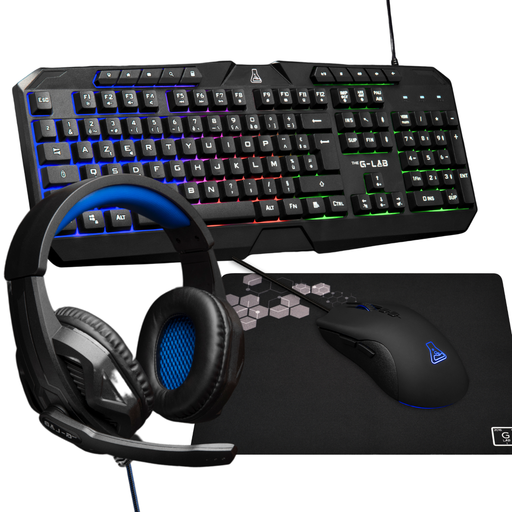
Why we chose it: This 4-in-1 bundle (keyboard, mouse, headset, pad) is a coherent, turnkey solution to get started without breaking the bank. The native AZERTY layout is a real plus, often missing from cheap imported bundles.
Unlike no-name bundles, this set from The G-Lab ensures a consistent baseline quality. It's a functional starting point, not a mishmash of bargain-bin components.
An all-in-one, plug-and-play solution, perfect for a first gaming setup without the hassle.
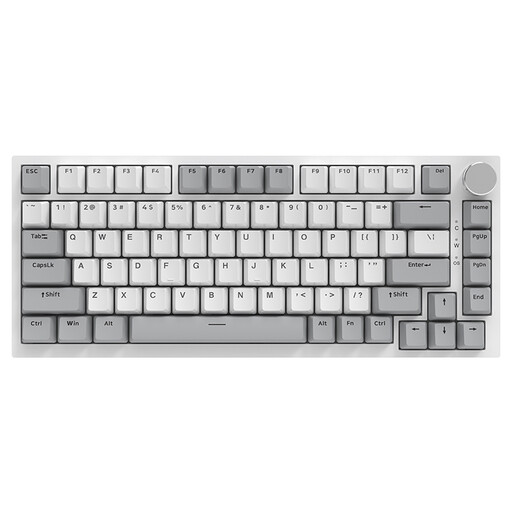
Why we chose it: This keyboard is for those who prioritise typing feel and customisation. Its 75% form factor frees up space for the mouse—a competitive gaming asset—while retaining essential function keys.
Here, the focus is on what really matters: a Gasket mount for a softer typing feel and a muted sound, and hot-swappable switches for deep customisation. This is far from a simple RGB gimmick.
Gasket mount and hot-swappable switches for a premium, tailor-made typing experience.
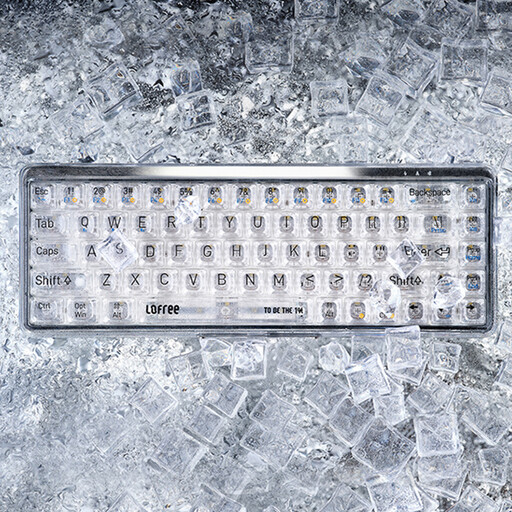
Why we chose it: Ideal for those looking to blend gaming with modern aesthetics. Its ultra-compact 65% form factor and transparent design make it a true decorative object for a desk that stands out from the rest.
Its bold design is more than just a facade. It features genuine mechanical switches (MX Jellyfish) and dual connectivity (Bluetooth 5.1/wired), making it equally at home in gaming and office work.
A stunning design and versatile connectivity for a desk that's as beautiful as it is powerful.
Discover our complete selection of tested and approved products that meet our high standards and local regulations.
A mechanical keyboard has an independent switch under each key. The result: more precision, better responsiveness, and a much longer lifespan. A membrane keyboard, on the other hand, uses a common rubber sheet. It's quieter and cheaper, but also less precise and wears out faster, which is not ideal for intensive gaming.
Absolutely, but pay attention to the technology! 2.4 GHz wireless (via a USB dongle) now offers imperceptible latency, on par with wired connections for competitive play. Bluetooth, however, should be reserved for office tasks due to its higher latency. Tri-mode models, like the RAPOO V700DIY, combine the best of all worlds for maximum versatility.
Forget the marketing numbers. Most pro gamers play between 400 and 1600 DPI. A stratospheric DPI count does not guarantee quality. What's essential is the quality of the optical sensor, the weight of the mouse, and its grip. A mouse like THE G-LAB Kult-Helium, with an adjustable range up to 6400 DPI, is more than enough for 99% of users.