
Livraison le jour même ou le lendemain

Qualité garantie

Débloquez vos offres de bienvenue: Livraison GRATUITE | Jusqu'à -80 % | 30 jours d'essai gratuits à JoyPlus
Téléchargez l'application
Building the gaming setup of your dreams is an exciting project. But with an overwhelming number of options, the risk of turning this investment into a costly disappointment is very real. Before pulling out your credit card, it's crucial to know how to separate marketing claims from the features that truly matter for your comfort and your gear's longevity.
Here are the 3 classic mistakes made when buying gaming gear, and more importantly, how to avoid them.
To make the right choice, focus on objective technical specifications. They are the real deciding factors, far beyond marketing claims.
A good gaming chair is an investment in your back health. Here are the points to check:
Lighting shapes the atmosphere of your gaming space. For a successful gaming decor, don't overlook these aspects:
Instead of a random list, we've matched each product to a user profile to help you find the gear that's truly right for you.
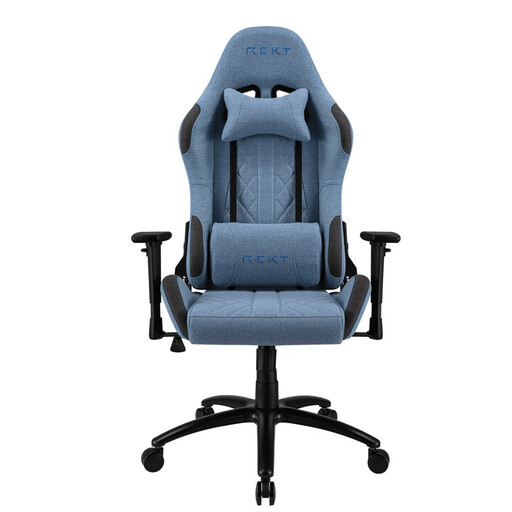
Why this choice? Ideal for those who use their desk for gaming as well as for remote work or leisure. Its elegant design and understated colour blend easily into a bedroom or office without clashing with the decor, all while delivering the performance of a true gaming chair.
It doesn't sacrifice ergonomics. With its steel frame, 55 kg/m? foam, and 3D armrests, it provides lasting support, unlike chairs that focus solely on a flashy look.
Its Elastron fabric is breathable, which prevents the discomfort of sweating during long sessions. A real advantage over entry-level PU leather covers that get hot and sticky.
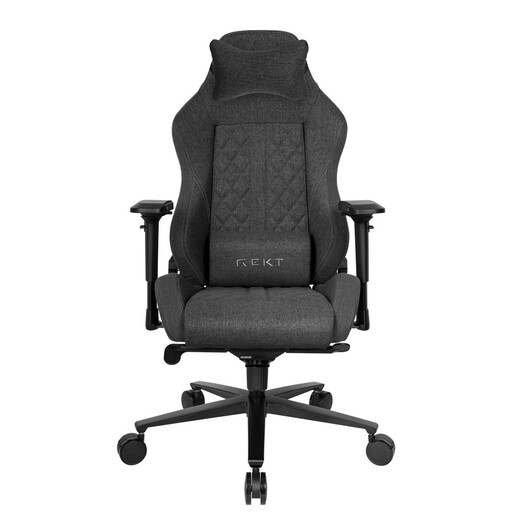
Why this choice? Designed for heavy users who spend long hours sitting. Its premium build focuses on performance and endurance—non-negotiable qualities for streaming or esports.
It sidesteps the low-quality materials trap with its ACD-12 aluminium base and high-density cold-cured foam (65 kg/m?). This guarantees well-above-average durability and support.
Its Elastron fabric is treated to be water-repellent, which makes maintenance much easier and protects the chair from everyday spills (like a knocked-over drink).

Why this choice? Perfect for personalising a wall without a complex installation. A simple and effective gaming decor accessory that instantly adds character to the room.
It avoids the gimmicky lighting trap by positioning itself as a purely decorative object. Its pink light is designed for ambience, not illumination, which prevents any visual fatigue. Its USB-C power supply is a modern and practical feature.
Its built-in, USB-rechargeable battery makes it completely portable. You can move it wherever you want without worrying about cables, making it ideal for changing up your decor or taking it to an event.
Discover our complete and up-to-date selection of products that meet our strict selection criteria and current safety standards.
Its lifespan depends directly on the quality of its components. An entry-level model with a plastic base and low-density foam can show significant signs of wear within the first or second year. Conversely, a gaming chair with a steel frame, an aluminium base, and high-density foam (over 50 kg/m?) can easily last more than 5 years with regular maintenance.
While not strictly "essential," it is highly recommended for anyone who spends more than an hour a day at their desk. Its main benefit is the ergonomic support it provides (lumbar, cervical), which prevents poor posture and the resulting long-term pain. A good ergonomic office chair can also do the job, but gaming chairs generally offer more advanced adjustments specifically designed for the gaming posture.
Prioritise indirect lighting. The ideal solution is to place LED strips behind your monitor or desk to create a luminous halo (the so-called "bias lighting"). This technique reduces the harsh contrast between the screen's brightness and the room's darkness, thereby reducing eye strain. Opt for models where the intensity and colour are adjustable, and most importantly, avoid placing powerful light sources directly in your field of vision.