
Livraison le jour même ou le lendemain

Qualité garantie

Débloquez vos offres de bienvenue: Livraison GRATUITE | Jusqu'à -80 % | 30 jours d'essai gratuits à JoyPlus
Téléchargez l'application
Building your dream gaming setup is an art form. It's about more than just the raw power of your PC or console; the visual atmosphere is what truly makes or breaks the immersion. The problem is, the gaming decor market is flooded with products that make enticing promises but often disappoint in practice. Before pulling out your credit card, it's crucial to know the pitfalls to avoid so you can build a space that is aesthetic, functional, and built to last.
Let's cut through the marketing jargon and focus on what matters. Here's our guide to sidestepping the most common mistakes and mastering the criteria that truly count.
Too many gamers end up disappointed by products that don't live up to their promises. Here are the three mistakes you absolutely must not make:
To avoid these disappointments, you just need to look at a few key technical specifications. These are what will guarantee the quality, versatility, and longevity of your setup.
This is arguably THE key differentiator for any LED gaming lighting worthy of the name.
A gaming setup worthy of the name relies on perfect synchronisation. So, check that your lights are compatible with ecosystems like Razer Chroma or Overwolf. These platforms allow your lights to react in real time to in-game events (an explosion, a level-up, an alert...), creating a total sensory experience. Compatibility with voice assistants (Google Assistant, Alexa) and unified protocols like Matter is also a real plus for simplifying day-to-day control.
Your gaming space isn't set in stone; it will evolve. Opting for a modular system is therefore a future-proof choice. Light panels you can assemble like bricks, extendable LED strips... modularity gives you the freedom to adapt and expand your setup over time, without having to throw everything out and start over.
Because every gamer is unique, here is our selection of products designed for different profiles that tick all the right boxes.
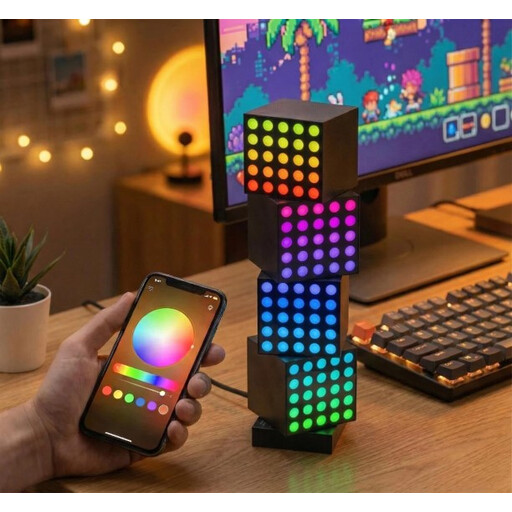
Why it's a perfect match: Content creators are looking for one thing above all: a stunning, unique, and customisable background. The modular Yeelight Cube system does just that, allowing you to build 3D structures with its various modules (Matrix, Panel, Spot). It offers total creative flexibility to stand out while streaming.
It bypasses the incompatibility trap by offering a unified and scalable ecosystem. All the cubes connect magnetically and are controlled from a single app for flawless synchronisation.
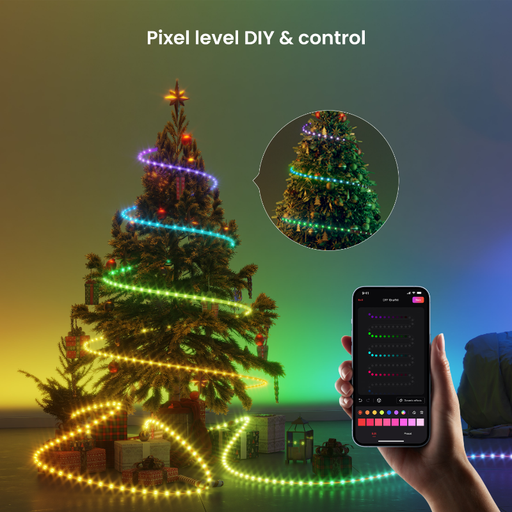
Why it's a perfect match: For total immersion, the lighting needs to follow the action. This strip is specifically designed to be placed behind a desk or TV to synchronise its colours with the on-screen content, extending the game's universe throughout the room.
Thanks to RGBIC technology, it breaks free from the limitations of classic RGB strips. Capable of displaying dozens of colours at once, it creates fluid and responsive effects, a far cry from abrupt, uniform colour changes.
Dynamic multicolour effects: Perfect for a reactive and immersive atmosphere. Easy Installation: Designed for desks, monitors, and TVs. Extendable with the Pro extension strip.
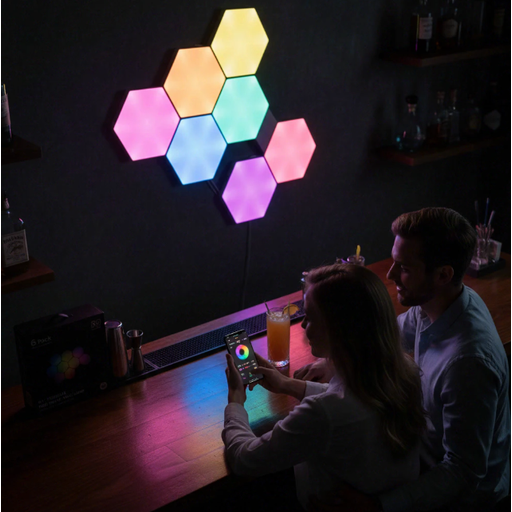
Why it's a perfect match: For those who see their wall as a blank canvas, these panels allow you to create unique geometric shapes. It's a piece of gaming decor that doubles as an ambient light, at the crossroads of art and technology.
It offers a turnkey, easy-to-install solution, far from risky DIY projects. The USB connection system between panels and the included adhesive (pro tip: warm it up slightly for a better hold) prevents any nasty surprises with mounting.
Limitless creativity: Assemble the 8 panels (and more if you like) into any shape you choose. Music Sync: The lights pulse to the rhythm of the music, perfect for setting the mood. Also available as triangular panels.
No gaming setup is truly complete without a screen that can keep up. For console gamers or those who like to see the big picture, a TV built for gaming is a very smart choice. The 50-inch Samsung Crystal UHD 4K U80F is an excellent entry point. It includes dedicated features like Motion Xcelerator for smoothness and HGiG support for optimised HDR rendering. It's enough to say goodbye to the latency issues or approximate colourimetry of standard TVs.
For an even more spectacular alternative, the XGIMI Mogo 4 Match Night Collection portable projector can turn any white wall into a cinema screen, for an extra-large immersive experience at home or on the go.
Finally, let's not forget the gaming accessories that add the finishing touch. A controller and smartphone holder like the CABLE GUYS Ikon Light Deadpool is more than just a practical gadget for charging your devices: it asserts the personality of your gaming space.
We have compiled a comprehensive list of products that meet our demanding selection criteria and current safety standards.
The main difference comes from the control chip (the "IC" in RGBIC). A classic RGB strip displays one single colour along its entire length at any given moment. In contrast, an RGBIC strip integrates independent chips that allow for control over different LED segments. The result: it can display multiple colours at the same time, creating much more fluid, complex, and immersive effects (colour waves, gradients, etc.).
For real-time synchronisation, you need to choose lights that are compatible with software platforms like Razer Chroma, Overwolf, or Corsair iCUE. Once the software is installed on your PC, it will automatically detect compatible games and peripherals. All you have to do is activate the sync, and your lights will react to in-game actions: a drop in your health bar, using a skill, an event in the environment, etc.
While any TV can display a game's image, a model optimised for gaming offers a far superior experience. The criteria to look for are a low response time (or input lag), a high refresh rate (60?Hz minimum, with 120?Hz being ideal for new-gen consoles), and dedicated modes like Auto Low Latency Mode (ALLM). Technologies like HGiG for HDR are also a real plus, as they ensure a visual rendering that is faithful to the game creators' vision.