
Livraison le jour même ou le lendemain

Qualité garantie

Débloquez vos offres de bienvenue: Livraison GRATUITE | Jusqu'à -80 % | 30 jours d'essai gratuits à JoyPlus
Téléchargez l'application
By the Joybuy Editorial Team, July 4, 2026
Whether you're a gamer, content creator, or remote worker, spending long hours in front of a screen demands an environment that is as high-performance as it is comfortable. A well-designed gaming setup is more than just a matter of aesthetics: it's a true investment in your well-being and productivity. But with the overwhelming number of options available, it can be hard to know where to start.
This guide will help you build a balanced gaming station by focusing on three essential pillars: the desk, the keyboard, and the chair. Follow our practical advice and discover our product selections to build a space that's uniquely yours.
Before making a purchase, there are a few criteria to consider to ensure every part of your gaming gear works together as a cohesive and effective whole.
Workstation ergonomics is the most critical factor. Poor posture can quickly lead to back, neck, and wrist pain.
The layout of your desk and peripherals has a direct impact on your comfort and performance. A TKL (TenKeyLess) mechanical keyboard, which omits the number pad, is a smart choice to free up space for your mouse. This compact form factor allows for a much wider range of motion, a decisive advantage in many games.
A tidy gaming space isn't just more visually appealing; it's also more functional. An all-in-one gaming desk often includes cable management solutions, like grommets or storage nets. It's a detail that changes everything, transforming a tangled mess into a clean workstation.
Here are a few products that form a solid foundation for an optimised gaming and work environment.
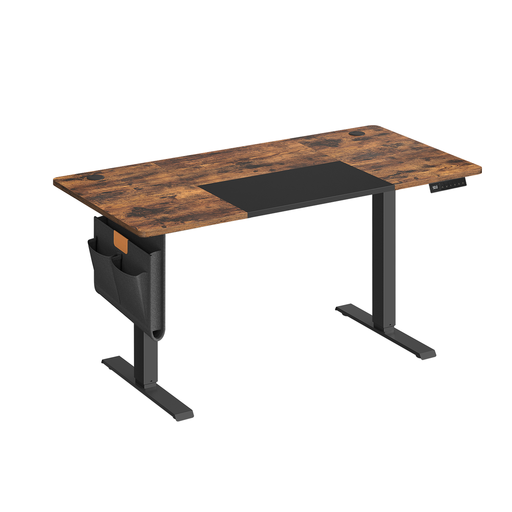
Why We Chose It This sit-stand desk combines ergonomic flexibility with practical features. Its ability to memorise multiple heights makes it ideal for shared use or for easily switching between your favourite positions.
Highlights
Who Is It For? For gamers, remote workers, and content creators who want to improve their workspace ergonomics without sacrificing practicality. Its versatility makes it the ideal centrepiece for a complete setup.
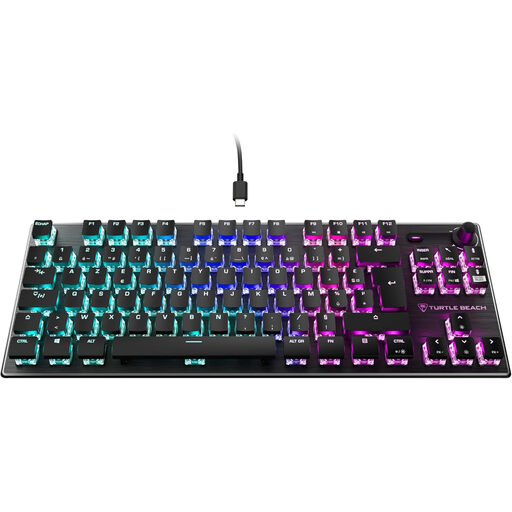
Why We Chose It The Vulcan TKL is built for performance. Its compact form factor and ultra-fast mechanical switches make it a precision tool for demanding gamers.
Highlights
Who Is It For? For gamers who prioritise responsiveness and space optimisation. Its sleek design and performance-oriented features make it an excellent choice for upgrading your gaming gear.

Why We Chose It This chair is all about comfort for marathon gaming sessions. With its retractable footrest and wide recline range, it easily transforms into a relaxation chair.
Highlights
Who Is It For? This ergonomic gamer chair is for those who spend long hours in front of their screen and are looking for maximum comfort, even during breaks.
Building your gaming setup is a highly personal journey. If these products don't exactly match what you're looking for, or if you want to explore other styles, especially when it comes to desks, we invite you to browse our dedicated category.
Discover Our Selection of Gaming Desks
A good gaming setup is all about balancing performance and comfort. The must-haves are: a PC (or console), a good monitor, an ergonomic chair, a stable desk, and quality peripherals (keyboard, mouse, headset). Don't forget lighting and cable management, which play a key role in the overall atmosphere and ergonomics.
A gaming chair is specifically designed to support the body during long sessions in a seated position. It generally offers far more advanced adjustments than a standard office chair: a deeper backrest recline, 4D armrests (adjustable in four directions), and removable head and lumbar pillows.
Absolutely. Even though you'll primarily be gaming while seated, a sit-stand desk is a huge plus. Being able to stand up during a loading screen, between matches, or while browsing the web helps to break up long sedentary periods. It's excellent for blood circulation and helps reduce fatigue during sessions that run long.