
Livraison le jour même ou le lendemain

Qualité garantie

Débloquez vos offres de bienvenue: Livraison GRATUITE | Jusqu'à -80 % | 30 jours d'essai gratuits à JoyPlus
Téléchargez l'application
Building your dream gaming setup is an exciting quest. From performance and aesthetics to comfort, every detail counts when creating an immersive battlestation. However, the market is saturated with marketing promises and gadgets that quickly drive up the cost with no real added value. Before you dive in, it's crucial to know how to avoid common pitfalls to invest your money wisely.
As a product specialist at Joybuy, my mission is to help you see things more clearly. Let's analyse the mistakes to avoid and the essential criteria for making the right choices.
Enthusiasm can sometimes lead to impulse buys. Here are three common mistakes that cost gamers dearly?:
To build a coherent and high-performance gaming setup, focus on a few fundamental parameters.
The connection type of your PC peripherals directly impacts latency, freedom of movement, and the organisation of your desk.
A wireless mechanical keyboard like the AJAZZ AK980 V2, with its triple connectivity, offers valuable flexibility for switching between gaming and work.
The feel and longevity of your hardware are determined by its internal design.
Lighting is no longer just a gimmick. Good RGB setup lighting contributes to the immersion and aesthetics of your space.
Rather than an exhaustive list, here are a few products that cater to specific user profiles, taking into account the criteria we've just discussed.
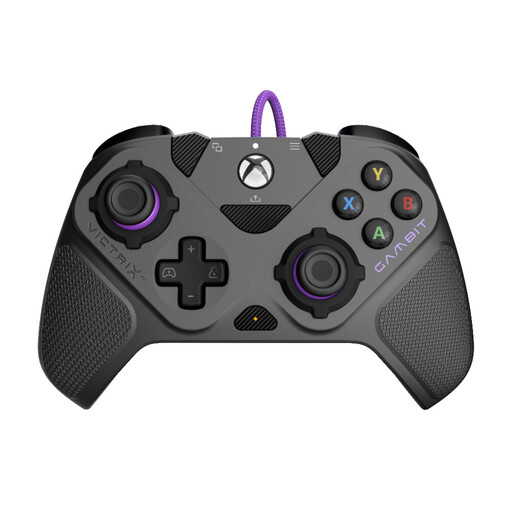
Ideal for : Built for performance on Xbox and PC, it's aimed at gamers seeking a competitive edge through extensive hardware and software customisation.
It avoids the "fake pro controller" trap by focusing on true modularity. The 12 interchangeable components allow it to be adapted for fighting, racing, or shooting games, instead of offering fixed, less useful features.
Clutch Triggers : 5 adjustable stopping points for instant shots in FPS games. Full Modularity : change the stick layout, D-pad, and back paddles.
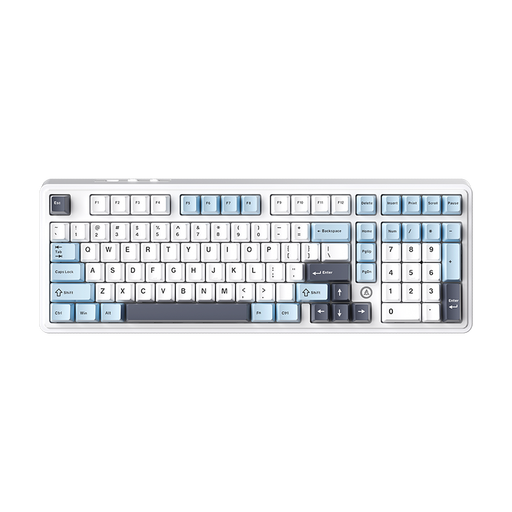
Ideal for : Perfect for those who love to tinker and fine-tune their hardware. This keyboard provides a solid foundation for creating a unique typing experience for both gaming and office work.
It sidesteps the "one-and-done" keyboard trap by being upgradable. Thanks to its hot-swap PCB, you're not locked in with the original switches. You can easily replace them to test different feels without buying a whole new keyboard.
Hot-swappable PCB : change switches without soldering. Gasket-mount structure and 5 sound-dampening layers : for a soft and pleasant typing sound, a far cry from the cheap "clack."
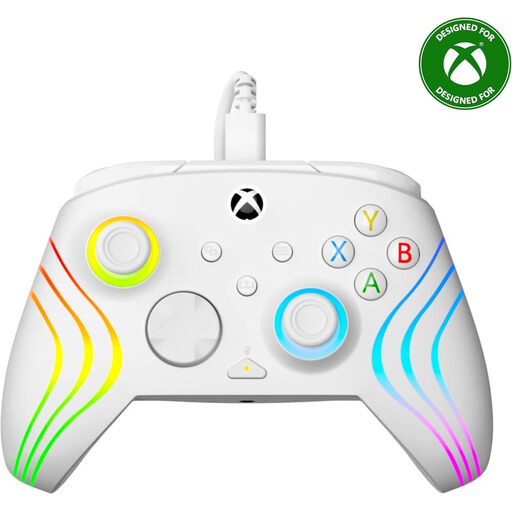
Ideal for : Perfect for Xbox and PC gamers who want to combine performance, durability, and a bold RGB aesthetic. The semi-transparent shell and customisable lighting make it a setup centrepiece.
It doesn't sacrifice quality for aesthetics. Beneath its RGB lighting lie Hall effect triggers, a durable technology that prevents wear and ensures long-term precision, unlike low-end controllers.
Hall Effect Triggers : increased precision and durability. 8-Zone RGB Lighting : fine-tune your lighting ambiance. Available in white, blue, or grey.
Other accessories can complete your space, like a PS5 cooling fan to optimise cooling during long sessions, a mini gaming PC like the FIREBAT AM02L for a compact setup, or a decorative gaming lamp like the Fortnite chest lamp for a touch of originality.
To create a unique atmosphere, lighting is key. Discover our selection of tested and approved products that meet strict quality and safety standards.
1. What's the difference between a mechanical and a membrane keyboard for gaming? A membrane keyboard uses a rubber dome under each key. It's generally quieter and cheaper. A mechanical keyboard has an individual switch for each key, offering better tactile feedback, greater precision, and a much longer lifespan. It's the preferred choice for gamers.
2. Does RGB lighting affect my PC's performance? The impact is negligible. The power consumption of RGB setup lighting (keyboard, mouse, LED strips) is very low and won't affect the performance of your CPU or graphics card. On the most complex setups, the control software might use a tiny fraction of CPU resources, but the impact remains minimal.
3. How do I choose the right pro controller for Xbox or PC? Don't just trust the marketing. Look for useful features like programmable back paddles to assign actions without letting go of the thumbsticks, adjustable triggers to adapt the travel distance for FPS or racing games, and interchangeable thumbsticks to vary height and shape. The presence of Hall effect sensors is an excellent indicator of durability.