
Livraison le jour même ou le lendemain

Qualité garantie

Débloquez vos offres de bienvenue: Livraison GRATUITE | Jusqu'à -80 % | 30 jours d'essai gratuits à JoyPlus
Téléchargez l'application
Whether you're an esports pro aiming for the podium, a content creator perfecting your setup, or simply an enthusiast seeking the ultimate gaming comfort, your choice of gaming peripherals is crucial. The market is flooded with marketing promises, but not all of them hold up. As a product expert at Joybuy, my mission is to help you sort through the inflated spec sheets and identify true innovation. Let's break down the common pitfalls to ensure you invest wisely.
The excitement of a new gamer keyboard or a brand-new mouse can quickly turn to disappointment. Here are the three most common mistakes and our advice on how to avoid them.
To make the right choice, forget the marketing hype and focus on these key technical points. This is where the true quality of your future gaming setup accessories lies.
The right connection depends on your use case.
For a mechanical keyboard, the switch type defines the typing experience.
The hot-swappable feature is a huge plus for durability and customisation. It means you can change the switches yourself without any soldering. This allows you to repair, upgrade, or transform your custom keyboard in an instant.
For a gamer mouse, two numbers matter more than anything else.
Rather than just listing products, let's look at which solutions meet specific needs.
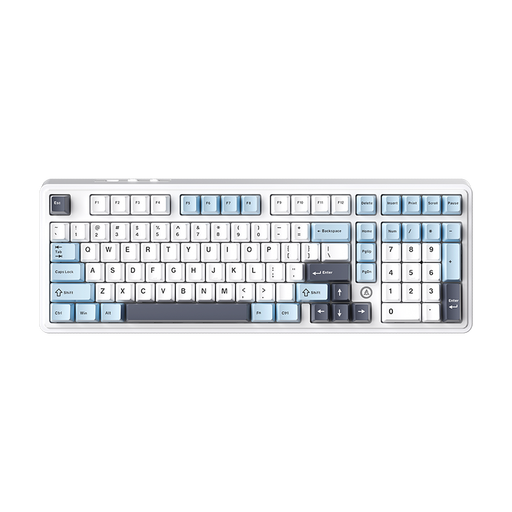
Why we chose it: The ultimate weapon for those who love to tinker and create a custom keyboard that reflects their personality. This model is designed to be modified from top to bottom, from its sound to its typing feel, for a 100% bespoke experience.
It sidesteps the switch dilemma by integrating a hot-swappable PCB. No more permanent choices: you're no longer locked into one switch type and can change them whenever you want.
"Gasket Mount" structure and five layers of sound-dampening foam for exceptional acoustics and typing comfort. Tri-mode connectivity for absolute versatility.
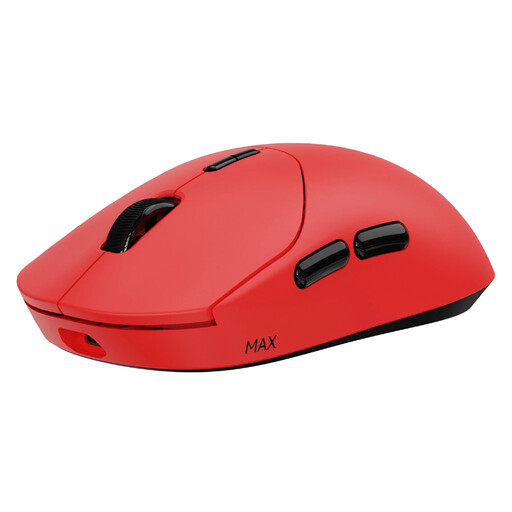
Why we chose it: Built for players who tolerate no compromise on responsiveness and precision. Here, every gram and every millisecond counts towards dominating the match.
It shatters the myth of underperforming wireless with its native 2.4 GHz connection at 8000 Hz and a monstrous 750-hour battery life. Wireless performance is no longer a sacrifice; it's an asset.
Featherlight 53 g weight for less fatigue and devastating flicks. Optical switches for instant responsiveness and rock-solid durability.
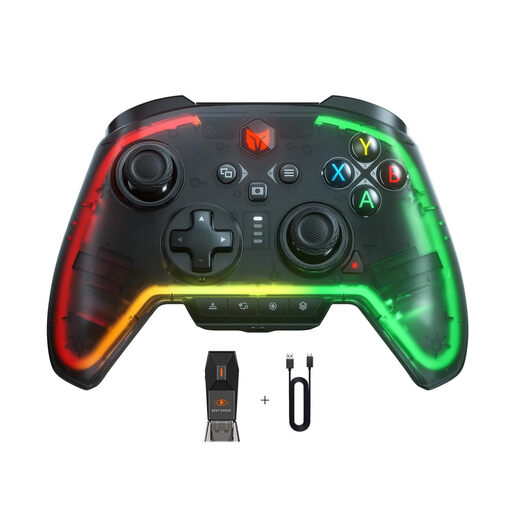
Why we chose it: For the versatile gamer who juggles between their PC and Switch. This PC controller is a true Swiss Army knife, packed with pro-level features to adapt to any game.
It avoids the gimmick trap by focusing on additions that make a real difference in-game: programmable back buttons, macro functions, and a turbo mode. These aren't novelties; they are real performance assets.
Broad compatibility (PC, Switch, PS4 via adapter) and a 6-axis gyro for enhanced immersion. The on-the-fly programmable buttons offer a tangible competitive edge.
A great gaming setup is more than just peripherals. The right lighting is the final touch for total immersion. Discover our selection to create a gaming environment that's uniquely yours.
The lifespan of a mechanical keyboard primarily depends on its switches. Most quality switches are rated for 50 to 100 million keystrokes, which guarantees many years of use, even with heavy gaming. Hot-swappable models have a significant advantage: if a switch fails, you can replace it in seconds without having to change the entire keyboard.
Yes, absolutely! While many regions use layouts like AZERTY, many gamers and developers swear by QWERTY, which is more common for gaming and coding. Both Windows and macOS allow you to change the keyboard layout in just a few clicks in the language settings. Simply select "English (US)" for your QWERTY keyboard to be recognized instantly.
An 8000?Hz polling rate means your mouse reports its position to the computer 8000 times per second, compared to 1000 times for a standard model. The result? Smoother cursor movement and even lower latency. To take full advantage of it, you need a powerful PC and a high-refresh-rate monitor (144?Hz and above). For the average gamer, 1000?Hz is more than sufficient. But for hardcore competitors looking to shave off every millisecond, 8000?Hz can provide that slight edge that makes all the difference.