
Livraison le jour même ou le lendemain

Qualité garantie

Débloquez vos offres de bienvenue: Livraison GRATUITE | Jusqu'à -80 % | 30 jours d'essai gratuits à JoyPlus
Téléchargez l'application
Building or upgrading a gaming PC in the UK is not simply a matter of comparing clock speeds, fan counts or whether a component features « RGB ». Components must be compatible with one another, fit inside the case and suit the way you use your PC. A rushed compatibility check can lead to more noise, an impossible installation or additional purchases.
The selection below is based on specifications provided by the manufacturers. It is designed to help you compare specific options without confusing aesthetics, compatibility and performance.
An ARGB PC case or RGB PC components can add plenty of character to a build, but lighting effects do not improve airflow. The number, position and format of the fans are what really make the difference. A front panel that is too enclosed can restrict air intake, even when the case contains several fans.
A CPU cooler measuring 160 or 170 mm in height may not fit inside a compact case. Likewise, a 360 mm liquid-cooling radiator requires compatible mounting points and sufficient clearance for the fans. Before ordering, compare the maximum CPU cooler height, graphics card length and space available for the power supply.
Intel/AMD compatibility must be checked against the exact processor and motherboard models. Intel LGA 1700 and LGA 1851 sockets, like AMD AM4 and AM5 platforms, do not always use the same mounting systems. Also remember to check for a 4-pin PWM connector, a 3-pin ARGB header or an internal USB port if you want to control a display or lighting using software.
Tempered glass lets you showcase your components, but it requires a little extra care during handling and does not remove the need for a properly ventilated front panel. For a compact build, the Cooler Master Elite 302 supports Mini-ITX and Micro-ATX motherboards, graphics cards up to 365 mm without front fans or a radiator, and a 163.5 mm CPU cooler.
For a build designed to evolve, the Cooler Master Elite 502 supports ITX, Micro-ATX, ATX and certain E-ATX formats, with a maximum CPU cooler height of 170 mm. It features a mesh front panel, three pre-installed 120 mm ARGB fans and 33 to 35 mm of space behind the motherboard for cable management.
A CPU air cooler is generally easier to install and has no pump or liquid circuit. Available in black or white, the MSI MAG Corefrozr AA13 measures 152 mm in height, supports Intel LGA 1700/1851 and AMD AM4/AM5 sockets, and uses four 6 mm copper heat pipes. The Cooler Master Hyper 612 APEX reaches 159 mm in height and features six heat pipes and two PWM fans.
A 240 mm liquid cooler can be a good option when space on the top or front of the case is limited. Available in black and white, the Cooler Master ML Core Nex Digital 240 has two 120 mm fans, a 277 mm radiator and compatibility with the Intel and AMD sockets specified by the manufacturer.
A 360 mm liquid cooler requires more space, but may suit a build with a heavily loaded processor. The Cooler Master MasterLiquid 360 Atmos Stealth features a 394 mm radiator and three Mobius 120 fans. Before buying, always check the available mounting position in the case, particularly if the motherboard or memory modules are large.
A wireless mechanical keyboard should not be chosen solely for its battery life. The Cooler Master MK770 Macaron offers three connection modes: wired USB, 2.4 GHz wireless and Bluetooth 5.1. Its 4000 mAh battery, ISO layout with 99 keys in a French layout and hot-swappable Kailh Box V2 switches make it suitable for a range of uses.
Its gasket-mounted construction helps reduce vibration and typing noise, according to the product description. The keyboard also offers a polling rate of 1000 Hz in wired and 2.4 GHz modes, compared with 125 Hz over Bluetooth, as well as RGB lighting that can be configured in MasterPlus+ software. To help preserve the battery, use a certified charger and protect the keyboard from liquids and extreme temperatures.
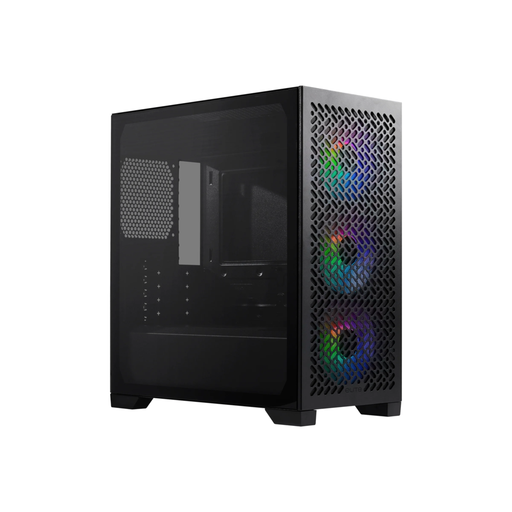
Why this choice suits this profile : This Cooler Master case is ideal for a first compact Mini-ITX or Micro-ATX build, and comes with three 120 mm ARGB fans.
The stated dimensions and detailed clearances reduce the risk of choosing an oversized graphics card or CPU cooler.
USB Type-C port, dust filters and support for a front radiator up to 360 mm.
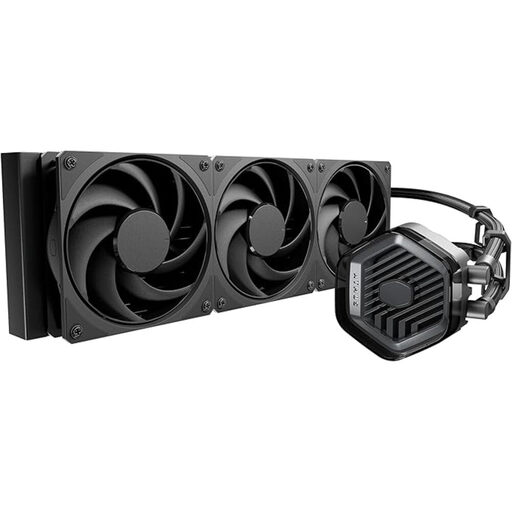
Why this choice suits this profile : Its 360 mm radiator, three Mobius 120 fans and Intel/AMD compatibility make it suitable for spacious builds.
Check the radiator mounting position before buying: this model provides the dimensions needed to carry out that check.
Black design without lighting, pump rated at 3400 rpm and a five-year manufacturer’s warranty.
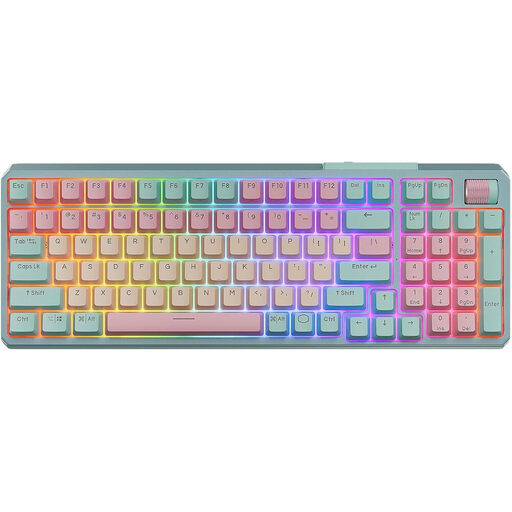
Why this choice suits this profile : This wireless mechanical keyboard is designed for gamers and creators who switch between devices and want to personalise their typing experience.
Its three connection modes mean you are not dependent on a single link, while the replaceable switches make future keyboard upgrades easier.
4000 mAh battery, double-shot PBT keycaps, multifunction dial and 128 KB of built-in memory.
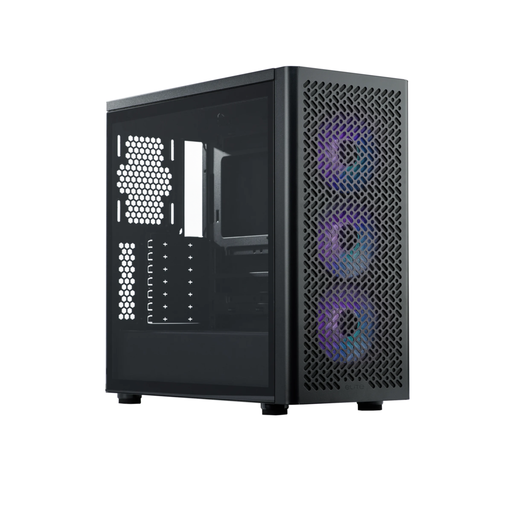
Why this choice suits this profile : Its format supports ATX motherboards, several storage drives and long graphics cards.
Support for a front radiator up to 420 mm and a 170 mm CPU cooler makes planned upgrades easier.
Mesh front panel, three ARGB fans included, USB Type-C port and removable HDD cage.
We have compiled a complete, real-time-updated list of products that meet these demanding selection criteria and European safety standards.
A CPU air cooler is suitable for users looking for a simple installation and a system without a pump or liquid circuit. A 240 or 360 mm liquid cooler may be worth considering if the case has the necessary mounting points and the build justifies a more substantial solution. In all cases, check the socket, dimensions and connectors before ordering.
It depends on how it is used, the amount of dust, the temperature and how software develops. A case can support several upgrades as long as its dimensions remain suitable. With liquid cooling, regularly check the fans and connections, and make sure there are no leaks. Always follow the warranty conditions and the manufacturer’s recommendations.
RGB lighting generally causes a limited increase in power consumption, but this varies depending on the number of fans, LED strips and peripherals being used. For a reliable estimate, check the power requirements of each component and choose a power supply with sufficient headroom for the graphics card, processor and other components.