
Livraison le jour même ou le lendemain

Qualité garantie

Débloquez vos offres de bienvenue: Livraison GRATUITE | Jusqu'à -80 % | 30 jours d'essai gratuits à JoyPlus
Téléchargez l'application
Building a computer with gaming PC components can quickly push up the cost if you focus solely on clock speeds, core counts or marketing promises. A successful build relies first and foremost on compatibility between the various components, along with suitable cooling and power delivery.
Three mistakes are particularly common among French shoppers:
On a recent AMD platform, an AM5 motherboard must be paired with a processor compatible with this socket. Models fitted with a B650 or B850 chipset support several Ryzen generations, but exact compatibility varies depending on the motherboard and its firmware version. It is therefore best to check the list published by the manufacturer before placing your order.
The motherboard form factor also deserves your full attention:
When it comes to memory, a 6000 MHz DDR5 RAM kit — a value generally expressed in MT/s — is a popular choice for an AM5 build. Check the number of available slots, the maximum supported capacity and EXPO compatibility. Two 16 GB modules, such as the 32 GB Kingston FURY Beast kit, will generally allow you to benefit from dual-channel operation, provided they are installed in the slots recommended by the motherboard.
A gaming graphics card should not be chosen based solely on its model number. You should also compare:
ZOTAC’s RTX 5070 measures approximately 304.4 mm and uses a 16-pin PCIe connector. Its product listing recommends a power supply of at least 650 W. The Palit RTX 5070 Ti GamingPro-S, meanwhile, reaches 331.9 mm, occupies 2.5 slots and recommends a 750 W power supply. These specifications should be checked against the case’s technical details, rather than its commercial name alone.
For a more affordable build, Gigabyte’s RX 7600 measures 282 mm, features 8 GB of GDDR6 and recommends a 550 W power supply. INNO3D’s RTX 5060 Ti measures 250 mm, has a power consumption of 180 W according to its technical specifications and recommends a 650 W power supply.
An 850 W PC power supply does not mean that your computer will constantly consume 850 W. This figure simply indicates the maximum power the unit can deliver. The ADATA XPG Core Reactor II VE 850W features a modular design, carries the 80 Plus Gold certification stated in its product listing and supports the ATX 3.1 standard with a 12V-2x6 connector.
However, remember to check the length of the PSU, the available PCIe connectors and the space provided for routing the cables. When it comes to PC cooling, the number of pre-installed fans alone does not guarantee the same results in every build. Their layout, airflow, CPU cooler height and the possible presence of a radiator all play an equally important role.
A compact Mini-ITX or Micro-ATX case may be perfectly suited to a space-saving desk setup, but it offers less room for fitting a thick graphics card, organising cables or installing a radiator.
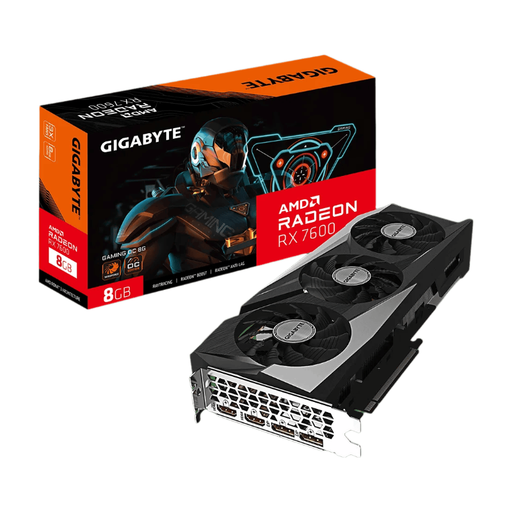
Why this choice suits this profile : With 8 GB of GDDR6 and a length of 282 mm, it is an appealing option for a first 1080p gaming build, provided you check the available space in the case and the power supply’s output.
The listing specifies a recommended 550 W power supply and an 8-pin connector, making the checks before purchase straightforward.
RDNA 3 architecture, 8 GB of memory and four video outputs, according to the stated specifications.
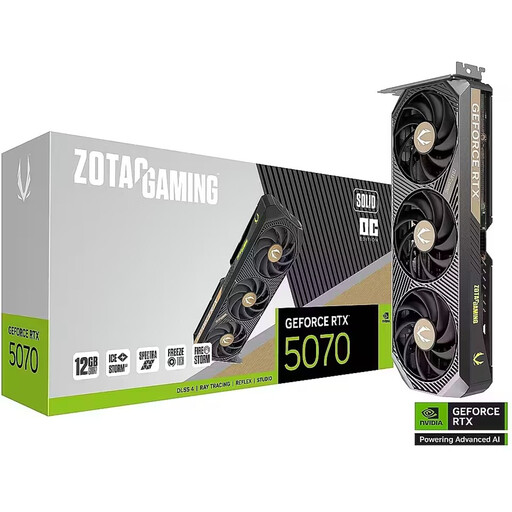
Why this choice suits this profile : Its 12 GB of GDDR7, DisplayPort and HDMI outputs, along with its suitability for creative work, make it a strong choice for demanding builds.
At approximately 304.4 mm long and 2.5 slots thick, it allows you to plan the required space rather than relying on the RTX 5070 name alone.
12 GB of GDDR7, PCI Express 5.0 x16 interface and a 16-pin power connector, according to the technical specifications.
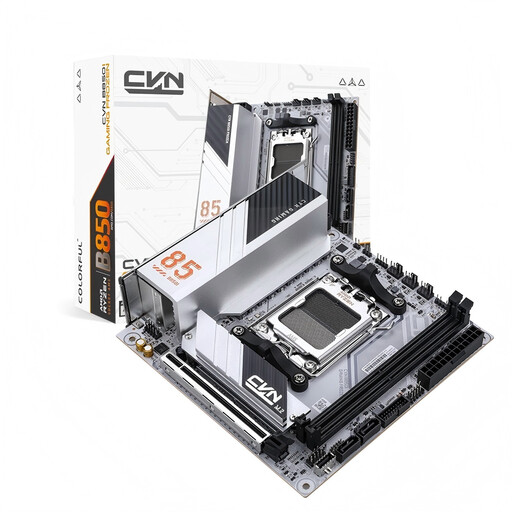
Why this choice suits this profile : With its 170 × 170 mm Mini-ITX form factor, this motherboard is aimed at anyone wanting a compact machine without giving up Wi-Fi 6E, two M.2 slots or an AM5 platform.
The form factor, number of slots and connectivity are clearly detailed, allowing you to anticipate the constraints of a Mini-ITX case.
AM5 socket, B850 chipset, two M.2 slots and 2.5 Gb/s networking, according to the product listing.
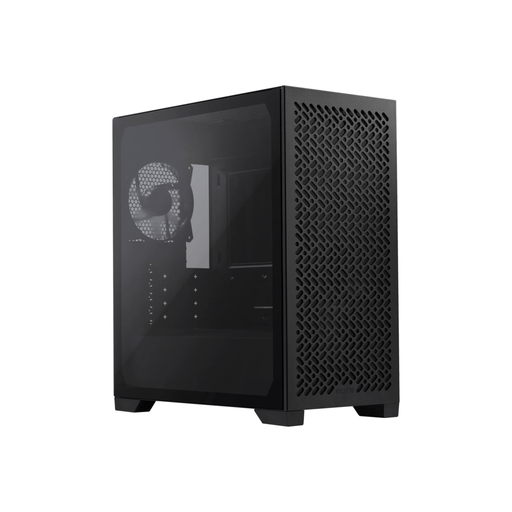
Why this choice suits this profile : This Micro-ATX case supports graphics cards up to 365 mm and features a magnetic mesh front panel as well as a USB Type-C port.
The clearances for the graphics card and CPU cooler are specified, as is compatibility with radiators up to 360 mm at the front.
Mini-Tower form factor, dust filters and support for six fans, according to the stated specifications.
We have put together a comprehensive, real-time updated selection of products that meet these demanding selection criteria and European safety standards.
32 GB of DDR5 RAM, split across two modules, provides comfortable capacity for most games, streaming and everyday multitasking. For 3D creation, video editing or certain artificial intelligence applications, upgrading to 64 GB — or more — may be worthwhile, depending on the software you use.
Not necessarily. The required wattage depends on the graphics card, processor and other components. Check the manufacturer’s recommendations and verify the available connectors. An 850 W power supply can provide useful headroom for future upgrades, but it does not remove the need to check the electrical compatibility of the entire system.
Clean the filters regularly, make sure airflow is not obstructed and monitor temperatures. Before carrying out any upgrade, check the dimensions, connectors, power supply capacity and motherboard firmware compatibility. These checks help you avoid incompatible purchases and make future upgrades easier.