
Livraison le jour même ou le lendemain

Qualité garantie

Débloquez vos offres de bienvenue: Livraison GRATUITE | Jusqu'à -80 % | 30 jours d'essai gratuits à JoyPlus
Téléchargez l'application
Buying a gaming mouse is not simply about choosing the model with the highest DPI count. A poorly suited mouse can quickly become uncomfortable, lack useful buttons or force you to install awkward software. Whether you play on PC, use a console or work for several hours a day, certain criteria deserve careful consideration before you buy.
A 26,000 DPI mouse offers a wide range of settings, but this figure alone does not guarantee better precision. The sensitivity you actually use depends on your screen, the games you play and your habits. In an FPS, moderate sensitivity often makes precise, controlled movements easier. For office work or a high-definition display, however, a higher setting may feel more comfortable.
Pay particular attention to the adjustment range, whether there is an easily accessible DPI button and whether you can save several sensitivity levels.
A lightweight mouse makes rapid movements easier, but a model that is too small or too low-profile may not suit a large hand. Conversely, a bulky ergonomic mouse may not feel responsive enough for some players.
Consider your grip: palm, claw or fingertip, as well as whether you prefer a right-handed or left-handed model. An ambidextrous mouse offers greater flexibility, while a mouse designed for a specific hand will often fit its shape more naturally.
A wired gaming mouse does not need a battery and maintains a stable connection, but its cable can get in the way. A wireless gaming mouse keeps your desk free from cable clutter, provided you keep an eye on battery life and charging.
For a USB mouse, check the connector type, cable length and compatibility with your computer or console. A PS5 mouse or Xbox mouse may work depending on the game being played, the available port and the functions supported by the console.
DPI indicates the sensitivity of the cursor movement. A mouse described as high-precision should above all offer stable, sufficiently gradual adjustment. Depending on their specifications, the gaming models in this selection offer 3,200, 7,200, 8,000, 12,800, 18,000 or up to 26,000 DPI.
Measured in hertz, the polling rate is the number of times per second that the mouse transmits its position to the device. A value of 1,000 Hz is common on gaming models and is also more than suitable for everyday use. It cannot, however, compensate for a poor sensor or a shape that does not suit your hand.
A programmable mouse lets you assign shortcuts, commands or macros to several buttons. This can be particularly useful in strategy games, MMOs, creative software or repetitive tasks.
Before choosing, count the buttons you can actually reach. Some manufacturers advertise several functions through a secondary key, even though the number of physical buttons is more limited. The supplied software may also be essential for adjusting profiles, DPI or lighting.
Weight has a direct effect on movement speed and how much control the mouse feels to offer. The models featured here range from approximately 36 to 125 grams, depending on their design. A non-slip finish can improve grip, but it requires regular maintenance with a soft, dry cloth.
An RGB mouse lets you personalise the look of your setup. It does not improve sensor precision, so treat it as a purely aesthetic feature and simply check whether the brightness and effects can be adjusted.
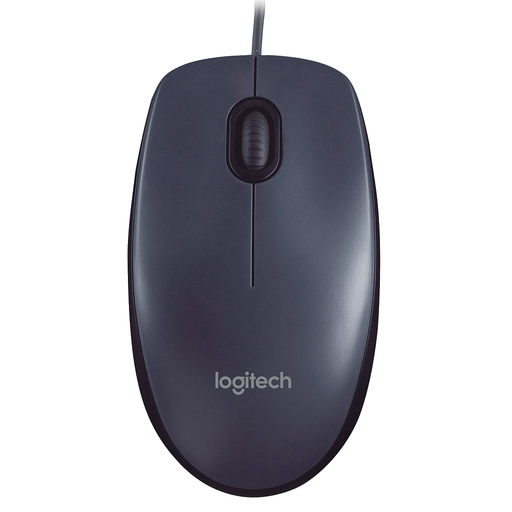
Why this choice suits this profile: This wired USB mouse connects instantly to a USB-A port, with no driver or software required. It features a 1,000 DPI optical sensor and three buttons. Its symmetrical shape suits both right- and left-handed users for everyday PC use.
It saves you paying for unnecessary gaming features when all you need is a mouse for browsing, working or occasional gaming.
Plug-and-play USB-A connection, 1.5 m cable and ambidextrous design.
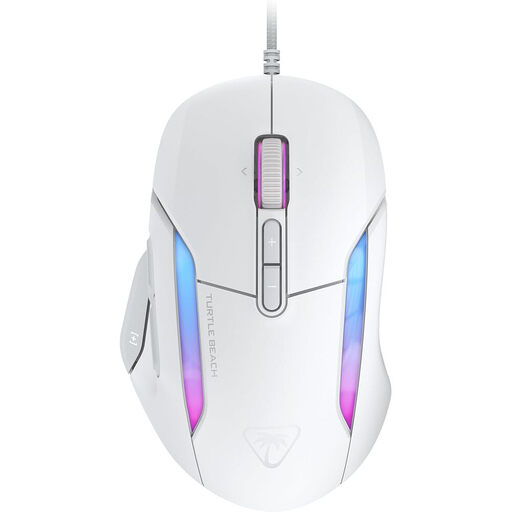
Why this choice suits this profile: Its shape suits medium to large hands and palm, claw or fingertip grips. It features a sensor reaching up to 26,000 DPI, seven programmable buttons and up to 23 functions with Easy-Shift [+].
The specifications clearly distinguish between the sensor, buttons, cable and software. This lets you compare the functions actually available, rather than relying solely on the headline figures.
26K sensor, 4D wheel, 1.8 m braided cable and adjustable RGB AIMO lighting.
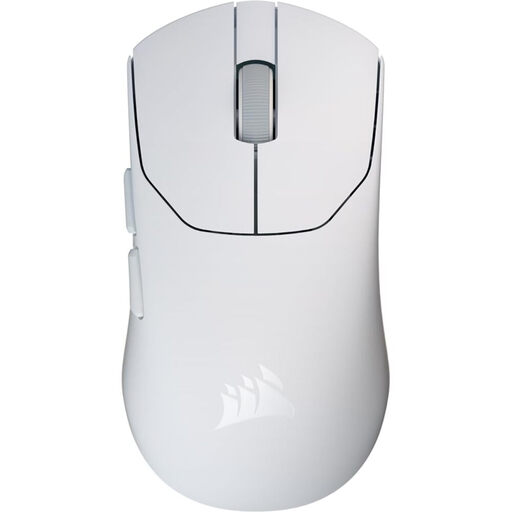
Why this choice suits this profile: This model is aimed at players looking for a lightweight wireless mouse without giving up the option of a wired USB mode. It weighs just 36 g, has five programmable buttons and offers up to 70 hours of battery life.
The dual 2.4 GHz and wired modes mean you do not have to rely entirely on the battery when you need to play or work without interruption.
36 g weight, sensor reaching up to 33,000 DPI and compatibility with Windows, macOS and Linux.
We have brought together a complete, real-time updated selection of products that meet these demanding criteria as well as European safety standards.
Look for a stable shape, a weight suited to your movements and a sensor with an easily accessible DPI adjustment. If you mainly play FPS titles, a few well-positioned buttons may be all you need. A lightweight or ambidextrous mouse may work well, but the choice ultimately depends on your grip and personal preferences.
A wired mouse avoids the need for recharging and connects simply via USB. The wireless version reduces desk clutter and gives you greater freedom of movement. If you choose wireless, check the battery life, receiver type and whether you can continue using it in wired mode while it charges.
Its lifespan depends in particular on the number of clicks, the condition of the cable, the scroll wheel and how well it is maintained. When the manufacturer states a lifespan for the switches, this is a technical specification, not a guarantee of how long the mouse will last in your actual use. Clean the mouse with a soft cloth, avoid liquids and unplug it before carrying out any maintenance.