
Livraison le jour même ou le lendemain

Qualité garantie

Débloquez vos offres de bienvenue: Livraison GRATUITE | Jusqu'à -80 % | 30 jours d'essai gratuits à JoyPlus
Téléchargez l'application
A gaming mouse is about much more than an impressive DPI count or a flashy RGB light show. Whether you're a PC gamer, a fan of FPS titles, or someone who regularly switches between gaming and office work, several technical choices have a direct impact on comfort and precision. A well-written product page can sometimes gloss over certain limitations.
A high-DPI mouse isn't necessarily more precise. DPI refers to the maximum sensitivity of the sensor, but tracking quality also depends on its stability, the surface you're using, and the settings you apply. In most cases, a properly calibrated sensitivity range will be far more useful than an extravagant maximum figure.
A lightweight gaming mouse makes quick movements easier, especially in FPS games. However, a shell that's too small or a poorly suited shape can quickly tire your wrist. On the flip side, a heavier model may be better suited to office work or gamers who prefer more controlled movements.
So take the term "ergonomic" with a pinch of salt. Check the orientation — right-handed, left-handed or ambidextrous — the length of the mouse, and the grip style that works for you: palm, claw or fingertip.
A wireless gaming mouse can communicate via 2.4 GHz, Bluetooth, or offer both modes. Bluetooth is handy for switching between devices and for office use, while the 2.4 GHz receiver is generally the preferred choice for gaming. A USB gaming mouse avoids the hassle of recharging, but its cable can get in the way if it's too stiff or too short.
For a rechargeable model, look at the advertised battery life, how long it takes to charge, and whether you can keep playing while it's charging. RGB lighting can also reduce battery life, depending on the mouse and the settings you choose.
An adjustable optical sensor lets you tailor the sensitivity to your game or work style. Spec sheets typically quote ranges from 3,600 to 42,000 DPI. That doesn't mean you should play at maximum sensitivity, of course.
The polling rate, measured in hertz (Hz), tells you how often the mouse reports its position to the computer. At 1,000 Hz, it theoretically sends data every millisecond. Some models boast an 8,000 Hz mouse, with a theoretical interval of 0.125 milliseconds. However, this feature requires a compatible computer and can put more strain on the processor.
For competitive gaming, models weighing 49 to 56 g favour fast movements. A mouse weighing between 75 and 88 g can offer more stability. A 112 g model like the Razer Basilisk V3 Pro Wireless is aimed more at users who appreciate a sturdier build and plenty of controls.
Don't just look at the weight on the scales: the distribution of mass, the width of the sides, and the texture of the coating all affect how the mouse feels in your hand.
A programmable mouse lets you assign shortcuts, macros or media commands to the various buttons. Five to seven buttons are enough for many games, while models with 10 or more are aimed at users who want to pack as many actions as possible onto their device.
Make sure the software is compatible with your system, that there's onboard memory, and that profiles can be saved directly to the mouse. On Linux or macOS, advanced features may be more limited depending on the manufacturer.
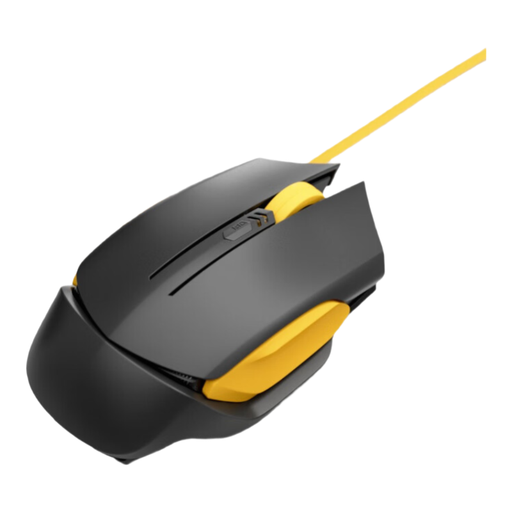
Why this choice suits this profile: this wired mouse is ideal for users who want a plug-and-play setup for both gaming and work, with no battery or receiver to worry about.
The USB connection eliminates battery concerns. The cable, described as tangle-resistant, should also hold up better to daily wear and tear.
Optical sensor, four DPI levels and an advertised polling rate of 1000 Hz.
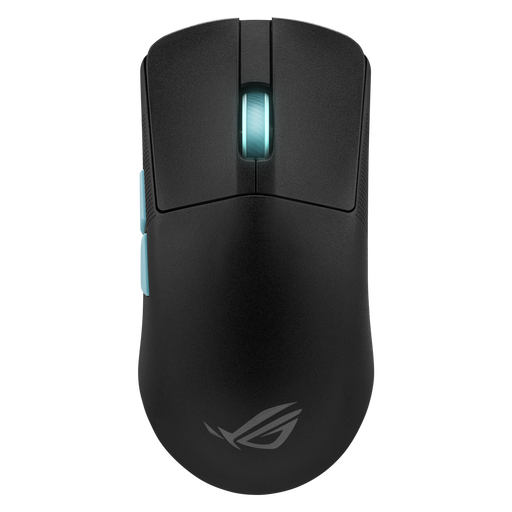
Why this choice suits this profile: with its advertised 54 g weight and tri-mode connectivity, it meets the needs of gamers who switch between competitive play, mobility and daily use.
The spec sheet clearly distinguishes between 2.4 GHz, Bluetooth and USB-C modes, making it easy to select the right connection for each device.
Advertised 36,000 DPI sensor, five programmable buttons and battery life of up to 119 hours in 2.4 GHz mode.
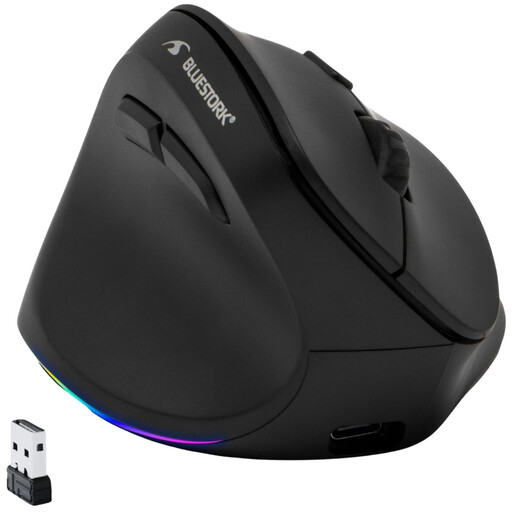
Why this choice suits this profile: its vertical left-handed design addresses a need that's often overlooked in gaming mouse selections.
Its left-handed orientation is clearly stated. The vertical shape and 2.4 GHz connection also let you game without a permanent cable.
Adjustable sensor up to 4800 DPI, rechargeable USB-C battery and switchable RGB lighting.
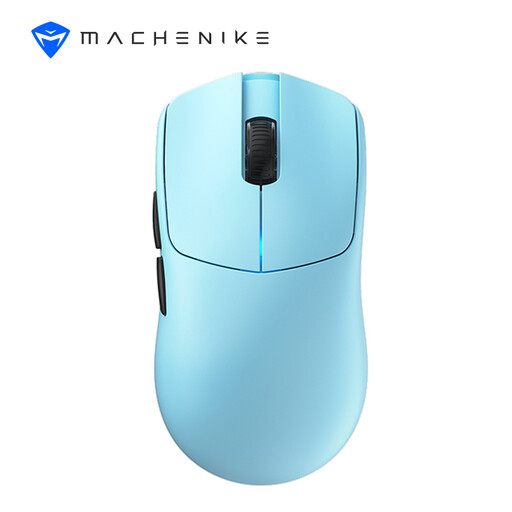
Why this choice suits this profile: this model targets gamers who want a combination of low weight, wireless connectivity and a high polling rate.
The spec sheet specifies wired and 2.4 GHz modes at 8000 Hz, as well as the need to install a separate driver to access this setting.
Advertised weight of 49 g, PAW3395 sensor reaching up to 26,000 DPI and claimed battery life of over 100 hours.
We've put together a comprehensive, real-time updated selection of products that meet these demanding criteria, while complying with European safety regulations.
Start with a moderate sensitivity, then adjust it based on the size of your mouse mat and your aiming style. A high DPI mainly offers a wider adjustment range. It will never replace a stable sensor or a setup that's properly tuned to the game.
Models equipped with a 2.4 GHz receiver are designed to minimise latency. For competitive gaming, check the connection mode you're using, the distance between the receiver and the mouse, and the battery level. Bluetooth is better suited to multi-purpose devices and office work.
It all depends on the switches, the cable, the battery and how intensively you use it. Manufacturers sometimes quote a number of clicks, but this figure doesn't tell you about wear on the mouse feet or the scroll wheel. Clean the sensor with a dry cloth, avoid liquids, and unplug the mouse before any maintenance.