Joybuy Insights

Gaming Mouse Buying Guide: How to Choose Without Marketing Traps

Choosing a new gaming mouse can often feel like an obstacle course. Between jargon-filled spec sheets and flashy marketing promises, it's easy to feel lost and end up regretting your purchase. As the head of product selection at Joybuy, my mission is to help you see things more clearly. Let's forget the advertising hype and focus on what's essential: finding the perfect mouse for your playstyle and budget.

Before we dive into the details, let's break down the two most common pitfalls that cost gamers dearly (sometimes literally):

  1. The myth of stratospheric DPI: Brands flaunt astronomical numbers (26,000, 36,000 DPI, and even higher). In reality, the majority of gamers, including pros, set their sensitivity between 400 and 3,200 DPI. An excessively high number is in no way a guarantee of quality; it's mainly a marketing gimmick to justify a higher price. The intrinsic quality of the sensor (its accuracy, lack of hardware acceleration) is far more important.
  2. Ergonomics sacrificed at the altar of design: An aggressive-looking RGB gaming mouse might be easy on the eyes, but it can turn into an instrument of torture after an hour of play. A poor grip leads to fatigue, wrist pain, and ultimately, a drop in your performance. Comfort and a good fit for your hand shape are non-negotiable.

The Essential Criteria for Choosing Your Gaming Mouse

To make the right choice, focus on these three key pillars. They directly impact your comfort, responsiveness, and in-game effectiveness.

1. Sensor, DPI, and Polling Rate

The sensor is the heart of your mouse. Its quality determines how faithfully your movements are translated to the screen.

  • DPI (Dots Per Inch): This is the sensor's sensitivity. A high DPI means the cursor will travel a greater distance on the screen for the same hand movement. Rather than chasing the highest number, opt for a mouse with an adjustable DPI range (e.g., 400 to 6,400 DPI) to adapt it to your games and screen size. A gaming mouse for FPS will often require a lower DPI for better precision, while other games may benefit from higher sensitivity.
  • Polling Rate: Measured in Hertz (Hz), this indicates how often the mouse reports its position to the computer. The current standard for gaming is 1,000?Hz (a 1 ms response time). Below this, a slight delay (input lag) can be felt. Higher rates (4,000 Hz, 8,000 Hz) exist, but their benefit is nearly imperceptible to most gamers, while consuming more CPU resources.

2. Weight and Ergonomics

Comfort is a crucial factor, especially for long gaming sessions. Two elements to consider:

  • Weight: A lightweight gaming mouse (usually under 80 grams) is often favored for fast-paced games like FPS, as it facilitates swift movements and reduces fatigue. Heavier mice can offer a greater sense of control and stability in other game genres.
  • Shape: An ergonomic gaming mouse is molded to fit the shape of the hand (most often for right-handed users). Ambidextrous models also exist. Your grip style also influences your choice:
    • Palm Grip: The entire hand rests on the mouse. Opt for fairly wide and high-arched models.
    • Claw Grip: The palm touches the back of the mouse, while the fingers are arched. Medium-sized mice are often the best compromise.
    • Fingertip Grip: Only the fingertips manipulate the mouse. Compact and lightweight models are ideal here.

3. Connectivity: Wired or Wireless?

The wired vs. wireless debate is no longer as black and white as it once was.

  • Wired Mouse: It guarantees a stable connection, zero latency, and never needs to be recharged. Its only drawback: the cable, which can sometimes hinder movement.
  • Wireless Gaming Mouse: It offers absolute freedom of movement. Modern technologies (2.4 GHz RF) now deliver latency that is indistinguishable from wired. The only requirement is to keep an eye on the battery life. A Bluetooth connection is another option, very convenient for its versatility, but it introduces higher latency that disqualifies it for competitive gaming.

Our Top Gaming Mouse Picks

Rather than an endless list, here are a few models that cater to specific player profiles, applying the criteria we've just discussed.
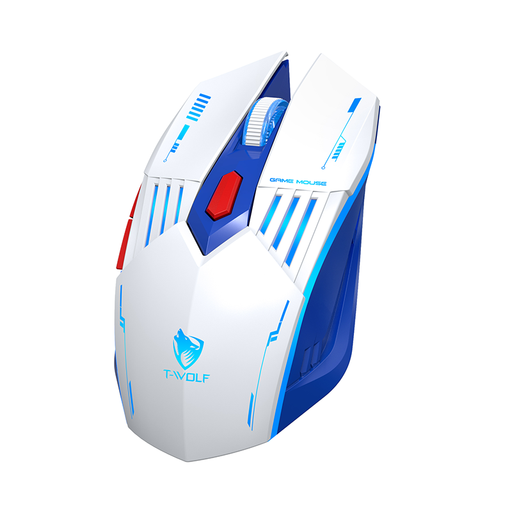
FOR THE VERSATILE GAMER ON A BUDGET
Rexsun Tri-Mode Gaming Mouse – 6D Buttons, 2.4G + Bluetooth + Wired, Adjustable DPI 800–3600, Type-C Charging, RGB Breathing Light, 300mAh Battery, White & Blue, X7

Rexsun Tri-Mode Gaming Mouse X7

Why it stands out: Ideal for anyone looking for an all-in-one solution without breaking the bank. Its triple connectivity (Wired, 2.4G, Bluetooth) allows it to switch between a gaming PC and a work laptop, offering highly appreciated flexibility for daily use.

How it avoids the pitfalls

It doesn't fall for the trap of excessive DPI. Its 1,200 to 3,600 DPI range is realistic and perfectly calibrated for most games. It also avoids the "cheap wireless" pitfall by including a high-performance 2.4G mode for gaming, in addition to wired.

Key Feature & Strengths

Triple connectivity: a rare versatility in this price range. Rechargeable via USB-C: the modern, universal standard.
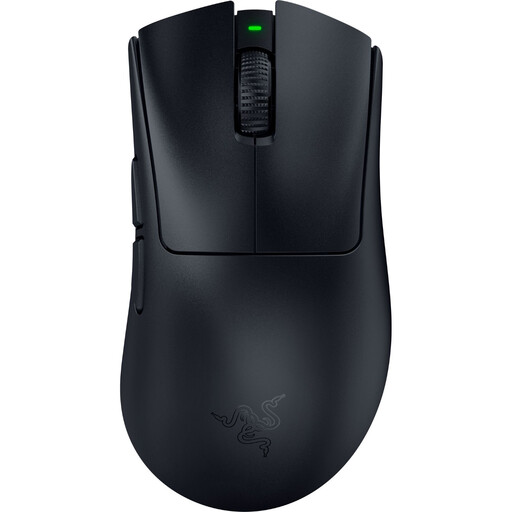
FOR THE FPS COMPETITOR
Razer DeathAdder V4 Pro wireless gaming mouse - 30000 DPI, 8 buttons - black

Razer DeathAdder V4 Pro

Why it stands out: Built for pure performance. FPS players who demand surgical precision and responsiveness for their flicks will find a powerful ally here. Its legendary ergonomic shape has been praised for its comfort for years.

How it avoids the pitfalls

It makes comfort an absolute priority, unlike models that sacrifice ergonomics. Its shape is the result of years of iteration. Its feather-light 56g weight is not a gimmick: it's a real asset for reducing fatigue and maximizing reaction speed.

Key Feature & Strengths

Feather-light weight (56g): for explosive and precise movements. Focus Pro Optical Sensor: one of the highest-performing on the market. HyperSpeed Wireless: imperceptible latency for total responsiveness.
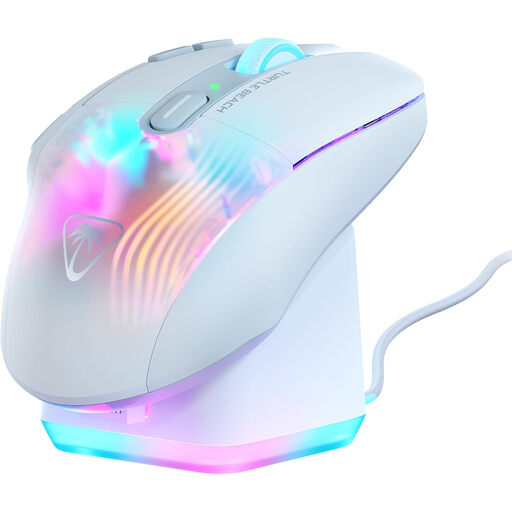
FOR THE MMO/RTS PLAYER
Turtle Beach Kone XP Air Gaming Mouse Wireless 2.4GHz & Bluetooth - 19000 DPI, 29 Buttons - White

Turtle Beach Kone XP Air

Why it stands out: The ultimate weapon for MMO, MOBA, or content creators who need a myriad of shortcuts under their thumb. With its 10 physical buttons and Easy-Shift[+] technology, it puts up to 29 programmable functions at your disposal.

How it avoids the pitfalls

It doesn't just stack buttons. Its ergonomics are designed so that every command remains accessible and comfortable, even after hours of use. The included charging dock brilliantly solves one of the main pain points of wireless: the chore of recharging.

Key Feature & Strengths

29 programmable functions: for absolute control over your actions. RGB rapid charge dock: as practical as it is stylish. 4D wheel: for extended scrolling options.

Want to see more models?

We've put together a complete, up-to-date selection of mice that meet our demanding selection criteria.

Frequently Asked Questions

What is the lifespan of a gaming mouse?

Its longevity depends on its build quality and your usage. A good indicator is the durability of the switches, expressed in millions of clicks (e.g., 20, 50, or 70 million). With regular use, a quality mouse can last you 3 to 5 years, sometimes longer. Wear on the mouse feet and a dirty sensor are the first signs of aging.

Is a high DPI really necessary for gaming?

Absolutely not. A very high DPI is more of a marketing point than a real advantage. Most professional gamers use settings between 400 and 1,600 DPI. What's important is the quality of the sensor (accuracy, lack of hardware acceleration) and the ability to find THE sensitivity setting that's right for you.

How do I clean and maintain my gaming mouse?

Regular maintenance extends the life and performance of your mouse.

  • Exterior: A slightly damp microfiber cloth is enough to clean the shell. Avoid harsh chemical products.
  • Sensor: Gently blow on the lens or use a can of compressed air (held at a distance) to dislodge dust.
  • Mouse Feet: Clean them with a dry cloth to maintain a smooth glide. If they are worn out, most major brands sell replacement feet.
  • Cable (for wired models): Make sure it isn't pinched or wound too tightly.